Thread

🛡️
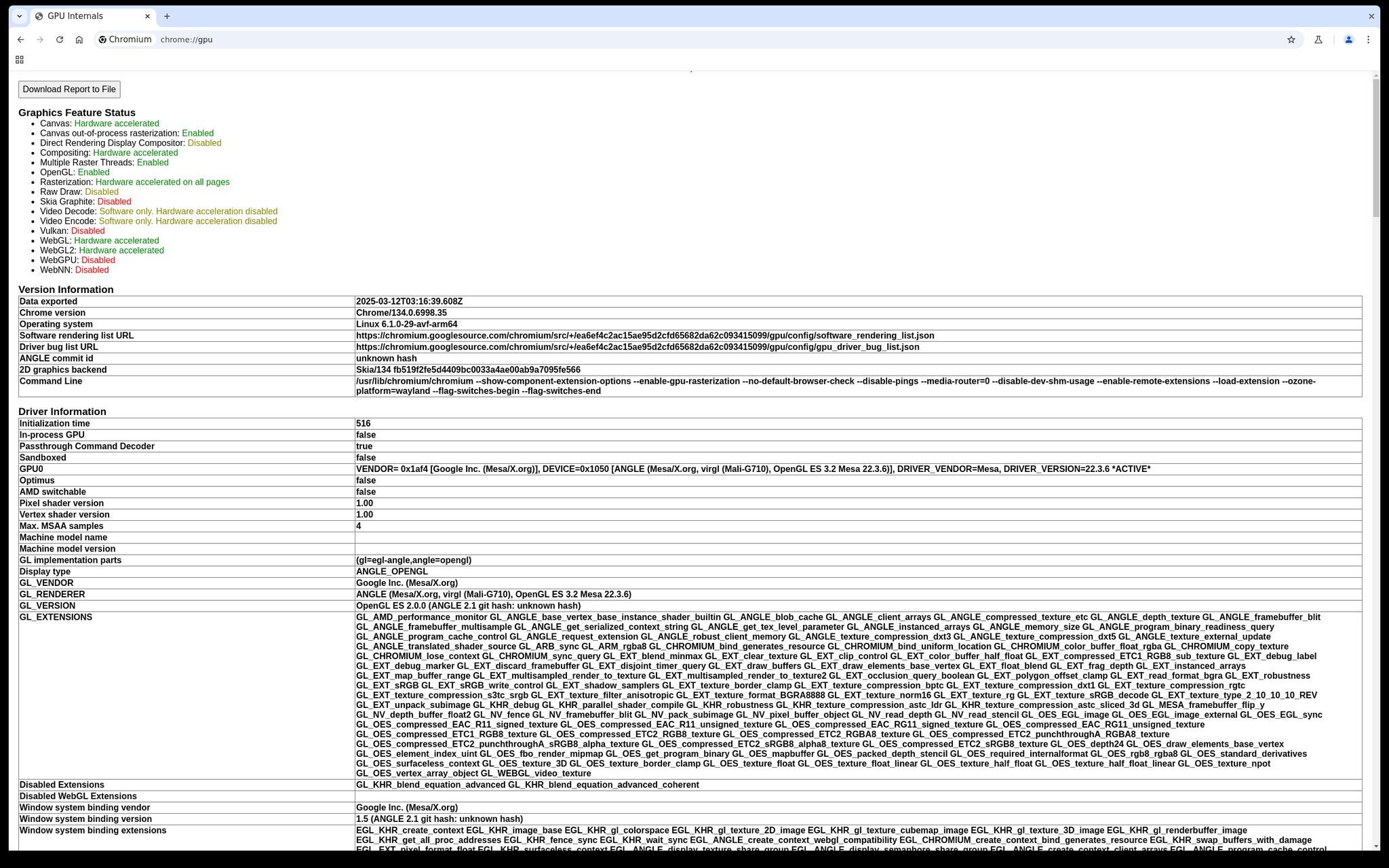
With the development branch of #GrapheneOS, we've already successfully already tested Chrome running on top of Wayland with GPU acceleration working via ANGLE on the host. You'll be able to have a GPU accelerated virtual desktop OS that's usable via DisplayPort alternate mode.
Final's avatar Final
Our 2025030900 release currently in the Beta channel is the first one with support for managing hardware-based virtual machines via the Terminal app in Android 15 QPR2. Since then, we've backported massive improvements to the feature for an upcoming new release, maybe even today. Backports include terminal tabs, GUI support with opt-in GPU hardware acceleration (ANGLE-based VirGL until GPU virtualization support is available), speaker/microphone support and fixes for a bunch of bugs including overly aggressive timeouts. We're working on VPN compatibility. At the moment, the Terminal app isn't compatible with having a VPN in the Owner user. It only works if VPN lockdown (leak blocking) is disabled and the VPN allows local traffic to pass through. It's also not clear how it SHOULD interact with a VPN since VPNs are profile-specific. #GrapheneOS
View quoted note →

Replies (42)

🛡️
GUI support allows you to run desktop operating system apps on mobile. Docking the device to a keyboard and mouse and external display in the future would allow using your phone like a desktop PC. You get the benefit of running a desktop OS over a device with strong hardware security and a proper secure element unlike a desktop. Adding this GUI support is also a stage into working towards support for running Apps within GrapheneOS virtual machines for stronger sandboxing and isolation. Additional security.
🛡️
As a preview of what's going to be possible in the upcoming release of #GrapheneOS, here's a screenshot from a Pixel Tablet running desktop Chrome in a virtual machine with basic GPU acceleration via ANGLE on the host. The infrastructure is a lot more robust than the Terminal app: image Our next release also enables running the Terminal app in secondary users. There's still the temporary limitation of only being able to use a single VM on the device at a time because the dedicated internal network interface it uses for the Terminal app isn't split up at all yet. GUI VM support will have 2 main use cases: 1) Running a specific app or an entire profile via GrapheneOS virtual machines seamlessly integrated into the OS. 2) Running Windows or desktop Linux applications with desktop mode + USB-C DisplayPort alt mode on the Pixel 8 and later. This virtual machine management app (Terminal) will be handling the 2nd case. It's essentially already available in a very primitive way. We expect this to become much more usable and robust entirely from the upstream Android work on the virtual machine and desktop mode features.

🛡️
No and yes. It can't be done directly through the OS and requires convoluted processes such as debug features and tampering with non-persistent state but it provides little overall value that avoids the solution of dealing with a hostile network like it which is not using that network at all. High risk users should just stick to WiFi and not use a SIM. Airplane mode prevents tracking from cellular by disabling the cellular radio. Such identifers usually aren't visible to apps in the OS unless they have READ_PRIVILEGED_PHONE_STATE, so system apps. The default SMS app is a special case that's given access to the IMEI, which is normally the GrapheneOS fork of the AOSP Messaging app unless users explicitly change it to another app at their own discretion. We had been asked about it and clarified back when old Snapdragon Pixels could do it. Exynos Pixels could, but it's a no at this stage and had been for a long time It's nothing like WiFi MAC address randomisation. Changing IMEI wouldn't prevent tracking via cellular since there are other identifiers specific to radios and also extensive fingerprinting possibilities. Choosing a random IMEI while everything else being the same as before would make you almost entirely unique as a starting point. It will only hide one commonly used ID rather than making the device not uniquely identifiable. Carriers often detect device model via IMEI and multiple other ways as part of their standard operating procedure. They change how things work based on the detected capabilities but also hard-wired quirks for device models, etc. Devices send a lot of info on capabilities or features they support. The general type of radio/device is extremely obvious to the network since a bunch of capabilities, configuration, etc. vary and are directly reported to the network. We try to match stock Pixel OS configuration but it's clear it's a Pixel based on network behavior and not just an arbitrary number. Identifying yourself to the network is what a SIM implements so you inherently get identified as a specific subscriber based on that too. You could change SIMs often but that's costly and doesn't solve the above problem. The radio is also supposed to send a unique identifier and will often send other identifiers, including but not limited to EID when using eSIM. Since IMEI is typically configurable by OEMs building the phone and often has a debug feature for changing it, it can end up being possible to change it. It's a mistake and typically comes along with vulnerabilities. Reporting upstream could come with rewards but we're not looking into it. If upstream patches it, its no good for us then... GrapheneOS only generally reports to Google if the vulnerability is major, exploited in the wild and/or their input to patch is required to protect the devices we support. Last major example of when we did this was for vulnerabilities exploited by a forensics firm selling a password brute force exclusively for the stock OS. While not affecting GrapheneOS the response and firmware changes helped us greatly in implementing duress password. I also haven't counted RF fingerprinting (affects other radios too) or tracking miscellaneous artefacts like mobile data web traffic (conditional) or direct connection to the provider's IPsec tunnel for WiFi. RF fingerprinting two of the same mobile devices is a common academic project and you can check them out online. Uninformed users would be fed false hope and act in ways they shouldn't with the feature which could endanger them. There is no legal restriction holding the project back, it's the above reasons. We plan to provide more configuration for controlling Wi-Fi calling/texting where users can entirely toggle off the IPsec tunnel it uses while still using the SIM. It's not one of our top priorities since disabling the SIM is already available as a standard option and does that.
🛡️
🛡️
If you have the choice to use anything then SimpleX is gold standard. Signal is excellent if the phone number requirement isn't a problem for you. We heavily recommend for Signal users. Provides many privacy and security features Signal misses. Session is good but disappointed with the lack of PFS. We disagree with their stance that it is not important. Exploiting someone's device gives access to their current encryption keys but if there is PFS then it doesn't imply recovering all past messages. It's great that they're honest though.
Yes. I see that another user also uses floris board and has issues that will allegedly be fixed in the nex update. Before that comes I tried using the default keyboard. Everything works fine unless I try to go to edit an old prompt (up arrow and then backspace). It doesn't delete the old letters I have typed. It only allows me to type and delete new letters
🛡️
There'd be no realistic concerns. Attack surface is miniscule, even in a hot state it needs a pretty thorough exploit chain and would need to be bespoke to a target. I don't recommend keeping a device seized and returned in the state it's returned in anyway. I'd disable any network access, take any important files out (you should have backups) and reset it. Some customers of forensic tools are known to implant spyware into seized devices when returning it. Serbian law enforcement did it, but those came with the prerequisite of having the device unlocked by their Cellebrite tool to install it. The spyware in question appeared to not be provided by Cellebrite either. No access = no install. Some forensiccompanies had tools that implanted spyware on AFU devices to keylog the PIN/Password when they could not access the device, such as GrayKey's Hide UI for iPhones. Hide UI alone was known to be buggy and problematic. It also didn't deliver the PIN remotely and required seizing it a second time when first revealed. Graykey moved away from being just for iOS devices a long time ago though. OS updates and device differences can intentionally (and more often unintentionally) break how exploits work. For example Pixel 9 was unsupported by Cellebrite despite no major security changes, and only just became supported this February. They'd likely put their focus on finding an exploit for the secure element to allow faster brute forcing.
🛡️
Yes. If the device is unlocked successfully via brute force then it's considered an unlocked device extraction. Cellebrite call hot phones that are locked 'AFU' and hot phones that are unlocked / brute forced successfully as 'Unlocked'. Older Cellebrite docs we published used to call their AFU iOS capabilities Instant Password Retrieval (IPR) but they stopped doing that for some reason. AFU exploits are to access and extract data without unlocking the device or to bypass the unlock mechanism entirely. Since data isnt encrypted/at rest when AFU they can obtain almost all of the data (except conditional circumstances like data of other Android user profiles or the Mail inbox on iOS) if an exploit is available. "BFU Yes" in their docs means accessing data encrypted by the device rather than user credentials in a BFU state. For Android it's some OS configuration and APKs of installed apps. iOS provides far more information.
🛡️
This is a GrapheneOS feature by default, 18 hours but configurable to 30 minutes of inactivity. iOS implemented it too but it's done in 3 days of no unlock. The Shortcuts app could be useful for this as you can assign device restarts to a trigger. A more primitive shortcut could be to assign a reboot when the clock hits a certain hour such as when you're asleep. Stronger USB port security features would help, I don't see why Apple couldn't copy what GrapheneOS does with disabling Pixels' USB-C port at a hardware level when they create both the phone and OS.
🛡️
There are some companies who claim BFU Physical extractions, mostly on very insecure MediaTek devices and some Samsung Exynos devices. This extracts everything but the data extracted is still encrypted... so it needs a brute force anyways. There isn't a "master key" because that key is created and derived from the user credential which you need to know. It's advertiser speak. Take a look at this video MSAB made: Notice it says "XRY Pro has allowed me to *BRUTE FORCE* that device" at around 1:20 despite the narrative in the title and the video? Shameless... A good amount of Samsung devices do have brute force support though as documented in our last doc publications and in this video. More reasons why a dedicated secure element like the Titan M2 is very valuable.
🛡️
BitLocker is fine, it's the best choice of OS disk encryption for Windows users since BitLocker has TPM support. TPMs suck compared to a proper secure element but they are better than nothing. fTPMs are more resistant to physical attacks documented with TPMs. Veracrypt refuses to have TPM support at all. Claims of backdoors are unsubstantiated and a lot of weaknesses come from other problems universal to most desktop disk encryption and awful design choices, such as BitLocker being only available in Pro, Enterprise or Education editions of Windows and the default settings just using a TPM with no additional authentication needed. BitLocker is the best choice when certain settings are configured. You'd need to configure group policies to allow BitLocker to have additional authentication such as a TPM + PIN or USB key (or all three through a hack job), force 256-bit AES encryption, and to make PINs alphanumeric instead of just numbers. Do not use the Windows Device Encryption in the Home edition. It requires a Microsoft account and requires backing up your key to your account's OneDrive. MacOS has FileVault which users should enable if it hasn't been already. ChromeOS uses the same per-user filesystem encryption per user GrapheneOS uses but depends on a Google account to sue it. Macs provide the best OOTB disk encryption. Both VeraCrypt and Picocrypt are fine apps and trustworthy. They're better overall for encrypting files or removable drives though, protect them with very secure passphrases. If the OS provides a disk encryption option then I'd believe you're better with using that.