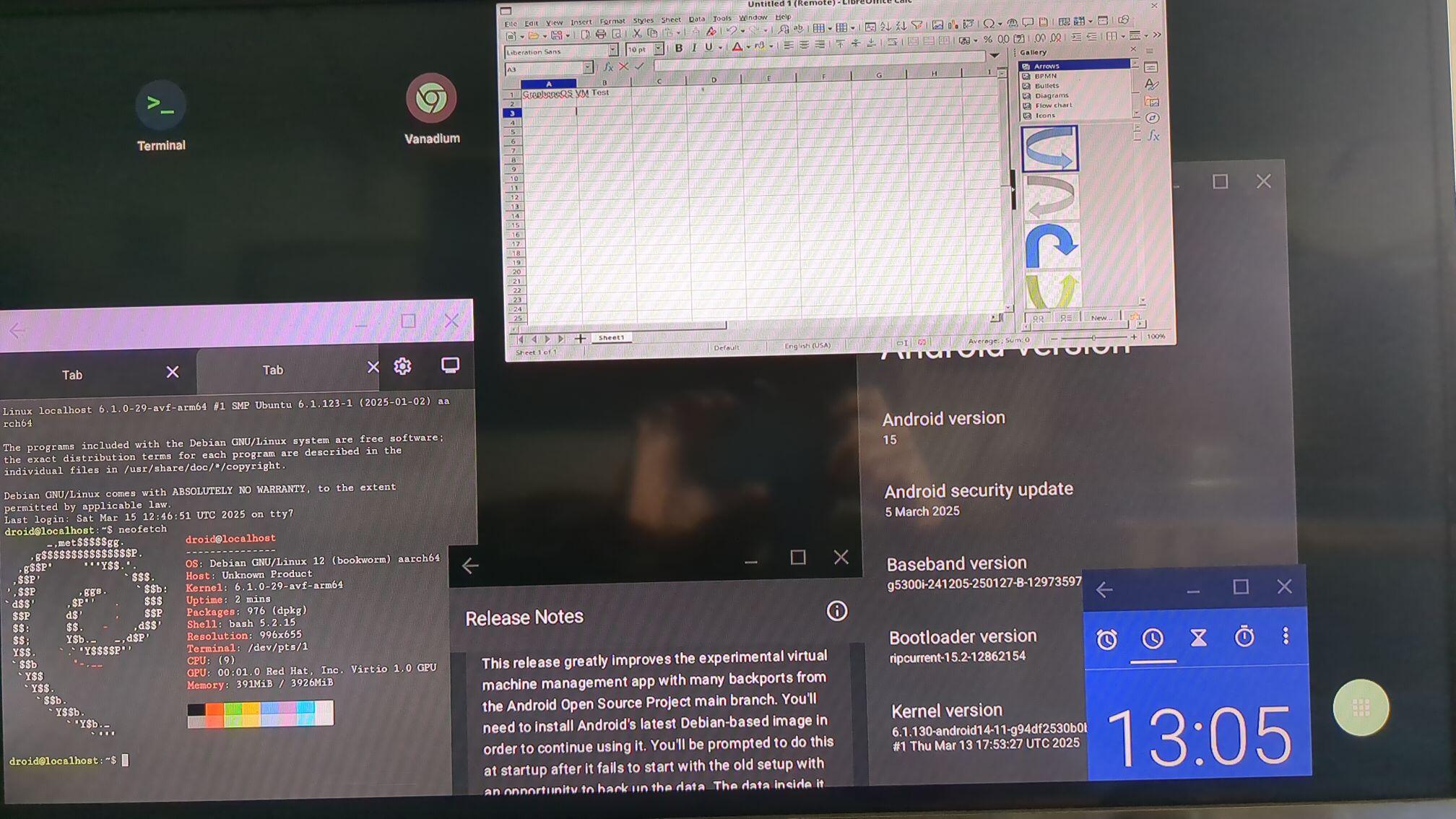
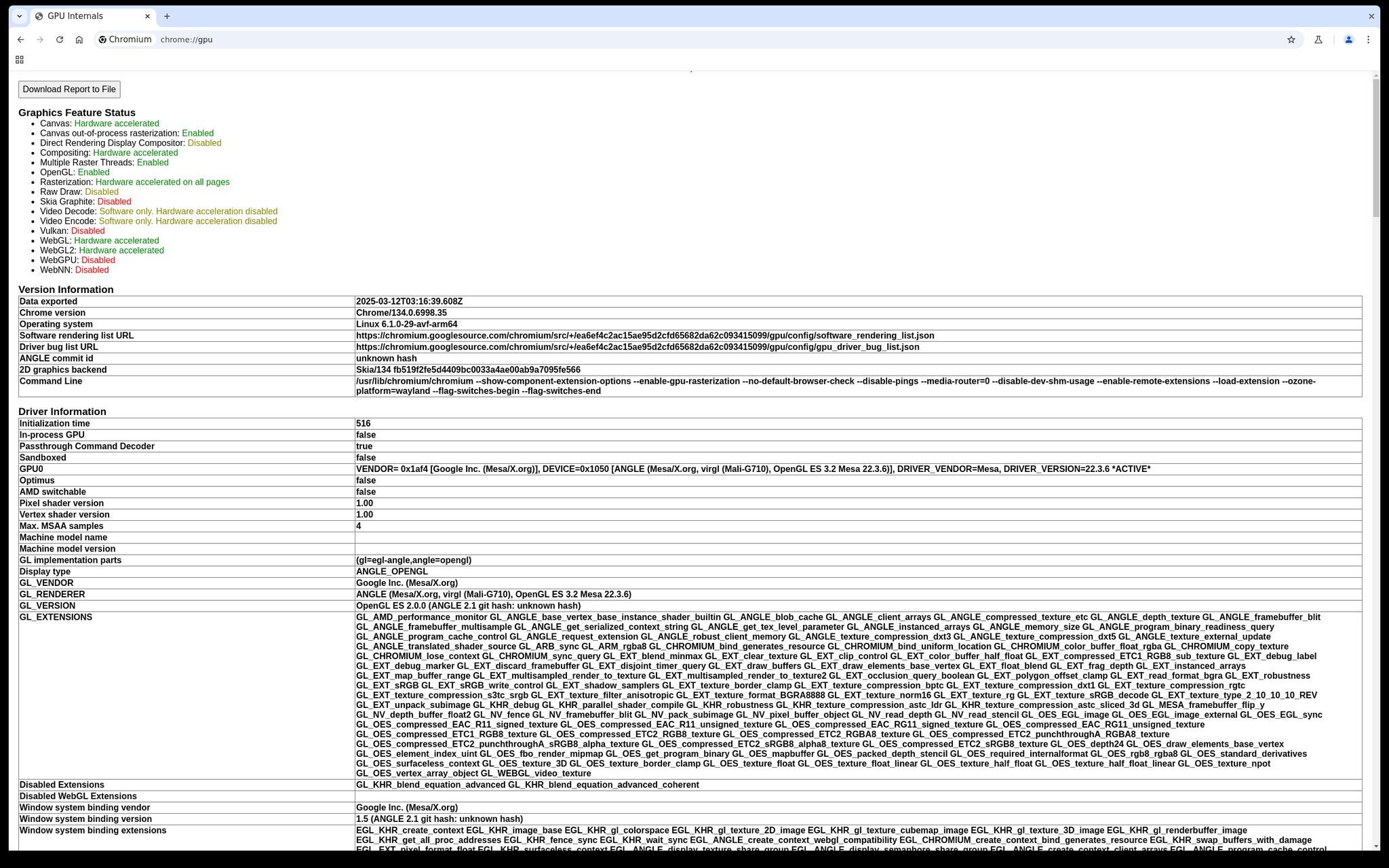
As a preview of what's going to be possible in the upcoming release of #GrapheneOS, here's a screenshot from a Pixel Tablet running desktop Chrome in a virtual machine with basic GPU acceleration via ANGLE on the host. The infrastructure is a lot more robust than the Terminal app:
 Our next release also enables running the Terminal app in secondary users. There's still the temporary limitation of only being able to use a single VM on the device at a time because the dedicated internal network interface it uses for the Terminal app isn't split up at all yet.
GUI VM support will have 2 main use cases:
1) Running a specific app or an entire profile via GrapheneOS virtual machines seamlessly integrated into the OS.
2) Running Windows or desktop Linux applications with desktop mode + USB-C DisplayPort alt mode on the Pixel 8 and later.
This virtual machine management app (Terminal) will be handling the 2nd case. It's essentially already available in a very primitive way. We expect this to become much more usable and robust entirely from the upstream Android work on the virtual machine and desktop mode features.
Our next release also enables running the Terminal app in secondary users. There's still the temporary limitation of only being able to use a single VM on the device at a time because the dedicated internal network interface it uses for the Terminal app isn't split up at all yet.
GUI VM support will have 2 main use cases:
1) Running a specific app or an entire profile via GrapheneOS virtual machines seamlessly integrated into the OS.
2) Running Windows or desktop Linux applications with desktop mode + USB-C DisplayPort alt mode on the Pixel 8 and later.
This virtual machine management app (Terminal) will be handling the 2nd case. It's essentially already available in a very primitive way. We expect this to become much more usable and robust entirely from the upstream Android work on the virtual machine and desktop mode features.
Our next release also enables running the Terminal app in secondary users. There's still the temporary limitation of only being able to use a single VM on the device at a time because the dedicated internal network interface it uses for the Terminal app isn't split up at all yet.
GUI VM support will have 2 main use cases:
1) Running a specific app or an entire profile via GrapheneOS virtual machines seamlessly integrated into the OS.
2) Running Windows or desktop Linux applications with desktop mode + USB-C DisplayPort alt mode on the Pixel 8 and later.
This virtual machine management app (Terminal) will be handling the 2nd case. It's essentially already available in a very primitive way. We expect this to become much more usable and robust entirely from the upstream Android work on the virtual machine and desktop mode features.

 A functional desktop mode is huge, but it is a stepping stone towards a far greater feature target for us: A Desktop OS VM manager.
One OS feature (the Linux terminal app) already provides a Linux command line using a Debian virtual machine. Ideally, we would want to move away from a non-hardened desktop distribution like Debian, which the upstream uses, and have something an ARM build of secureblue, securecore or even a gold target for Windows 11 ARM for superior app compatibility.
Here you can see desktop operating system apps within a freeform window over the standard GrapheneOS applications. There are many unique setups and software choices if we can further develop this:
A functional desktop mode is huge, but it is a stepping stone towards a far greater feature target for us: A Desktop OS VM manager.
One OS feature (the Linux terminal app) already provides a Linux command line using a Debian virtual machine. Ideally, we would want to move away from a non-hardened desktop distribution like Debian, which the upstream uses, and have something an ARM build of secureblue, securecore or even a gold target for Windows 11 ARM for superior app compatibility.
Here you can see desktop operating system apps within a freeform window over the standard GrapheneOS applications. There are many unique setups and software choices if we can further develop this: