Danie

Danie's avatar
Danie
npub1g2jp...yjj6
Testing out new wallet
Netdata and some free AI searches saved me a ton of resource usage on my desktop and server I recently installed free Netdata in a container on my homelab server to see what it would show in terms of resource usage, bottlenecks, etc. When you start out of Netdata you get a 2-week trial business subscription which includes 10 free AI credits (for analysis reporting). I let it run for 24 hours and then asked Netdata's AI to give me any key findings and recommendations. The key things it showed me pretty quickly, already blew me away. It's the old story of things are "working" but are far from optimal. Basically the issues I had were too many tasks firing off concurrently (or before others had finished) causing major bottlenecks (disk backlogs) on my different drives. I have three different backups, S.M.A.R.T. drive tasks running, Timeshift, RAID array scrubs, etc going. I took the report from Netdata and fed it in as-is to Google Gemini (Perplexity has been leading me down very long rabbit holes the last few months) and asked what now. To cut a long story short, Gemini took me through various tests and recommendations around spacing all the tasks out far better, advising which should be daily, weekly, or monthly. It also suggested tweaking settings for the drives as well as the rsync jobs. For example when exporting to an external USB drive, it showed how to slow the rsync transfer down so that the drive was not choking, and neither was the server CPU. It also gave a nice summary table of how all the tasks were now spaced out over days and weeks. I then decided to install Netdata on my desktop PC, and am glad I did. It boots quicker, and terminal screens open instantly (especially the Atuin history), etc. Again the issue being identified by Netdata was massive disk backlogs. It turns out my main /home data disk is 5.8 years old and has a 161ms response, where it should be 10x quicker. I need to replace this drive soon, but the optimisations suggested by Gemini, have now eased out a lot of the strain I was putting on this drive. My Manjaro desktop configuration is a good 8 or 9 years old with tons of crud. I used to use VirtualBox for VMs but switched to KVM a while back, yet the old VirtualBox vboxnet0 network and kernel hooks were still in my system. I have a beautiful Conky window on my desktop, but I did not realise the amount of resources it was using through massive inefficiencies including firing off sudo smartctl every3 secs to check drive temperatures (polling the drive controller 28,800 times a day), if/then statements that each fire off the same query three times, using outdated network calls, etc. So Gemini helped optimise that dramatically by collapsing the queries and using memory caching instead, and reducing many checks to 30 secs or longer where the data does not change quickly. There was also rsync jobs that were made less intense, so that CPU was smoothed out more. Some old snapd stuff was also identified that was loading into memory, although I no longer used it, so that all got cleared out as well. I was using SAMBA shares with a Windows VM running in KVM, and it advised to ditch the SAMBA shares and rather use the faster Virtio-FS folder sharing, as well as the VirtIO network mode in KVM. As Gemini pointed out initially, some events were coming together on my homelab server to create a perfect storm. My desktop PC is now booting up again in seconds, network acquisition is quicker, and with less intensive polling, my browsers are also more responsive. I'm actually scaling back on my Grafana, Prometheus, Telegraf, InfluxDB stack on my server too. Netdata collects tons of data every second and seeing it is running, I'd rather try to optimise around that, seeing the information I get is a lot more useful. Netdat requires basically no configuration, unlike how Grafana, InfluxDB, Telegraf, and Prometheus must all work tother. There are some things that Grafana must still do, like pulling my Home Assistant stats through into graphs. The free Netdata tier only gives you 5 nodes in their cloud service, but you can view more locally if you host it yourself. Obviously after the trial period, I will also lose the AI credits. Netdata is open source on the client agent (data collection) and "available" for the client dashboard. The cloud side, and the AI, is proprietary. I'll see how it goes on the free tier after 2 weeks, and what sort of reporting I can still export. But the benefit so far has made a dramatic difference, and will likely also ensure my hard drives have a longer and beneficial life. Netdata running in a docker container on my homelab server is consuming 2.1% CPU and 327 MB of RAM. Disk space is now at 1.3 GB, so I'll need to keep an eye on that. There are retention sizes that can be set for each tier of data that is being stored (per second, per minute, and per hour tiers). A tip on installing for Arch based systems. Netdata's script had all sorts of network permission issues on my PC. In the end I just did a plain pacman AUR package install and everything worked. See image #technology #optimisation #dashboards
Google's Project Genie lets you conjure entire interactive worlds and step into them “While I'd love to give this a try myself, it's only currently open to Google AI Ultra subscribers in the United States. Just in case you weren't aware, that's Google's top-tier plan that costs $250/month. So, as you can imagine, access to this feature will be a bit limited for now.” It does look pretty good from the video in the linked article. The thing though, with this type of functionality and realism, is you're not going to be able to run this on your home server. It costs money to host services like these, so for the foreseeable future this will likely be a paid service of some sort (unless your virtual world can have lots of advertising billboards in it!). But nice to see it is already technically possible. See #technology #virtualworlds
Microsoft handed encryption keys for customer data to the government “The FBI went to Microsoft last year with a warrant, asking them to hand over keys to unlock encrypted data stored on three laptops as part of an investigation into potential fraud involving the COVID unemployment assistance program in Guam — and Microsoft complied.” Two issues are of concern here: 1. Microsoft does indeed have their own encryption keys to your data. Unlike some companies that do not have encryptions keys at all e.g. Proton, and they will only hand over available metadata (such as IP address, connection times, etc) that they have access to when receiving a valid warrant. Microsoft can be legally compelled as it is now known they have keys to decrypt customer data in their cloud. 2. The legal warrant is only going to be a requirement for accessing US citizen or US corporate data. It is not needed for accessing global citizen data or data stored outside the USA, thanks to the CLOUD and PATRIOT Acts. The same will apply for governments with questionable human rights records (or privacy protection) who may also issue legal warrants to access private data from Microsoft. I can only imagine both the issues above are part of what is driving the EU to have their own cloud services based in the EU where only they control the encryption keys. See #technology #privacy #cloud
Suunto’s New Route Planner Is Free and Awesome "Something you don't see every day: a sports tech company actually giving away premium features for free. Suunto's route-planning tool lets you create and download GPX files without even creating an account. No paywall, no trial period—just open the page and start planning routes. And the tool itself works great." This is a great tool for planning hikes, cycling, trail running, running, mountaineering, and similar activities. It could also work well for 4x4 trails as it does seem to have all the minor tracks and trails routable, along with ascent and descent numbers. Another nice touch is being able to toggle on/off heat maps of routes most used. I tested it on a route I know well over Table Mountain in Cape Town, it did choose the best elevation route, not the shortest route. See or the route planning site at #technology #navigation #mapping #routes
Meet Roomy: An Open-Source Discord Alternative for the Decentralised Web “Roomy is an open-source Discord alternative built on the AT Protocol (ATProto), the same protocol that powers Bluesky, with ActivityPub (the protocol behind Mastodon, Pixelfed, Pleroma, and others) planned for the near future. Currently in alpha, it sits somewhere between Matrix and Discord in terms of its practical position in the broader chat ecosystem.” It is built on open protocols (no lock-in) and right now you can sign into the web interface using an existing Bluesky login, to be followed soon by any ActivityPub based ID (Mastodon, Pixelfed, Pleroma, etc). Interestingly, it will be bridging many diverse and decentralised networks. From what I understand of it, posts that each person makes to this service, physically go to their own registered servers (decentralised) with Roomy providing the merged view. It seems there are quite a few features still to be implemented such as Fediverse login, moderation regarding removing of users from a room, encryption, self-hosting of Roomy, desktop/mobile apps, and more. Right now Bluesky users can use their login to test it out. See and Roomy at #technology #opensource #socialnetworks #decentralised
TikTokers are heading to UpScrolled following US takeover “TikTok’s takeover in the US has prompted users to join an alternative social platform called UpScrolled. The app, which is available on Android and iOS, currently holds the 12th spot in Apple’s App Store, and it’s struggling to keep up with an influx of new traffic.” Yes, it's not the first alternative to TikTok as we've seen RedNote and also Loops (a decentralised Fediverse alternative) as well as others. UpScrolled is still a centralised hosting service hosted in Dublin, Ireland, and owned by an Australian company using private funding. So, it is a step better than US ownership and hosting like nearly all the major centralised social media platforms are. TikTok's secret sauce is its algorithm though, but the downside of that algorithm is that it can be manipulated, which like with Facebook, has the power to change minds and influence users. With UpScrolled, and Loops, you don't get this sort of manipulative algorithm. This may also result in less addictive doom-scrolling. Do we have enough social media platforms yet? Well clearly not, as many new ones are starting up and only time will tell how they survive into the future. There is currently no advertising on UpScrolled, but they are probably going to have ads in future for the platform to be sustainable. They do state though: “But they’ll be designed and managed by us. No Google Ads. No third-party tracking. No targeting based on personal data.” On privacy, they state: “UpScrolled will never share your data with third parties for marketing, profiling, or commercial gain. We only disclose user data as required by Australian law — such as in response to a valid court order or lawful request — and always in accordance with our privacy policy.” It is available on Android and iOS right now, and their future plans include desktop versions. See or their website at #technology #socialnetworks #alternativeto #TikTok
Satellite is helping the internet to slip beyond authoritarian control “A recent Reuters report on Iran’s escalating battle with Starlink highlights why that playbook is starting to fray. Tehran has spent years perfecting censorship and surveillance, yet it now finds itself struggling to contain a satellite-based internet service designed explicitly to bypass terrestrial controls.” I suppose it is more correct to say foreign satellite services, as a service based inside one's own country can still be switched off by decree. Many telecoms licenses are granted with certain conditions attached, so quite often these telecoms providers are duty bound to shut down or otherwise censor services (including age verification, blocking undesirable sites, etc). And this most certainly includes First World countries as well. Our freedoms are mostly taken for granted, but actually they are attached to threads that can be pulled for various reasons. But it is true that satellite connectivity has been a new frontier as it becomes more commercial. It not only grants connectivity to those who were denied (including for reasons of living in remote areas) but it also is a commercial opportunity for those countries providing it, and yes, even for reasons of spying as well. But technology is evolving and with phones also now being able to connect to satellite services, the world is pretty well much being lit up. We just have to bear in mind that there may be plenty of advantages, but we've also seen from Facebook's early forays into some countries, that technology can have all sorts of unintended consequences as well. Satellite is only one of many advances though, as we are also seeing the rise in use of peer-to-peer communication, I2P networks, Tor browser traffic being obscured, etc. Satellite's big advantage is that it communicates over a very broad area, so attempts to block it are usually very localised only. I hope that more connectivity will encourage States to rather uplift their people instead of trying to oppress them. Whether we like it not, the era is changing, just like landlines, video rentals, dial-up modems, pagers, and many other technologies that found themselves superseded. This is not about the speed of downloads, but more the breaking of the shackles of control and suppression. On a lighter note, we've actually had the means for over 100 years for one home to chat or message another home 10,000 kms away. I was text messaging someone in Europe not so long ago, using a direct link that passes through no gateway, no undersea cable, at all. Amateur Radio is still around, and going quite strong in the digital era. In fact, we should know that satellites are themselves just radio repeater high sites. It is all still radio! The difference with satellites is the cost of the end user device is a lot cheaper now. See #technology #censorship #satellites
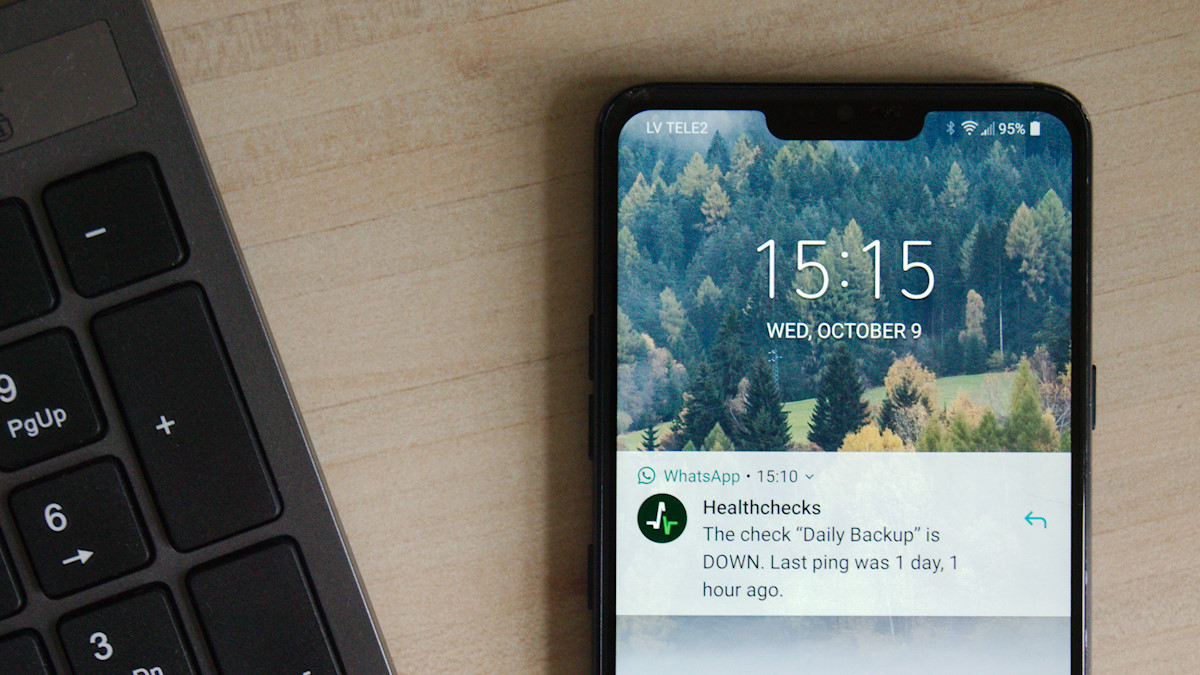
Healthchecks.io emails me when my automation jobs don't run We all “should” have scheduled backups running, and sometimes other automated tasks as well. In some cases you may see an error popup, but often it is just an e-mail to say the task has run. The problem is often we don't bother to check that daily e-mail properly, or we don't miss one of the e-mails out of the five that arrive daily for different tasks. This is where open source Healthchecks.io comes in. It is an online service for monitoring regularly running tasks such as cron jobs. It uses the Dead man's switch technique: the monitored system must “check in” with Healthchecks.io at regular, configurable time intervals. When Healthchecks.io detects a missed check-in, it sends out alerts. Whilst you can self-host it with unlimited functionality, it can be a concern if your own hosting goes offline. They do have a generous 20 checks plan which you can use for free though to monitor from outside your services. It is as simple as creating a check, getting the unique link for that check, and appending a command string at the end of any cron commands, or in a bash script you may be running. I'm still in the process of tweaking mine, but I'm hoping to move away from the 5 daily mails I get after cron jobs have run, and rather now only receive a mail when there is a problem to be looked at. Healthchecks.io can now classify HTTP pings from clients as start, success, or failure signals by looking for specific keywords or phrases in the HTTP request body. They've been going for 10 years now, with over 40,200 free accounts, and just under 51 million pings per day. Luckily they have paid accounts bringing in over US$18,300 monthly to sustain the business (hosting costs real money). See or their site at #technology #opensource #monitoring
6 things RAID does not protect you from “Among new NAS buyers, and perhaps even older users too, RAID is one of the most misunderstood aspects of network storage. In a multi-drive setup, you have RAID in place, so you are covered in case one of the drives dies. That's the promise RAID sells, and it delivers on that very specific promise as well. The problem starts when you expect it to do more than it's supposed to. It is not a safety net for everything. The sooner we realise that, the better it will be. If you wait until the last moment or until an incident occurs, it will be too late to correct course. While RAID may be good for one thing, it just cannot protect you from many of the things that actually cause data loss in the real world. Here are some examples.” An article well worth reading before diving into buying a RAID setup, especially as a RAID setup often costs lot more money than two three drives doing rsync backups. A RAID is good for real-time redundancy. If a drive fails, the other/s carry on going without issues. You can replace that failed drive, and just rebuild the RAID. But RAID drives also all work hard as they are all constantly being written to. There is something to be said for having a second drive, and just doing a daily rsync backup to that drive. That second drive only needs to spin up once a day to receive updated or new files, and delete removed files. This not only extends that drive's life, but you can restore any mistakenly deleted files too. When your primary drive fails (anything up top around 5 or 6 years) you can actually use the backup drive as the primary drive. It just takes a bit more configuration effort to point to it (but that could be about 5 minutes of effort). I've had to do this once, so I know it is fully possible. See #technology #backups #RAID #selfhosting