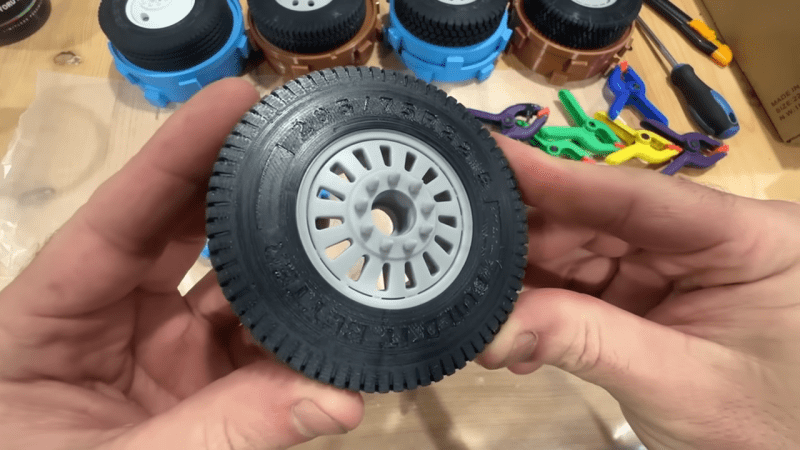
Make Your Own Tires For RC Cars You can buy a wide range of RC car tires off the shelf. Still, sometimes it can be hard to find exactly what you’re looking for, particularly if you want weird sizes, strange treads, or something that is very specifically scale-accurate. In any of these cases, you might like to make your own tires. [Build It Better] shows us how to do just that! Making your own tires is fairly straightforward once you know how. You start out by producing a 3D model of your desired tire. You then create a two-piece negative mold of the tire, which can then be printed out on a 3D printer; [Build It Better] provides several designs online. From there, it’s simply a matter of filling the tire molds with silicone rubber, degassing, and waiting for them to set. All you have to do then is demold the parts, do a little trimming and post-processing, and you’ve got a fresh set of boots for your favorite RC machine. [Build It Better] does a great job of demonstrating the process, including the basic steps required to get satisfactory results. We’ve featured some other great molding tutorials before, too. Video after the break. youtube.com/embed/OA6iUYAr_bk?… hackaday.com/2025/12/16/make-y… image
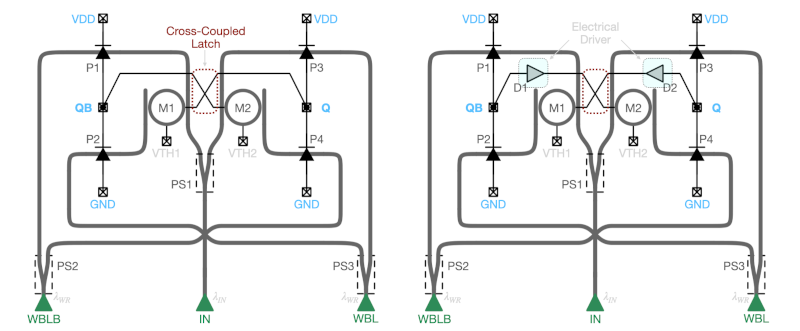
Memory at the Speed of Light Look inside a science fiction computer, and you’ll probably see tubes and cubes that emit light. Of course, it’s for effect, but the truth is, people do think light computing may be the final frontier of classical computing power. Engineers at the University of Southern California Information Sciences Institute and the University of Wisconsin-Madison are showing off a workable photonic latch — a memory element that uses light. The device uses a commercial process (GlobalFoundries (GF) Fotonix Silicon Photonics platform) and, like a DRAM, regenerates periodically to prevent loss of the memory contents. On the device, you’ll find a combination of tiny photodiodes, micro-ring resonators, and optical waveguides. Simulations show the memory element can operate at 20 GHz and might even be readable at 50 or 60 GHz. If you want to dive deeper, the work is based on a paper from earlier in the year. hackaday.com/2025/12/16/memory… image
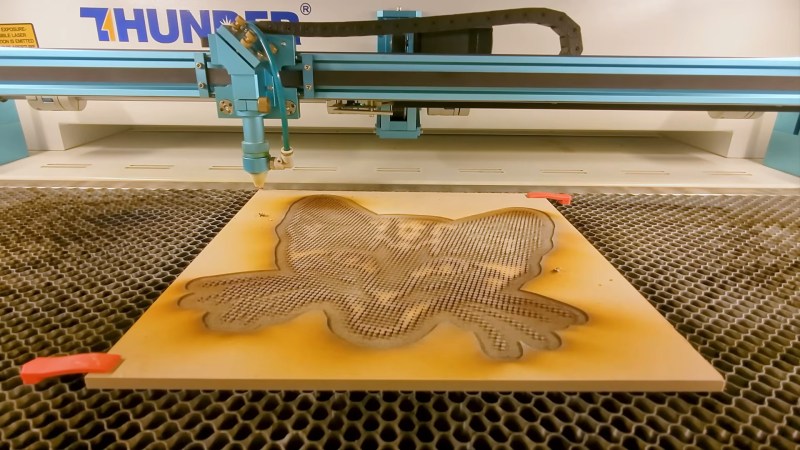
Laser Cutter Plus CYMK Spraypaint Equals Full-Color Prints This is one of those fun hacks that come about from finding a product and going “I wonder if I could…” — in this case, artist/YouTuber [Wesley Treat] found out his favourite vendor makes spray cans in CYMK colours– that is the Cyan, Yellow, Magenta and blacK required for subtractive printing. Which got him wondering: can I make full-colour prints with this paint? The MDF-based print, with naive half-tone dots. His answer was “yes”, and the process to do so is fairly simple. First, split the image into colour channels, generate a half-tone pattern for each one, and carve it out of MDF on the laser. Then spray the MDF with the appropriate colour spray paint. Press the page against each block in turn, and voila! A full colour print block print, albeit at very low DPI compared to your average inkjet. Now, you might be wondering, why half-tone instead of mixing? Well, it turns out that these CYMK paints are too opaque for that to work in a block-printing process. At least with a naive spray technique; [Weseley] does admit a very fine mist might be able to make that work. The second question is why not just hook the rattle cans into a CNC machine for a paint-based mega inkjet? That’s a great question and we hope someone tries it, but [Weseley] evidently likes block-printing so he tried that first. The Mylar stencil print, with a more artistic half-tone pattern. Laser-ablating enough MDF away to make decent print blocks took too long for [Weseley]’s tastes, however, so he switched to using mylar stencils. Instead of spraying a block and pressing onto it, the paint is sprayed through the stencil. The 10 mil Mylar not only cuts faster, but can support finer detail. Though the resulting prints loose some of the artistic flair the inconsistencies block printing brings, it probably looks better. If you prefer to skip the manual paint-can-handling, perhaps we can interest you in a spray-can plotter. If you do like manually flinging paint, perhaps you could try this dot-painting spray can attachment, for a more self-directed half-tone. Thanks to [Keith Olson] for the tip. youtube.com/embed/qV7yNM8mUBE?… hackaday.com/2025/12/16/laser-…
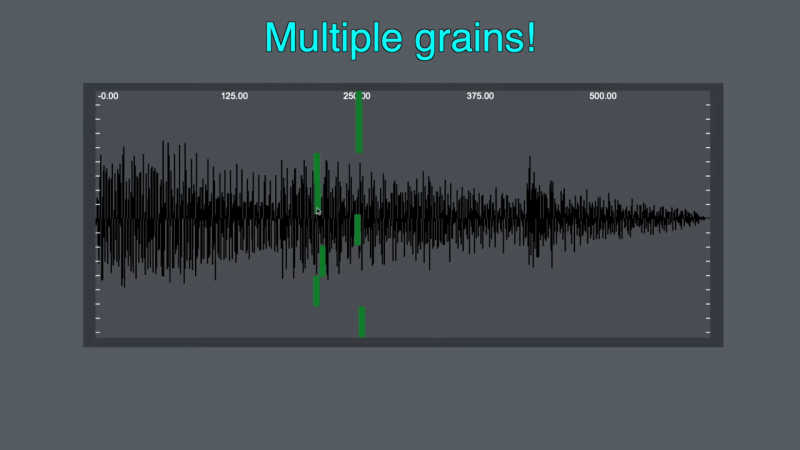
Building A Granular Sampler Synth Synthesizing sounds from scratch is all well and good, you just use a bit of maths. However, the latest build from [Daisy] eschews such boring concepts as additive or subtractive synthesis, instead going for a sample-based approach. This build is based around the Daisy Seed microcontroller platform. It was actually inspired by an earlier project to create a ribbon synth, which we covered previously. In this case, the ribbon potentiometer has been repurposed, being used to control the playback position of a lengthy recorded sample. In this build, the Daisy Seed is running its audio playback system at a rate of 48,000 samples per second. It’s capable of storing up to 192,000 samples in memory, so it has a total of 4 seconds of sample storage. The Daisy Seed uses an analog-to-digital input to record two seconds of audio into the sample buffer. It can then be replayed by placing a finger on the ribbon at various points. Playback is via granular synthesis, where small sections of the overall sample buffer are used to synthesize a new tone. The video explains how the granular synthesis algorithm is implemented using the Plugdata framework. Design files are available for those eager to replicate the build. Once you start tinkering in the world of synthesis, it’s easy to fall down the rabbit hole. Video after the break. youtube.com/embed/0vWgR7alH7Y?… hackaday.com/2025/12/16/buildi… image
Se pensavi che la VPN servisse a proteggerti… ripensaci! Le estensioni del browser sono da tempo un modo comune per velocizzare il lavoro e aggiungere funzionalità utili, ma un altro caso dimostra con quanta facilità questo comodo strumento possa trasformarsi in un canale per la raccolta silenziosa di dati sensibili. I ricercatori di Koi Security hanno segnalato che l’ estensione Urban VPN Proxy per Google Chrome, contrassegnata come “In evidenza” e installata da circa sei milioni di utenti, ha intercettato le comunicazioni con i chatbot AI più diffusi. Tra queste, richieste e risposte a servizi come ChatGPT, Claude, Copilot, DeepSeek, Gemini, Grok, Meta AI e Perplexity. Urban VPN Proxy ha una valutazione di 4,7 nel Chrome Store e circa 1,3 milioni di installazioni sono state registrate nel catalogo dei componenti aggiuntivi di Microsoft Edge. Secondo il rapporto, la funzionalità di raccolta dati è stata abilitata di default dopo l’aggiornamento del 9 luglio 2025, quando è stata inviata agli utenti la versione 5.5.0. Per diverse piattaforme di intelligenza artificiale, l’estensione caricava script JavaScript separati e li incorporava nelle pagine del chatbot . Una volta implementati, gli script hanno sostituito i meccanismi di richiesta di rete standard del browser (fetch() e XMLHttpRequest()), in modo che tutto il traffico passasse prima attraverso il codice di estensione. Ciò ha consentito di estrarre il contenuto delle finestre di dialogo e inviarlo ai server esterni analytics.urban-vpn[.]com e stats.urban-vpn[.]com. I dati raccolti includono query degli utenti, risposte ai chatbot, ID e timestamp delle conversazioni, metadati di sessione, nonché informazioni sulla piattaforma e sul modello di intelligenza artificiale. L’informativa sulla privacy aggiornata di Urban VPN, in vigore dal 25 giugno 2025, menziona la raccolta di tali dati per finalità di navigazione sicura e analisi di marketing, promettendo l’anonimizzazione, sebbene l’azienda riconosca che non è sempre possibile escludere completamente le informazioni sensibili dai testi delle query. Gli autori del rapporto hanno prestato particolare attenzione ai partner con cui vengono trasferiti i dati di navigazione web. Tra questi, un’affiliata di BIScience, specializzata in analisi pubblicitarie e monitoraggio del marchio. I documenti di Urban VPN sottolineano che BIScience utilizza dati non anonimizzati per generare insight commerciali, che poi condivide con i partner commerciali. Evidenziano inoltre il collegamento tra BIScience e Urban Cyber Security Inc., lo sviluppatore di Urban VPN Proxy, registrato nel Delaware. La pagina dell’estensione pubblicizza una funzionalità di protezione basata sull’intelligenza artificiale che avvisa in caso di dati personali nelle richieste e link sospetti nelle risposte. Tuttavia, Koi Security ha osservato che le conversazioni venivano raccolte e inoltrate indipendentemente dal fatto che questa opzione fosse abilitata o meno. I ricercatori hanno trovato una logica di intercettazione delle conversazioni simile basata sull’intelligenza artificiale in altre tre estensioni dello stesso editore: 1ClickVPN Proxy , Urban Browser Guard e Urban Ad Blocker. Insieme, hanno oltre otto milioni di installazioni e la maggior parte di esse è anche contrassegnata come “In evidenza”, il che suggerisce un ulteriore controllo da parte delle piattaforme. The Hacker News ha inviato richieste di informazioni a Google e Microsoft ed è in attesa di commenti. L'articolo Se pensavi che la VPN servisse a proteggerti… ripensaci! proviene da Red Hot Cyber. image
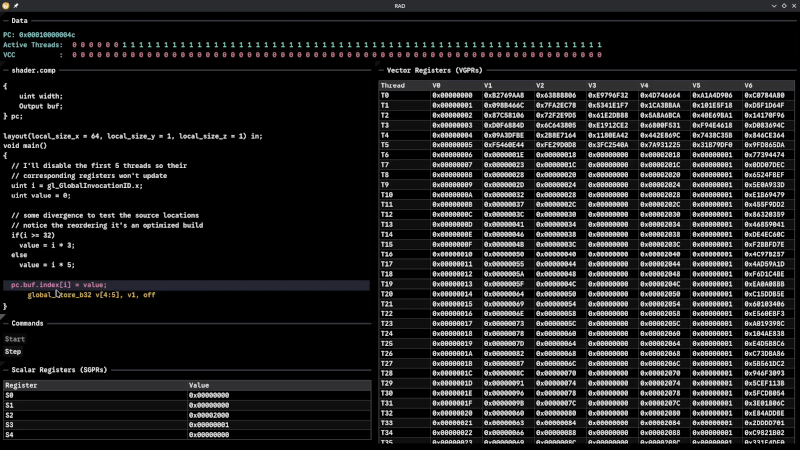
Debugging the AMD GPU Although Robert F. Kennedy gets the credit for popularizing it, George Bernard Shaw said: “Some men see things as they are and say, ‘Why?’ I dream of things that never were and say, ‘Why not?'” Well, [Hadz] didn’t wonder why there weren’t many GPU debuggers. Instead, [Hadz] decided to create one. It wasn’t the first; he found some blog posts by [Marcell Kiss] that helped, and that led to a series of experiments you’ll enjoy reading about. Plus, don’t miss the video below that shows off a live demo. It seems that if you don’t have an AMD GPU, this may not be directly useful. But it is still a fascinating peek under the covers of a modern graphics card. Ever wonder how to interact with a video card without using something like Vulkan? This post will tell you how. Writing a debugger is usually a tricky business anyway. Working with the strange GPU architecture makes it even stranger. Traps let you gain control, but implementing features like breakpoints and single-stepping isn’t simple. We’ve used things like CUDA and OpenCL, but we haven’t been this far down in the weeds. At least, not yet. CUDA, of course, is specific to NVIDIA cards, isn’t it? youtube.com/embed/HDMC9GhaLyc?… hackaday.com/2025/12/16/debugg… image
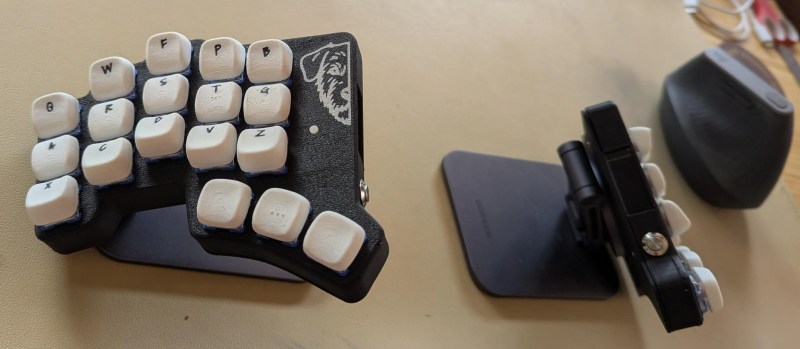
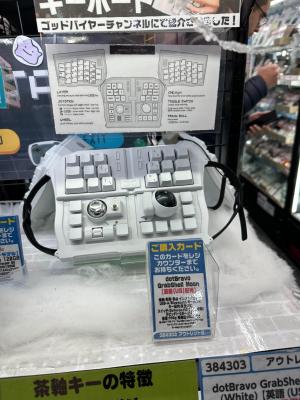
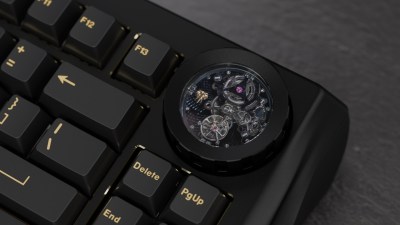
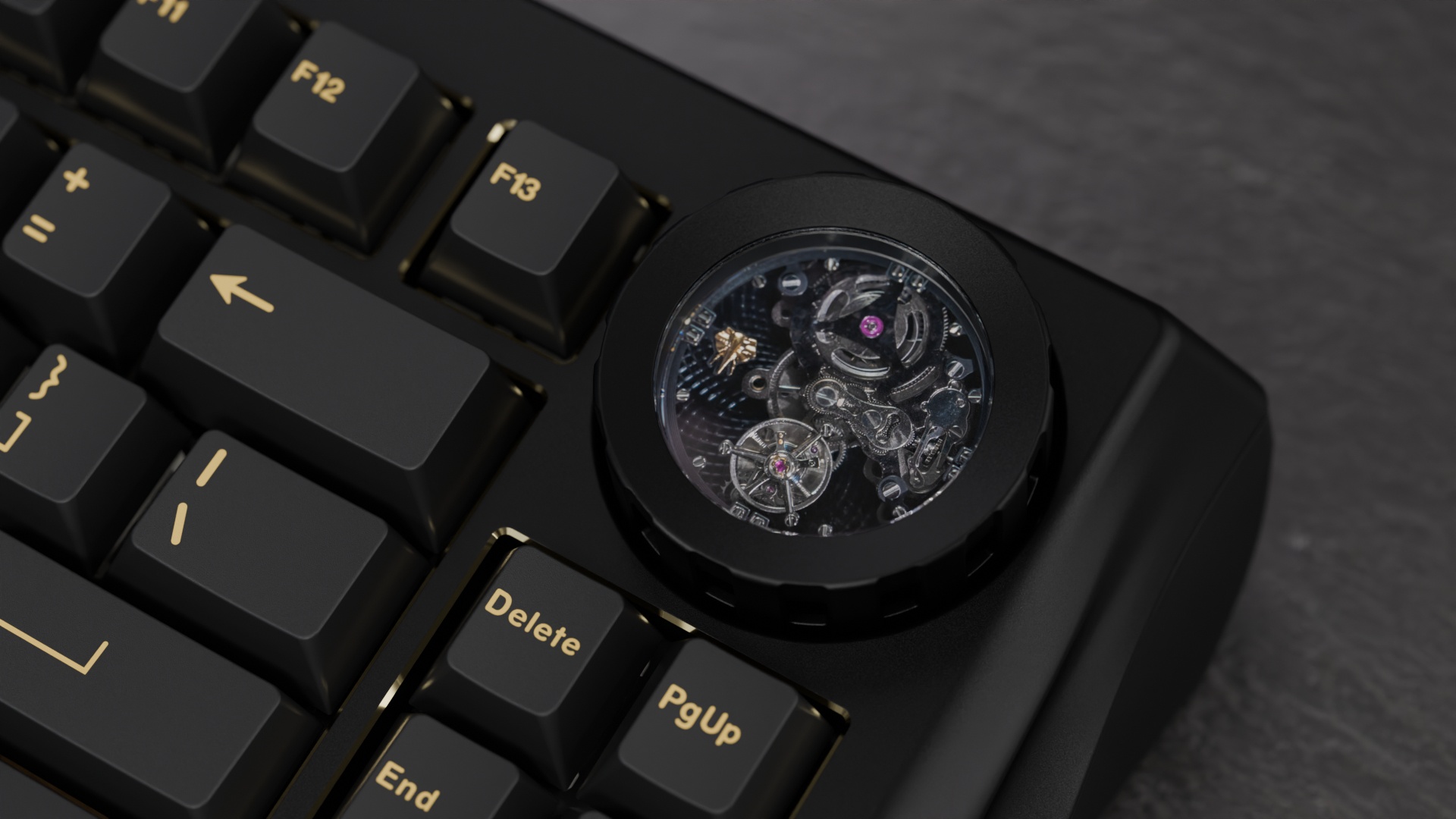
Keebin’ with Kristina: the One with the Curious Keyboards I love first builds! They say so much about a person, because you see what’s paramount to them in a keyboard. You can almost feel their frustration at other keyboards come through their design choices. And the Lobo by [no-restarts] is no exception to any of this. There’s just something about this Corne-like object with its custom case and highly-tappable and variously tilted keycaps. The list of reasons for being begins innocently enough with [no-restarts] wanting a picture of their dog on the case. Image by [no-restarts] via redditFrom there, things get really personal. You may notice the thumb cluster is slightly different — [no-restarts] doesn’t like the thumb tuck required by the Corne to reach the innermost keys. I really dig the homing bumps on the middle thumb keys. Another difference is the splayed layout, as [no-restarts] is especially prone to pinky splay. Finally, there are a pair of OLEDs hiding on the inner sides of the case, which are designed to be visible when tented. Overall, [no-restarts] is happy with it, but has some ideas for revision. Yep, that sounds about right. The Lobo is all hand-wired, and there’s a PCB with hot swap sockets in its future. If you’re interested in the case files, GitHub is your friend.Getting a Handle on Grabshell [kurisutofujp] recently saw a GrabShell in the flesh, and why haven’t I heard of this keyboard before? The next best time is now, so here we go with the explanation, both for myself and the other 9,999. Image by [kurisutofujp] via redditEssentially, this thing is made for using while you wander around the office (or the Metaverse). You can hold it in mid-air, secured in your Gargoyle-ness with a pair of straps, your fingers wrapped around to hit the alphas. But you don’t have to use it that way, see. You can stand it up on the desk if you don’t want to type in mid-air. It can also be opened sort of halfway and used like a SafeType vertical keyboard. If none of this excites you, GrabShell can also be laid flat on the desk. The distance between the two halves in this configuration is quite generous, and frankly, I’m a bit jealous. So let’s talk about the generous thumbing-around area. As you’ll see in the video below, the left has a joystick and a toggle switch that flips it from arrow keys to mouse cursor. There’s a serious-looking scroll wheel beneath that. All three of these can be pushed in for additional inputs. The right side of the thumb panel has a sweet-looking trackball that’s housed in a really cool-looking way. Another cool thing: there’s a frigging I2C port on the top, just exposed and hanging out because reasons. Switch-wise, the board is a mix of hot-swappable Gateron G Pro browns and low-profile Gaterons under double-shot ABS keycaps. I think it sounds nice in the video below; others say it sounds cheap and hollow. To each their own. youtube.com/embed/O7p68Gxxlfo?… The Centerfold: ZMK Dongle Repackaged As Vintage Computer Image by me using images by [mharzhyall] via redditIt’s just so cute, that’s why it’s here. The buttons, they do nothing, but that’s okay — they might could do something in the future. This is a ZMK dongle, like I said in the subheading, and [mharzhyall] put a new case around it. Basically it lets you connect keyboards wirelessly. Do you rock a sweet set of peripherals on a screamin’ desk pad? Send me a picture along with your handle and all the gory details, and you could be featured here! Historical Clackers: the Edland Typewriter Was a Total Flop The Antikey Chop reports that this curious little rook-looking index typewriter was such as flop as to be nearly lost to history entirely. Image via The Antikey Chop Produced between 1891 and 1893 by the Liberty Mfg. Company, the machine was conceived by Joseph Laurentius Edland of Brooklyn, NY. All seemed lost until 1964, when a handful of Edlands were found languishing in a warehouse in Galway, NY. Although only made for two years, there were three different versions developed. The one pictured here is the second, with a metal base and embossed index, whereas the first had a wood base and flat index. The third version, the Typewheel Edland, had a typewheel for a print element à la the Blick. Edlands cost a semi-reasonable $5 at the outset, but eventually doubled in price. So, why the absolute failure? It was no better or worse a machine than its contemporaries, but perhaps just wasn’t well-marketed. Another theory is that the Edland failed because they were made of pot metal. Seems reasonable. Want to know how to use one? RTFM (PDF). Finally, a Keyboard with a Mechanical Watch Movement Wait, what? Why though? Well, it ticks along as you type, is that cool? It might be fun to see if you can keep up a certain number of keystrokes per second. Okay, I’m warming up to this idea pretty quickly, can you tell? The Nama keyboard, dubbed after the scientific term for the mammoth, is appropriately named. It can weigh up to an astonishing 19.4 lbs (8.8 kg) depending on the case material. (Consider that a Model M, a proper bludgeoning device in its own right, weighs just 5 lbs (2.2 kg).) This Nama has a tourbillion movement, the granddaddy of them all. Image by Wuque Studio via Notebook Check Nama comes from Wuque Studio, and was built as an ode to their manufacturing capabilities. Now this is starting to make more sense. They are the Banana Republic to vendor Chilkey’s Old Navy, who are the brand behind the ND75, if that rings any bells. Now the Nama looks like your basic mechanical keyboard on the surface, but five years of design decisions went into this line. You can get it with an aluminium case (14.5 lbs / 6.6 kg) or a brass CNC’d case (18.95 lbs / 8.6 kg), which of course is what makes it so heavy. But yeah, the defining feature is definitely the watch movement. You bet your Backspace it’s fully functional except as a watch, and it doubles as a volume control knob, so you don’t have to settle for touching it with just your eyeballs. Yeah, so the astute among you will have noticed that there are no numbers or hands on the watch movement, which would be, what, tacky? I don’t know anymore. At any rate, it’s protected by a piece of sapphire glass, which should keep Cheetos dust and such out of there. Oh, you want to know the cost? $749 for the bare-bones with no movement, and $1299 for the brass-bottomed boy with the tourbillion. That’s… actually not that bad for a tourbillion movement. youtube.com/embed/ROmD6F3XZEw?… Got a hot tip that has like, anything to do with keyboards? Help me out by sending in a link or two. Don’t want all the Hackaday scribes to see it? Feel free to email me directly. hackaday.com/2025/12/16/keebin… https://hackaday.com/wp-content/uploads/2025/12/Edland-typewriter.avif?w=400 https://hackaday.com/wp-content/uploads/2025/12/Edland-typewriter.avif image
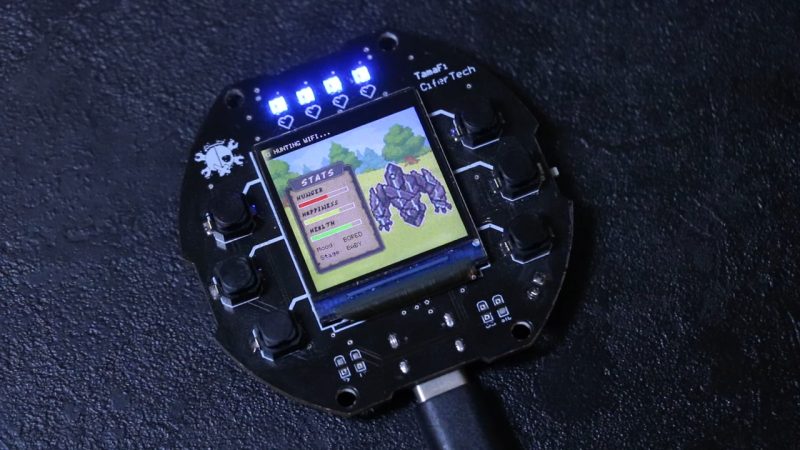
Virtual Pet Responds To WiFi When the Tamagotchi first launched all those decades ago, it took the world by storm. It was just a bunch of simple animations on a monochrome LCD, but it had heart, and people responded to that. Modern technology is capable of so much more, so [CiferTech] set out to build a virtual pet that can sniff out WiFi networks. The build employs an ESP32-S3, perhaps the world’s favorite microcontroller that has WiFi baked right in from the factory. It’s paired with a 240×240 TFT LCD that delivers bright, vivid colors to show the digital pet living inside. Addressable WS2812B LEDs and a simple sound engine provide further feedback on the pet’s status. The pet has various behaviors coded in, like hunting, exploring, and resting, and moods such as “happy,” “curious,” and “bored.” For a bit of environmental reactivity, [CiferTech] also made the local WiFi environment play a role. Nearby networks can influence the “hunger, happiness, and health” of the pet. Incidentally, if you’ve ever wondered what made the Tamagotchi tick, we’ve explored that before, too. youtube.com/embed/UCHQCaAtMd8?… hackaday.com/2025/12/16/virtua… image
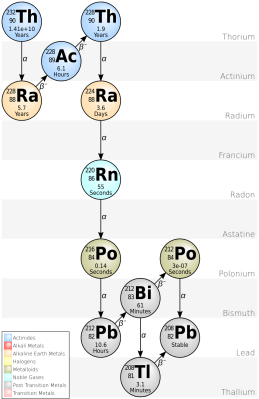
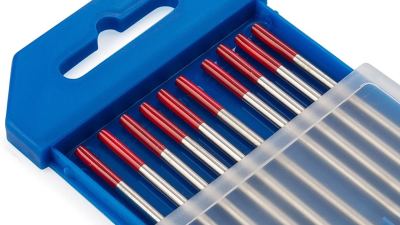
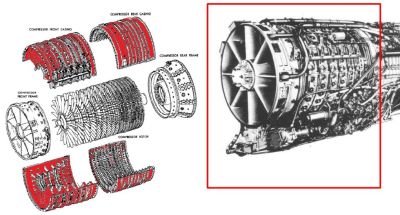
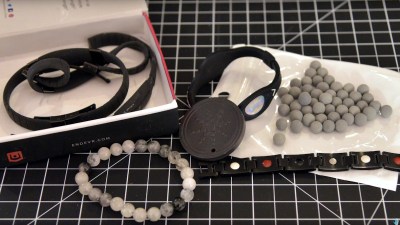
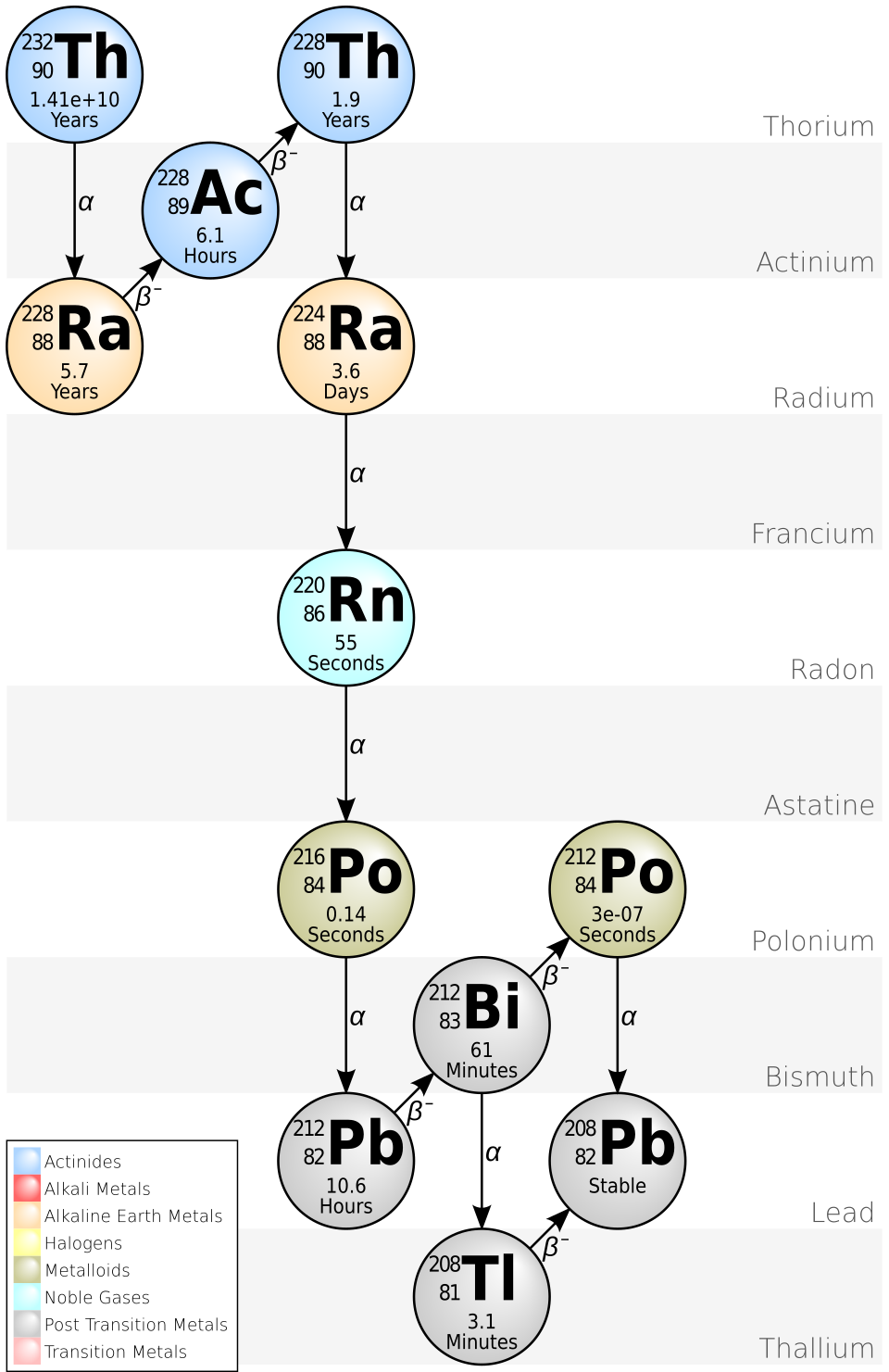
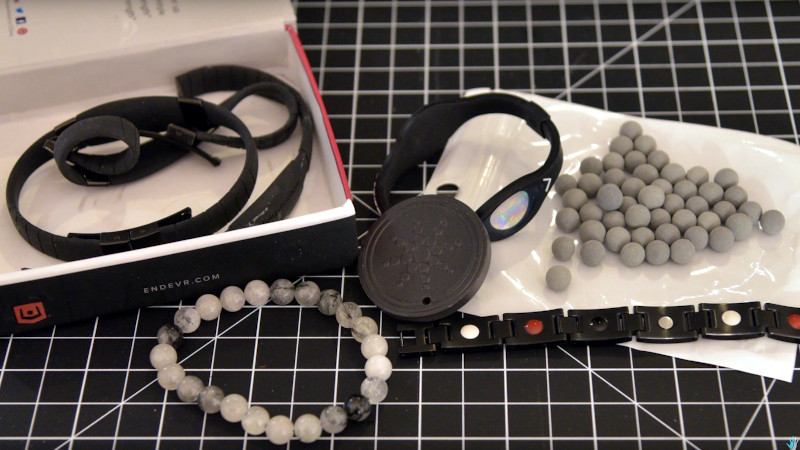
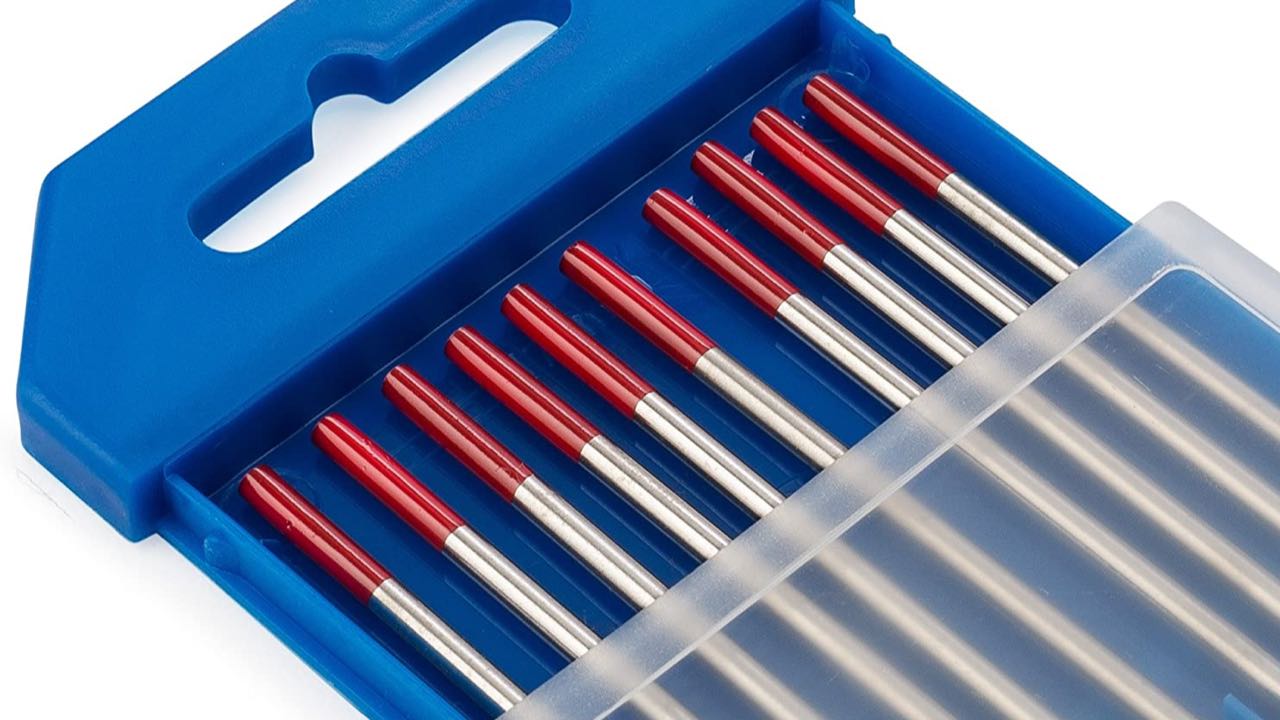
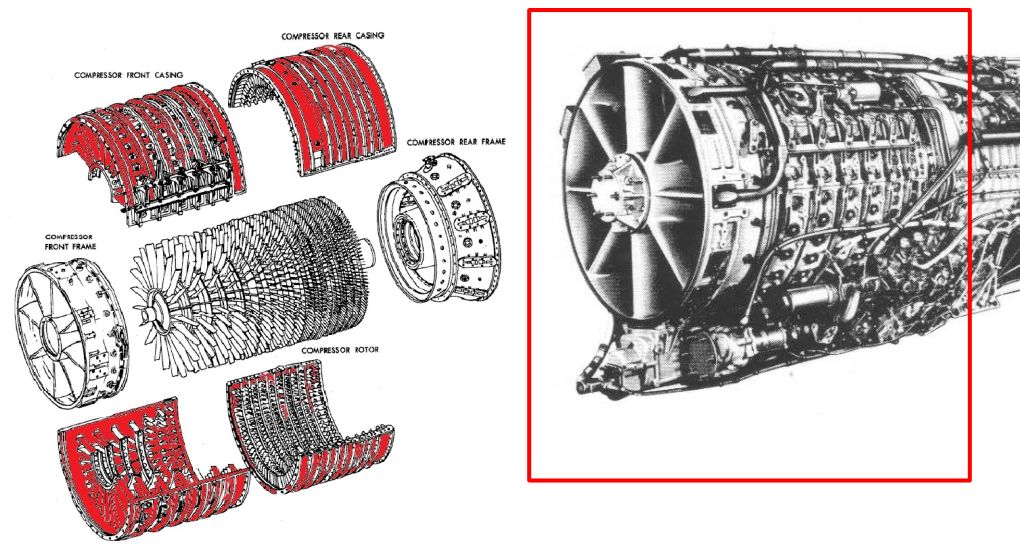
Thorium-Metal Alloys and Radioactive Jet Engines Although metal alloys is not among the most exciting topics for most people, the moment you add the word ‘radioactive’, it does tend to get their attention. So too with the once fairly common Mag-Thor alloys that combine magnesium with thorium, along with other elements, including zinc and aluminium. Its primary use is in aerospace engineering, as these alloys provide useful properties such as heat resistance, high strength and creep resistance that are very welcome in e.g. jet engines. Most commonly found in the thorium-232 isotope form, there are no stable forms of this element. That said, Th-232 has a half-life of about 14 billion years, making it only very weakly radioactive. Like uranium-238 and uranium-235 it has the unique property of not having stable isotopes and yet still being abundantly around since the formation of the Earth. Thorium is about three times as abundant as uranium and thus rather hard to avoid contact with. This raises the question of whether thorium alloys are such a big deal, and whether they justify removing something like historical artefacts from museums due to radiation risks, as has happened on a few occasions.Elemental Facts Thorium-232 decay chain. (Source: Wikimedia) Since the (probably machine-generated) article that inspired these questions didn’t bother to include any useful details or references, it’s time to do a bit of a dive ourselves. This starts with the element thorium and its isotopes. Obviously the problem with thorium here is not so much with the metal itself or its elementary properties, but rather the fact that a small fraction will decay into radium-228 via alpha decay. This has a half-life measured in years before rapidly passing through actinium-228 to become thorium-228, with a half-life of 1.9 years. The subsequent decay chain is pretty rapid, taking it through very short-lived isotopes of radon-220, polonium-216 and so on until it becomes stable lead-208. Virtually all of this occurs via alpha decay. Of note is again that the initial isotope here – Th-232 – has a half-life of 14 billion years, or roughly the estimated age of the Universe. This makes it by far the most stable unstable isotope, with U-238 having a half-life of only about 4.463 billion years. Effectively, for most intents and purposes it might as well be a stable isotope. Thorium is found in most rocks and soil, at around 6 ppm, with several minerals like thorite and monazite containing significantly higher levels. This raises the question of how dangerous Th-232 truly is, such as when you start concentrating it in some fashion. How much radiation exposure do you experience once you take e.g. thorium ore and wear it around, or concentrate it into pure Th-232 and combine it with magnesium into a metal alloy that people regularly spend time around? Negative Vibes One persistent fad in the ‘alternative health’ community is that of negative ions and kin, with many shops selling items like bracelets and similar body-worn items that are supposed to generate these chi-balancing vibes via special ions. Interestingly, some of these are sold with thorium or uranium isotopes embedded in them. Since these items are worn directly against the skin for extended periods of time, they form an excellent test case of the potential harm of such direct exposure to a significant amount of these isotopes. According to the fact sheet on on the NRC website, as performed by Oak Ridge National Laboratory (ORNL), these items contain sometimes quite significant quantities of the radioactive material that range from Th-232 to U-238 and even Ra-226, some at more than 0.05% by weight to the point where they would have required a radioactive material license. The estimated local skin equivalent radiation dose was said to be more than the IAEA limit of 50 mSv annually. Despite this, these items require no special disposal methods and you are free to keep using them, albeit with some precautions. Another study showed an annual exposure of 1.22 mSv, which with the assumed validity of the linear no-threshold (LNT) model would lead one to expect to see some kind of negative health effects. So far these have remained absent despite the popularity of these bracelets and the close contact. TIG Welding Thoriated tungsten TIG welding electrodes, with red band. (Credit: Weldguru.com) Outside of accidental exposure in the case of weird bracelets, there is a common use case for thorium, with thoriated tungsten welding electrodes. These are used with DC TIG welding, and contain around 1% (yellow band) to around 2% (red band) of thorium oxide (ThO2). Although an alternative exists with cerium oxide (CeO2) in ceriated tungsten electrodes, thoriated tungsten remains popular due to the long lifespan and good performance with common applications. Although it’s noted that thoriated tungsten electrodes are radioactive due to the small percentage of thorium within the ThO2, it is such a small amount that no special precautions seem to be warranted. Much like with the thorium oxide found in the aforementioned bracelets and kin, you’ll probably be fine if you don’t try eating it. Since thorium is also not a heavy metal, unlike uranium, it is in that regard significantly safer, as is its oxide form which does not have the pyrophoric proclivity of the metal form. Alloys Compressor of a J-79 jet engine with Mag-Thor alloy sections (Credit: T.P. Kuipers et al., Ministerie van Defensie, Bundeswehr This brings us back to the thorium-metal alloys which started the whole journey. A number of missiles and jet engines have used or currently use Mag-Thor alloys, which has led to for example the Dutch and German defense ministries investigating the radiation exposure from the J-79 jet engines, as found in F-104G Starfighter and F-4 Phantom aircraft. The reason for this investigation was, as stated, the expected radiation dose when these engines and their respective aircraft are being worked on, handled for disposal, or displayed in a museum or collection. Here we also see the amount of thorium added to the used alloy, at up to 4% by weight, with an average of 1.7%. This means that the overwhelming majority of metal in these alloys is magnesium. Part of the study was the measured dose at various distances from the components examined, along with a potential cumulative dose. Even in the most conservative scenario the dose came to about 1.2 µSv/hour, or less than 1 mSv/year, since it was probably assumed that people generally do not live 24/7 around these objects. Realistically, a much bigger potential health risk involving thorium would be something along the lines of incandescent gas lantern mantles, which leads to significant higher exposure to the general public. Not to mention the hazards of the radioactive potassium-40 in something like bananas. hackaday.com/2025/12/16/thoriu…
Supply Chain. Aggiornavi Notepad++ e installavi malware: cosa è successo davvero Una nuova versione, la 8.8.9, del noto editor di testo Notepad++, è stata distribuita dagli sviluppatori, risolvendo una criticità nel sistema di aggiornamento automatico. Questo problema è venuto a galla dopo che alcuni utilizzatori e investigatori hanno rilevato che, anziché scaricare legittimi aggiornamenti, il sistema provvedeva a scaricare eseguibili dannosi. I primi indizi del problema sono emersi nei forum della comunità di Notepad++. Un utente ha segnalato, ad esempio, di aver riscontrato che l’aggiornamento dello strumento GUP.exe (WinGUp) stava eseguendo un file che sembrava sospetto, %Temp%AutoUpdater.exe, il quale aveva iniziato a raccogliere dati relativi al sistema. Il malware eseguiva i tipici comandi di ricognizione e salvava i risultati nel file a.txt: cmd /c netstat -ano >> a.txt cmd /c systeminfo >> a.txt cmd /c tasklist >> a.txt cmd /c whoami >> a.txt Dopo aver raccolto i dati, curl.exe è stato utilizzato per inviare un file a temp[.]sh, un servizio di condivisione di file e testo già visto in altre campagne malware. Poiché GUP utilizza la libreria libcurl, non curl.exe, e non raccoglie affatto tali informazioni, i membri del forum hanno ipotizzato che l’utente abbia installato una build non ufficiale e infetta di Notepad++ oppure che il traffico di aggiornamento sia stato intercettato. Per ridurre il rischio di intercettazione del traffico, lo sviluppatore Don Ho ha rilasciato la versione 8.8.8 il 18 novembre, che scarica gli aggiornamenti solo da GitHub. Tuttavia, questa soluzione si è rivelata insufficiente. Pertanto, il 9 dicembre è stata rilasciata la versione 8.8.9, con misure di sicurezza più rigorose: ora l’editor non installerà gli aggiornamenti a meno che non siano firmati dal certificato dello sviluppatore. “A partire da questa versione, Notepad++ e WinGUP controllano la firma e il certificato dei programmi di installazione scaricati durante il processo di aggiornamento. Se il controllo fallisce, l’aggiornamento verrà interrotto”, si legge nell’annuncio ufficiale. Va notato che all’inizio di dicembre, il noto specialista in sicurezza informatica Kevin Beaumont ha dichiarato di essere a conoscenza di tre organizzazioni che avevano subito incidenti correlati a Notepad++. “Sono stato contattato da tre aziende che stavano riscontrando problemi di sicurezza su computer che eseguivano Notepad++. Sembra che i processi di editing venissero utilizzati come punto di accesso primario”, ha scritto Beaumont. “Di conseguenza, gli aggressori ricorrevano all’intervento manuale.” Il ricercatore ha osservato che tutte le organizzazioni interessate avevano interessi nell’Asia orientale e che l’attività dannosa sembrava mirata. Il fatto è che, quando Notepad++ verifica la presenza di aggiornamenti, accede a notepad-plus-plus.org/update/g… Se è disponibile una nuova versione, il server restituisce un file XML con il percorso dell’aggiornamento: Beaumont ha ipotizzato che il meccanismo di aggiornamento automatico potrebbe essere stato compromesso per distribuire aggiornamenti dannosi che avrebbero consentito l’accesso remoto agli aggressori. Lo specialista ha anche osservato che gli aggressori spesso utilizzano pubblicità dannose per distribuire versioni infette di Notepad++, che alla fine installano malware. Anche il bollettino ufficiale sulla sicurezza di Notepad++ contiene qualche incertezza. L’indagine è in corso e il metodo esatto di intercettazione del traffico non è ancora stato determinato. Si consiglia vivamente a tutti gli utenti di aggiornare Notepad++ alla versione 8.8.9. Si segnala inoltre che, a partire dalla versione 8.8.7, tutti i file binari e gli installer ufficiali devono essere firmati con un certificato valido. Se l’utente ha installato un certificato radice personalizzato precedente, è necessario rimuoverlo. L'articolo Supply Chain. Aggiornavi Notepad++ e installavi malware: cosa è successo davvero proviene da Red Hot Cyber.