Digg Relaunches From the Grave With Some ‘AI Enhancements’ “If you find yourself nostalgic for an earlier era of the internet, you may welcome the news that after spending the last decade or so being passed between owners like a Christmas present no one wants, Digg—the site that was Reddit before Reddit—has been relaunched, with its new incarnation now in open beta. Now, original co-founder Kevin Rose is back to try again; along with Reddit co-founder Alexis Ohanian, he re-acquired the site last year.“ Yes, we seem to have way too many sites and options nowadays. We've already seen the spin-off from Reddit to decentralised alternatives such as Raddle, Ramble, Beehaw, and many more. But this is a nostalgic throwback to the good old Digg days, a bit like when Reddit started out itself. One can only now hope that MySpace would have come back in a similar fashion, and usurped Facebook. But we can still hope... See and the Digg site at https://digg.com #technology #socialnetworks #digg
How American Big Tech guards the profits it extracts around the world “So far, the investigative project, known as “Big Tech’s Invisible Hand,” has mapped nearly 3,000 “influence actions” by the tech industry. This reporting has revealed, among other things, the elaborate web of intermediaries and lobbying used to influence Latin American regulators, how Google obtained leverage over the news media, and how proponents of building more data centres made a series of dubious claims about their benefits.” A very interesting read, and it is true there is huge money involved, and that Big Tech does reach right into every home and business, unlike the ways that Big Tobacco, Big Pharma, or Big Oil ever did. Big Tech often gets to influence what we read and see, and whether our posts ever get seen or not. The other Bigs relied on propaganda and PR, but all at arm's length. I saw Big Tech at work in their early days with lunches etc but once they were rebuffed by tech experts inside organisation, we saw them bypass those levels and go straight for the jugular in terms of the end decision-makers (those who are not tech savvy). So yes, it is extremely worrying, actually. Big Tech ultimately wants lock-in with their products and to be able to increase profits (maximising shareholder value). They don't want to take over, or run the world. But they have no qualms about the damage they cause whilst pursuing profits. The other problem is it is nearly impossible for newer startups to usurp them, because if they can't compete, they will buy them out. It is something to be aware of, but unlike voting (or not) for politicians, somehow billions of users would have to act in unison to ignore Big Tech and use alternatives. That is just not going to happen either. Legislation? Well, politicians are receiving lunches and being “educated” by Big Tech. It's a vicious circle. See #technology #BigTech
Threema Encrypted Messenger Service Sold to Private Equity Again “Your encrypted messages sit on infrastructure controlled by a German private equity firm whose previous acquisitions include Cloud7 premium dog beds and The Tofoo Company.” Right now there is no immediate problem or risk identified, but the situation is that a company which now owns Threema has no real knowledge or focus on how it works, and they could change the terms and conditions that protect privacy, in the future. So this is just something to note for now. The article does touch on some of Threema's previous security audit issues, and notes that no new independent audits have verified the fixes. If you are concerned, then Signal, Session, SimpleX, and a few others are good alternatives. I don't find many friends using Threema or Session, but Signal and SimpleX are pretty busy for me. See #technology #privacy #messengers
DarkMX is a decentralised comms app that utilises Tor and I2P to have an anonymous, reliable, and censorship-resistant presence on the internet * You can chat * You can share files * You can search other people's files * You can keep a contact list and send private messages to your friends * You can create your own custom .onion site, available to anyone with a Tor Browser Like many services which use Tor or I2P network, users tend to remain anonymous, and pretty well much everything goes, so this is not a child-friendly network. The focus on this particular network though is more around all sorts of file sharing, with zero moderation, so you want to be careful about what you actually download. But despite that, the app works with a built-in Tor client. If you want to use the I2P network, like I do, then you will need to install your own I2P or i2pd client app to run your I2P router node. I2P can be more private and resilient than even the Tor network. Just note that the app needs to connect to your I2P router for a good 30 minutes to discover peers and get communication going. Thereafter, it will be a lot quicker. The screenshot shows also where you can find the diagnostics for both networks. If I2P is accessible, the Tor connection is paused. The app also plays a role as a server of files to any Tor browser. So if you want to share files, music, or whatever (legally of course) then you can turn on Web Access, and separate you files into different groups if you wish to keep some separate, and then copy the link to share. Have a look at: From I2P network 📃.txt From any Tor browser 📃.txt Or try HTM for a Tor browser http://svdiwvzqmpozcicznynjxc3fcv3a4znv7c7nc6ycnrtsf677652gbzid.onion/DarkMX/site/index.html You should see a web page, but the DarkMX application needs to be running on my side otherwise nothing will be visible, as there is no 24/7 server service. It is PC to PC. But it is not just files and web pages. A Channel can also be used for just chatting or discussion topics as well. It has apps for Android, Windows, and Linux. You will note that hidden services are sometimes mentioned. This is because the Tor as well as I2P networks are not indexed by Google and other clearnet (normal HTML TCP based web services). See https://darkmx.app #technology #decentralised #privacy #Tor #I2P image
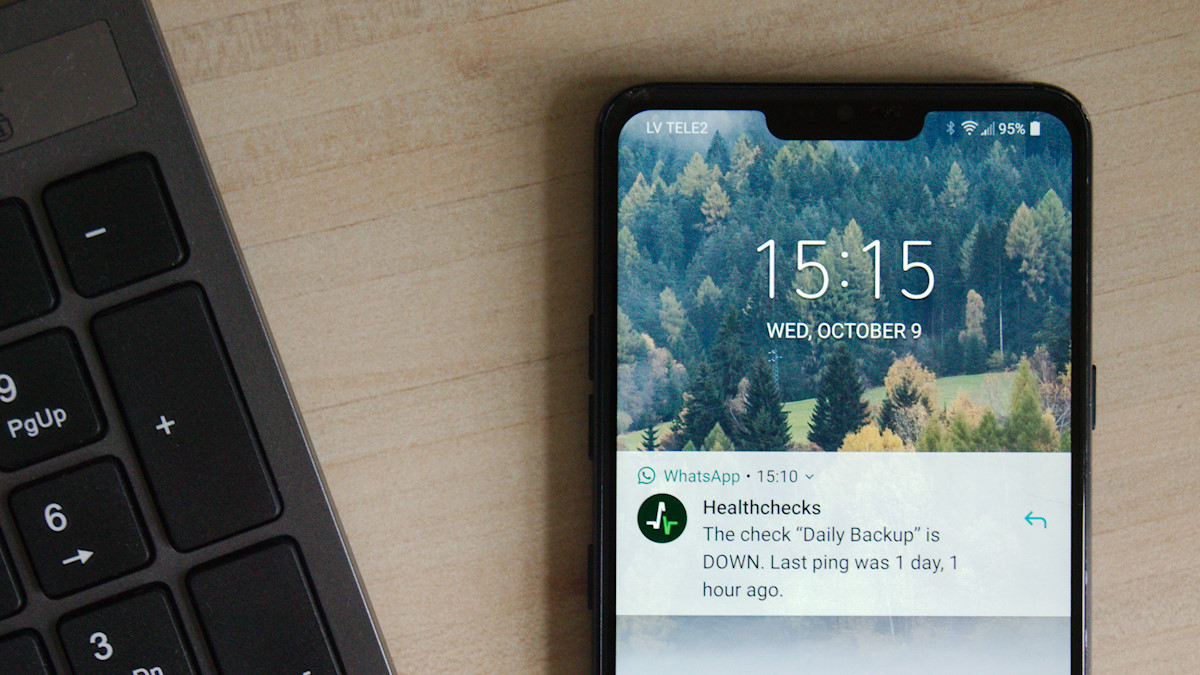
Healthchecks.io emails me when my automation jobs don't run We all “should” have scheduled backups running, and sometimes other automated tasks as well. In some cases you may see an error popup, but often it is just an e-mail to say the task has run. The problem is often we don't bother to check that daily e-mail properly, or we don't miss one of the e-mails out of the five that arrive daily for different tasks. This is where open source Healthchecks.io comes in. It is an online service for monitoring regularly running tasks such as cron jobs. It uses the Dead man's switch technique: the monitored system must “check in” with Healthchecks.io at regular, configurable time intervals. When Healthchecks.io detects a missed check-in, it sends out alerts. Whilst you can self-host it with unlimited functionality, it can be a concern if your own hosting goes offline. They do have a generous 20 checks plan which you can use for free though to monitor from outside your services. It is as simple as creating a check, getting the unique link for that check, and appending a command string at the end of any cron commands, or in a bash script you may be running. I'm still in the process of tweaking mine, but I'm hoping to move away from the 5 daily mails I get after cron jobs have run, and rather now only receive a mail when there is a problem to be looked at. Healthchecks.io can now classify HTTP pings from clients as start, success, or failure signals by looking for specific keywords or phrases in the HTTP request body. They've been going for 10 years now, with over 40,200 free accounts, and just under 51 million pings per day. Luckily they have paid accounts bringing in over US$18,300 monthly to sustain the business (hosting costs real money). See or their site at #technology #opensource #monitoring
6 things RAID does not protect you from “Among new NAS buyers, and perhaps even older users too, RAID is one of the most misunderstood aspects of network storage. In a multi-drive setup, you have RAID in place, so you are covered in case one of the drives dies. That's the promise RAID sells, and it delivers on that very specific promise as well. The problem starts when you expect it to do more than it's supposed to. It is not a safety net for everything. The sooner we realise that, the better it will be. If you wait until the last moment or until an incident occurs, it will be too late to correct course. While RAID may be good for one thing, it just cannot protect you from many of the things that actually cause data loss in the real world. Here are some examples.” An article well worth reading before diving into buying a RAID setup, especially as a RAID setup often costs lot more money than two three drives doing rsync backups. A RAID is good for real-time redundancy. If a drive fails, the other/s carry on going without issues. You can replace that failed drive, and just rebuild the RAID. But RAID drives also all work hard as they are all constantly being written to. There is something to be said for having a second drive, and just doing a daily rsync backup to that drive. That second drive only needs to spin up once a day to receive updated or new files, and delete removed files. This not only extends that drive's life, but you can restore any mistakenly deleted files too. When your primary drive fails (anything up top around 5 or 6 years) you can actually use the backup drive as the primary drive. It just takes a bit more configuration effort to point to it (but that could be about 5 minutes of effort). I've had to do this once, so I know it is fully possible. See #technology #backups #RAID #selfhosting
FavBox is an open source browser extension that enhances and simplifies bookmark management without cloud storage or third-party services It extends your browser's native bookmarking features. Key features: 🔄 Syncs with your browser profile 🔒 No third‑party data sharing. No ads. No tracking. 🎨 Minimalist, clean UI 🏷️ Tag support for easy organisation 🔍 Advanced search, sorting, and filtering by tags, domains, folders, and keywords 🌁 Multiple display modes 🌗 Light and dark themes 🗑️ Detects broken and duplicate bookmarks ⌨️ Hotkeys for quick search access 🗒️ Local notes support ❤️ Free and open source Something I found very useful with this extension is it quickly showed me all the duplicate bookmarks I have as well as one's with broken links, so I could clean those up. The extension is available for Chromium based browsers right now, but there is work in progress for a Firefox version too. See #technology #browsers #bookmarks #opensource
FireWally Is A Great Firewall App for Mac, and It's Free “Most people haven't actively managed a firewall in at least a decade, assuming they ever have. But keeping track of which applications are using the internet—and how much data they're using—is still useful at times, as is blocking apps from accessing the net entirely.” Yes free on a Mac is a feature! But despite that, it could be a useful app especially when roaming. It is for Mac only though. The linked article also has a link to the page in the app store to get the app. See #technology #security
Jack Dorsey’s Bitchat App Sees Downloads Spike in Uganda Over Internet Shutdown Worries “Recently, the app drew attention during Nepal’s Gen Z protests, where it supported protesters in overthrowing the government. On September 4, authorities banned 26 platforms, including Facebook, X, YouTube, and Signal, to curb demonstrations against nepotism and a digital tax. Downloads jumped from 3,000 to 50,000 daily, with 48,000 in Nepal alone on September 8, equating to 38% of global installations. Users leveraged Bitchat’s mesh networking capabilities, with each node extending reach up to 30 meters in crowded areas, to organise marches that culminated in arson at the parliament building and the regime’s fall.” Bitchat is a decentralised peer-to-peer messaging application that operates over Bluetooth mesh networks. No internet required, no servers, no phone numbers. This also means ideally you want to have installed it BEFORE any outages. It is an open source and offline mesh chat application, which means each device acts as both client and server, automatically discovering peers and relaying messages across multiple hops to extend the network's reach. It is similar to what Meshtastic does with license-free radio. There is zero registration required, and therefore it is also not easy to identify anyone using it. It does now also have Geohash channels, where someone on that channel will extend it to the Internet, if available. The Internet side can use the Tor network if available. Broadcast messages are public, but if you know someone's handle on Bitchat, you can chat with full end-to-end-encryption. It has an interesting feature to emergency delete all chats, keys, etc when you triple tap on the app title. And apart from protests and censorship resistance, it is also ideal for any natural disasters where infrastructure has been knocked out. The app runs on iOS as well as Android. See and get the app at #technology #opensource #decentralised #protests #disasters
Stop Using Your Keyboard and Start Using Handy, a Free Speech-to-Text App “In recent years AI models like Nvidia's Parakeet and OpenAI's Whisper, both open source, have made great strides in turning human voices into text. Both excel at correctly adding things like punctuation and capitalisation, and you can run them right on your computer. The problem? They're both a little complicated to set up. That's where Handy comes in. This is a dead-simple, totally free application that can set up either of these models on your computer and give you a keyboard shortcut to use it.” So whilst Handy may work well on some other desktop environments on Linux, I had quite a few issues trying to get it to work on Wayland. For a start, I had to run an environment variable before it would actually even display the window (WEBKIT_DISABLE_DMABUF_RENDERER=1 ). The suggestion to use wtype for the paste insertion did not work for me under Wayland at all as it gave this: `[ERROR] Failed to paste transcription: wtype failed: Compositor does not support the virtual keyboard protocol`. I had to use the one called dotool. When I tried to use the direct paste method, it kept chopping off the first character, but did insert it where it was supposed to be. In the end, I found the best thing that actually worked was to use no paste method, and I just press control V myself after I finished speaking. So for this to work, you also want to change the setting for Clipboard Handling from Don't Modify to Copy to Clipboard. It's really not ideal, but I must admit, I suppose if you've got quite a bit that you need to type, then it actually can be quicker to use handy and just do one or two basic edits. For other types of text entry though, it might still be better to be able to have that precise control you have when typing on a keyboard. For other types of text entry though, it might still be better to be able to have that precise control you have when typing on a keyboard. I've actually dictated this post using Handy to enter the text here. And I must say that the grammar and everything is quite precise with all the commas in the right places and so on. So yes, it can actually save you a bit of time. Even when you need to pause to think, it actually removes that, or should I say, just dictates it correctly without the pauses. So for me that's quite handy because I pause quite a bit to think sometimes, and that might not work with some voice dictation, especially if they think you've got to the end you know of your sentence. But also from this you can see it does become a bit long-winded when you're thinking aloud. So still I probably might just revert to anyway just using my keyboard for text entry. But your mileage may vary. There are versions offered for Windows, macOS, and Linux. See and their GitHub project at  #technology #opensource #dictation