
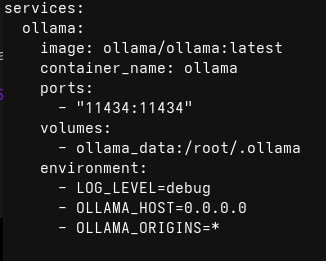
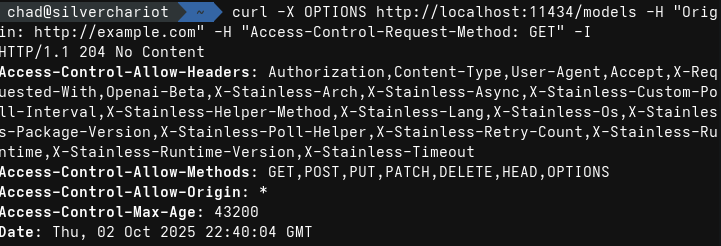
Greetings! I've tested this scenario using my own Ollama host via docker compose. In short, what you're likely seeing is the browser blocking mixed content (http://localhost and  ). This interaction is blocked by Brave's "shields"; I was unable to replicate this in Chromium, but the same interaction is very likely to be blocked by an adblocker/privacy extension.
Disabling Brave's shields and/or similar extensions on is one solution, however you can also get around this by using Ollama over a valid HTTPS host, or even hosting an instance of Shakespeare locally over HTTP (thus avoiding mixed content entirely).
For the last option, here is a rough example of a service that could be added to a docker-compose.yml file that clones, builds, and serves the static site files locally:
```
services:
shakespeare:
image: node:20-alpine
ports:
- "8081:3000"
working_dir: /app
command: >
sh -c "
echo 'Starting build and serve process...' &&
apk add --no-cache git &&
rm -rf /tmp/shakespeare &&
git clone
). This interaction is blocked by Brave's "shields"; I was unable to replicate this in Chromium, but the same interaction is very likely to be blocked by an adblocker/privacy extension.
Disabling Brave's shields and/or similar extensions on is one solution, however you can also get around this by using Ollama over a valid HTTPS host, or even hosting an instance of Shakespeare locally over HTTP (thus avoiding mixed content entirely).
For the last option, here is a rough example of a service that could be added to a docker-compose.yml file that clones, builds, and serves the static site files locally:
```
services:
shakespeare:
image: node:20-alpine
ports:
- "8081:3000"
working_dir: /app
command: >
sh -c "
echo 'Starting build and serve process...' &&
apk add --no-cache git &&
rm -rf /tmp/shakespeare &&
git clone  /tmp/shakespeare &&
cp -r /tmp/shakespeare/* . &&
cp -r /tmp/shakespeare/.* . 2>/dev/null || true &&
npm ci &&
npm run build &&
npm install -g serve &&
serve -s dist -l 3000
"
volumes:
shakespeare_dist:
```
Hope this is helpful in some manner!
/tmp/shakespeare &&
cp -r /tmp/shakespeare/* . &&
cp -r /tmp/shakespeare/.* . 2>/dev/null || true &&
npm ci &&
npm run build &&
npm install -g serve &&
serve -s dist -l 3000
"
volumes:
shakespeare_dist:
```
Hope this is helpful in some manner!
Shakespeare - Open Source AI Builder
Build custom apps with AI assistance using Shakespeare, an open-source development environment
Shakespeare - Open Source AI Builder
Build custom apps with AI assistance using Shakespeare, an open-source development environment
GitLab
Soapbox / Shakespeare · GitLab
AI-Powered Nostr Website Builder https://shakespeare.diy/
